Every IT team, from startups managing a small device fleet to global enterprises, needs clear visibility into what hardware they own, where it is, and who is using it. That is where computer hardware inventory software comes in.
This type of inventory management software helps organizations maintain a comprehensive hardware inventory across laptops, desktops, servers, peripherals, and even virtual machines. It provides real-time data on every hardware asset, allowing IT managers to make informed decisions about purchasing, maintenance, and replacement.
For smaller teams or organizations with tight budgets, free or freemium hardware inventory tools offer a smart starting point. They simplify asset tracking, support lifecycle management, and ensure compliance without requiring expensive enterprise software.
As modern IT environments become more distributed—with hybrid work, cloud adoption, and global teams—maintaining visibility across all hardware and software assets has become both a strategic and operational necessity.
Why hardware inventory software matters
Cost savings through visibility
Without a proper hardware inventory management tool, many organizations unknowingly overspend. They might buy extra laptops when existing ones sit idle or continue paying for maintenance on retired devices. A reliable inventory management system helps optimize resource allocation, identifying underused assets and saving time and money.
Real-time visibility and control
Modern inventory tools provide real-time monitoring of devices across offices, warehouses, or remote locations. You can see who owns each device, its warranty status, and usage details. This centralized view replaces scattered spreadsheets and reduces human error.
With real-time data, IT teams can proactively manage maintenance schedules and ensure devices remain secure and compliant with company policies.
Security and compliance assurance
Every untracked or outdated device represents a potential risk. Free or paid tracking software allows you to record serial numbers, device owners, and warranty details—making it easier to detect missing or unauthorized hardware.
Combining hardware and software inventory also improves compliance. When auditors ask for reports on licensed software or retired hardware, you can generate accurate, audit-ready documentation instantly.
Supporting IT operations and service desks
Integrating inventory systems with your service desk accelerates troubleshooting and ticket resolution. When technicians know the exact hardware specs and software versions involved, they can fix issues faster. For distributed teams, this reduces downtime and improves user experience.
Key features to look for in free computer hardware inventory software
When evaluating free or freemium options, focus on features that align with your environment’s size, complexity, and technical capacity.
Automated hardware discovery
Look for automated tools that can scan your network and identify connected devices, either agent-based (installed on endpoints) or agentless (via network protocols). Automated discovery eliminates manual entry and ensures your comprehensive hardware inventory stays up to date.
Centralized device database
An effective inventory management system consolidates data into one place. It should store details like device type, model, location, assigned user, and serial numbers. This helps IT maintain visibility and manage hardware effectively across departments or regions.
Reporting, dashboards, and alerts
Good inventory management software provides dashboards showing asset utilization, lifecycle stage, and warranty expiry. Alerts help teams act before devices fail or licenses expire. These features save time by automating repetitive tracking tasks.
Multi-platform and multi-device support
Your tool should support all relevant asset types—laptops, desktops, servers, mobile devices, and network equipment—across multiple operating systems (Windows, macOS, Linux). Comprehensive coverage ensures consistent visibility across your entire infrastructure.
Integration capabilities
Free doesn’t have to mean isolated. The best free tools integrate with asset management software, ITSM platforms, or MDM solutions. This connection bridges asset tracking with incident management, procurement, and lifecycle workflows.
Scalability and upgrade path
Start free, but plan ahead. Choose software that offers paid upgrades when your inventory or compliance needs grow. This way, your data and workflows scale without major migration headaches.
Security and user access controls
Ensure your chosen software includes user access controls and encryption. Sensitive asset data—especially for endpoint devices—must remain protected. Even small teams benefit from defining admin vs. user permissions to minimize errors or unauthorized changes.
Top free or freemium computer hardware inventory software options
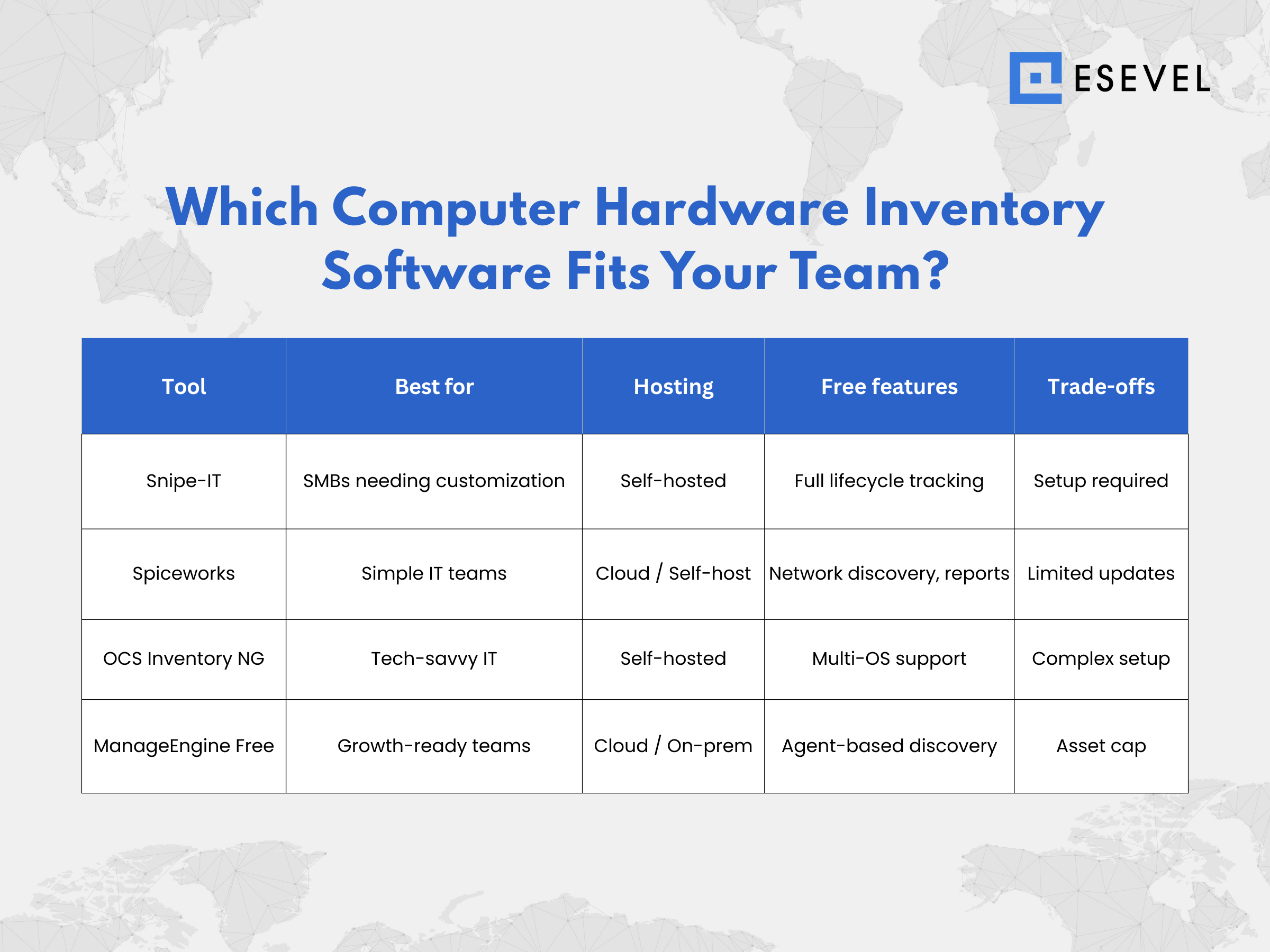
Below are some trusted, legitimate options for free or open-source hardware inventory management tools, each catering to different team sizes and technical skills.
1. Snipe-IT
Best for: Small to mid-sized teams needing full control over hosting and customization.
Key features:
- Asset tagging and barcode/QR code tracking
- Check-in/check-out workflow
- License and warranty tracking
- API and integration support
Pros: Self-hosted and open-source, allowing complete customization.
Cons: Requires internal hosting and some technical setup.
2. Spiceworks Inventory
Best for: Small IT teams seeking simplicity and community support.
Key features:
- Automatic network discovery
- Hardware and software inventory
- Real-time monitoring and alerts
- Built-in reporting tools
Pros: Free and easy to set up.
Cons: Some legacy versions are no longer actively supported; limited analytics.
3. OCS Inventory NG
Best for: Technically savvy teams wanting a flexible open-source solution.
Key features:
- Agent-based and agentless discovery
- Multi-platform (Windows, Linux, Mac, Android)
- Plugin support and detailed asset tracking
Pros: Very powerful with wide OS compatibility.
Cons: Steeper learning curve and manual maintenance required.
4. ManageEngine AssetExplorer Free Edition
Best for: Teams seeking a free-tier solution with an enterprise upgrade path.
Key features:
- Automated discovery via agents or network scan
- Hardware and software asset tracking
- Warranty and license management
- Integration with service desk tools
Pros: Easy to deploy and offers a smooth upgrade path.
Cons: Free edition has an asset cap (usually up to 25 devices).
How to choose the right free tool for your organisation
Finding the right hardware inventory management tool depends on your technical resources, team size, and long-term IT goals.
1. Assess your environment
Count your assets and complexity level. A team with 20 laptops may only need simple tracking software, while a global IT department managing 2,000 endpoints requires an integrated system offering real-time data and automation.
2. Evaluate technical resources
Do you have the internal capacity to host and maintain an open-source solution like Snipe-IT or OCS Inventory NG? If not, a cloud-based option with built-in support might fit better.
3. Consider growth and lifecycle management
Start free, but ensure your solution scales. Over time, your team might need advanced analytics, workflow automation, or integrations for lifecycle management. Choose a tool that offers an easy upgrade path.
4. Check integrations and ecosystem
If you already use a service desk, ITSM, or MDM tool, confirm the software integrates with it. A connected system saves time, improves data accuracy, and provides full visibility across your IT ecosystem.
5. Understand trade-offs
Free tools often come with limits—fewer assets, no customer support, or basic dashboards. Ensure these trade-offs align with your current needs.
6. Plan deployment carefully
Start with a baseline audit. Run a pilot using a subset of assets, then expand across the organization once data quality and workflows stabilize. Train your team on reporting, security, and updates.
Frequently asked questions
Can free hardware inventory software scale as my organization grows?
Yes, most offer paid plans or open-source customization for scaling. Always check asset limits and upgrade options before committing.
Do I need to upgrade to a paid version later?
Eventually, yes—especially if you require advanced analytics, integrations, or vendor support. Free tiers are great for proof-of-concept or small-scale environments.
How long does deployment typically take?
For cloud-based tools, setup can take under an hour. Self-hosted or open-source systems may take several days depending on configuration complexity.
Will free tools support compliance and audits?
Most can export asset reports, but advanced audit-ready features (like digital signatures or compliance frameworks) may require premium versions.
What hidden costs should I expect?
Free software might still require hosting infrastructure, maintenance time, or paid add-ons for integrations and storage.
Building a smarter inventory strategy
Managing your organization’s hardware inventory doesn’t have to be expensive or complicated. With the right free or freemium software, you can gain full visibility, improve data accuracy, and support proactive decision-making—all while staying within budget.
Here’s how to get started:
- Audit your assets – Identify what hardware and software inventory you already have.
- Shortlist tools – Choose two or three free inventory management tools that fit your size and needs.
- Run a pilot – Test each tool’s performance, integration, and reporting.
- Train your team – Teach best practices in asset tracking, data security, and reporting.
- Plan for growth – Once your needs expand, upgrade seamlessly to a more advanced version.
At Esevel, we understand how critical asset visibility is for remote and hybrid teams. From hardware deployment to lifecycle management, we help organizations gain real-time insights into their IT assets and streamline global operations.Ready to take control of your hardware inventory? Download our Free Hardware Inventory Checklist or schedule a consultation with Esevel to find the right software for your team.