Computers rarely fail without warning. They slow down, overheat, or show small errors before hardware failure or data loss happens.
That is why computer preventive maintenance is essential. It keeps hardware and software stable, ensures the operating system stays software updated, and protects computer s performance so your PC running smoothly over time.
For growing teams, consistent computer maintenance is not optional. It is how you reduce risk and avoid costly downtime.
What is computer preventive maintenance
Computer preventive maintenance is the routine process of maintaining devices to prevent hardware failure, data loss, and performance slowdowns. Instead of fixing problems after they occur, you follow structured maintenance tasks to keep systems stable.
It focuses on both hardware and software. That means keeping the operating system software updated while also protecting internal components from dust and wear.
Effective computer maintenance typically includes:
- Updating the operating system and applications
- Running malware scans
- Deleting temporary files
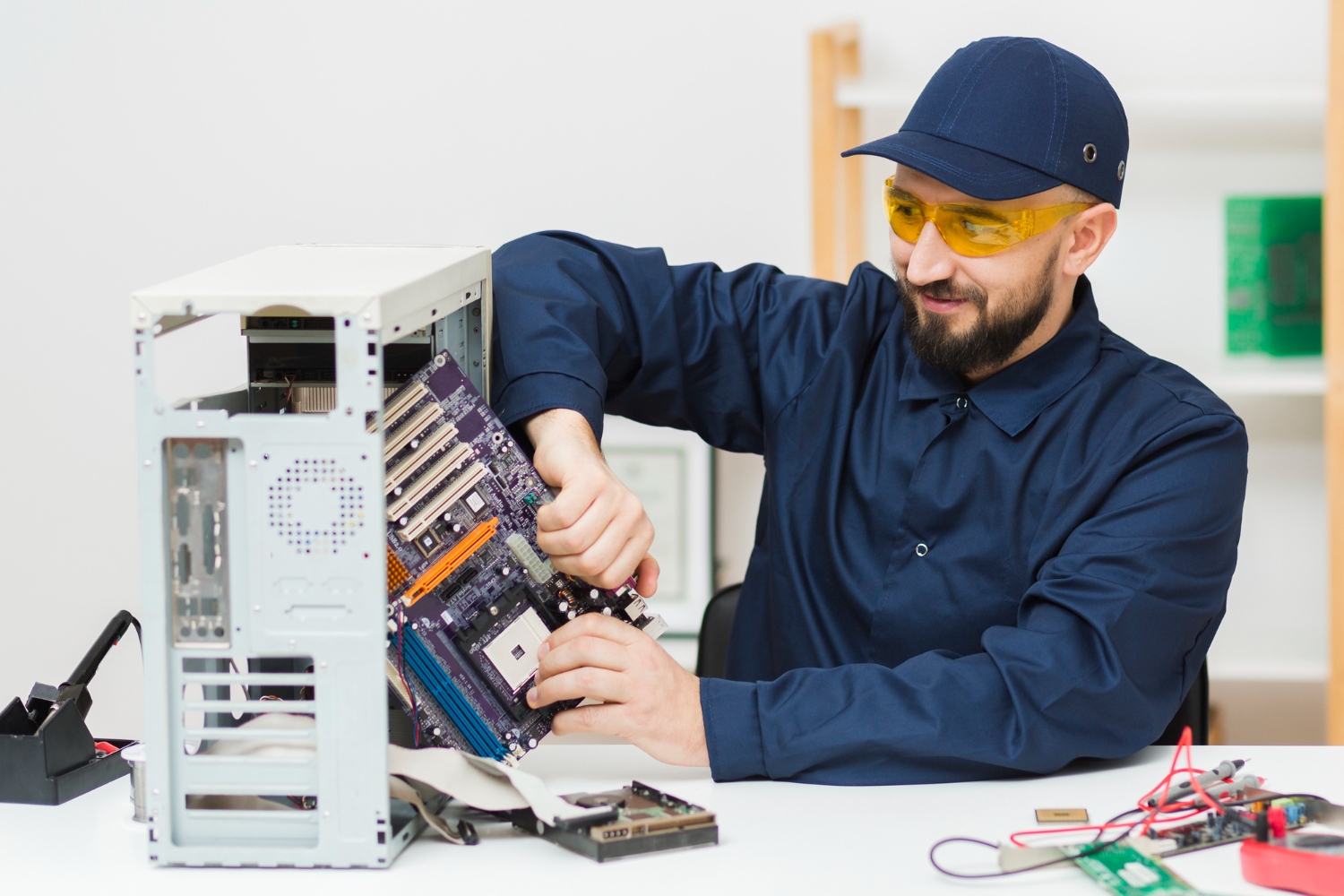
- Cleaning your computer to remove dust from fans and vents
- Checking internal components using compressed air when needed
When done consistently, preventive maintenance protects computer s performance and keeps your PC running smoothly. It reduces downtime and extends device lifespan without requiring complex tools.
Why computer preventive maintenance matters for growing teams
Computer preventive maintenance is not just about keeping devices clean. It protects productivity, security, and long-term operational stability.
When teams rely on laptops and desktops every day, even small performance issues can disrupt workflows. A slow system affects meetings, deadlines, and collaboration.
Prevent hardware failure before it happens
Internal components such as fans, storage drives, and power supplies degrade over time. When dust builds up and airflow is restricted, overheating increases the risk of hardware failure.
Regular cleaning your computer and using compressed air to remove dust helps maintain proper ventilation. This simple step protects internal components and reduces unexpected breakdowns.
Protect against data loss and security risks
Outdated systems are more vulnerable to security threats. If the operating system or critical applications are not software updated, security gaps can appear.
Running routine malware scans and ensuring updates are automatically updated reduces risk. Preventive maintenance protects sensitive data and lowers the chance of data loss.
Maintain computer s performance over time
Computers naturally slow down when temporary files accumulate and background processes increase. Without regular computer maintenance, your PC running efficiently becomes harder over time.
Deleting temporary files, reviewing startup programs, and optimizing system settings improve computer s performance. These maintenance tips help devices stay reliable without expensive upgrades.
For growing teams, consistency is key. A structured preventive maintenance routine keeps devices stable, secure, and ready to support daily work.
Essential computer preventive maintenance tasks
A strong computer preventive maintenance plan does not need to be complicated. It needs to be consistent, structured, and aligned with how your team uses devices every day.
Below are the essential maintenance tasks that protect both hardware and software while keeping systems secure and stable.
Keep the operating system and software updated
One of the most important steps in computer maintenance is keeping the operating system and applications software updated. Updates fix bugs, close security gaps, and improve overall system stability.
Whenever possible, enable systems to be automatically updated. Automatic updates reduce human error and ensure critical patches are not delayed.
Failing to update software increases the risk of malware infections and data loss. Regular updates protect your business without requiring advanced technical knowledge.
Run regular malware scans
Cyber threats continue to evolve, and outdated security practices are no longer enough. Running malware scans on a regular schedule helps detect harmful programs before they damage your system.
Malware can quietly affect computer s performance and compromise sensitive information. Scheduled scans add an important layer of preventive maintenance.
For businesses, this step is not optional. It is part of responsible device management.
Clean internal components and remove dust
Physical care is often overlooked in computer preventive maintenance. Dust accumulation inside devices restricts airflow and increases internal temperature.
Using compressed air to remove dust from vents and fans protects internal components from overheating. Regular cleaning your computer extends hardware lifespan and reduces the risk of hardware failure.
This step is simple but highly effective. It prevents long-term damage that can be expensive to repair.
Remove temporary files and optimize storage
Over time, systems accumulate temporary files that consume storage and slow performance. These files may not be harmful, but they reduce efficiency.
Deleting temporary files improves computer s performance and helps keep your PC running smoothly. Storage optimization also reduces strain on internal components such as drives.
Regular cleanup supports both performance and longevity.
Review startup programs and background processes
Many applications automatically launch at startup. While convenient, too many startup programs can slow down boot times and affect daily use.
Reviewing and limiting unnecessary startup applications improves responsiveness. This small adjustment keeps preventive maintenance practical and performance-focused.
When combined, these maintenance tasks create a reliable routine. Computer preventive maintenance is not about complex tools. It is about consistent actions that protect systems over time.
Building a computer preventive maintenance schedule
A computer preventive maintenance schedule turns routine maintenance tasks into consistent action. Without structure, computer maintenance becomes reactive and increases the risk of hardware failure or data loss.
An effective schedule balances hardware and software care. That includes keeping the operating system software updated, running malware scans, deleting temporary files, and cleaning your computer to protect internal components from dust.
Not every device needs the same frequency. High-usage systems may require more frequent preventive maintenance, while standard office devices can follow a lighter cycle. Automation, such as systems that are automatically updated, and clear ownership of maintenance tasks ensure your PC running efficiently is not left to chance.
The table below shows a simple example of how to structure a practical computer preventive maintenance schedule.
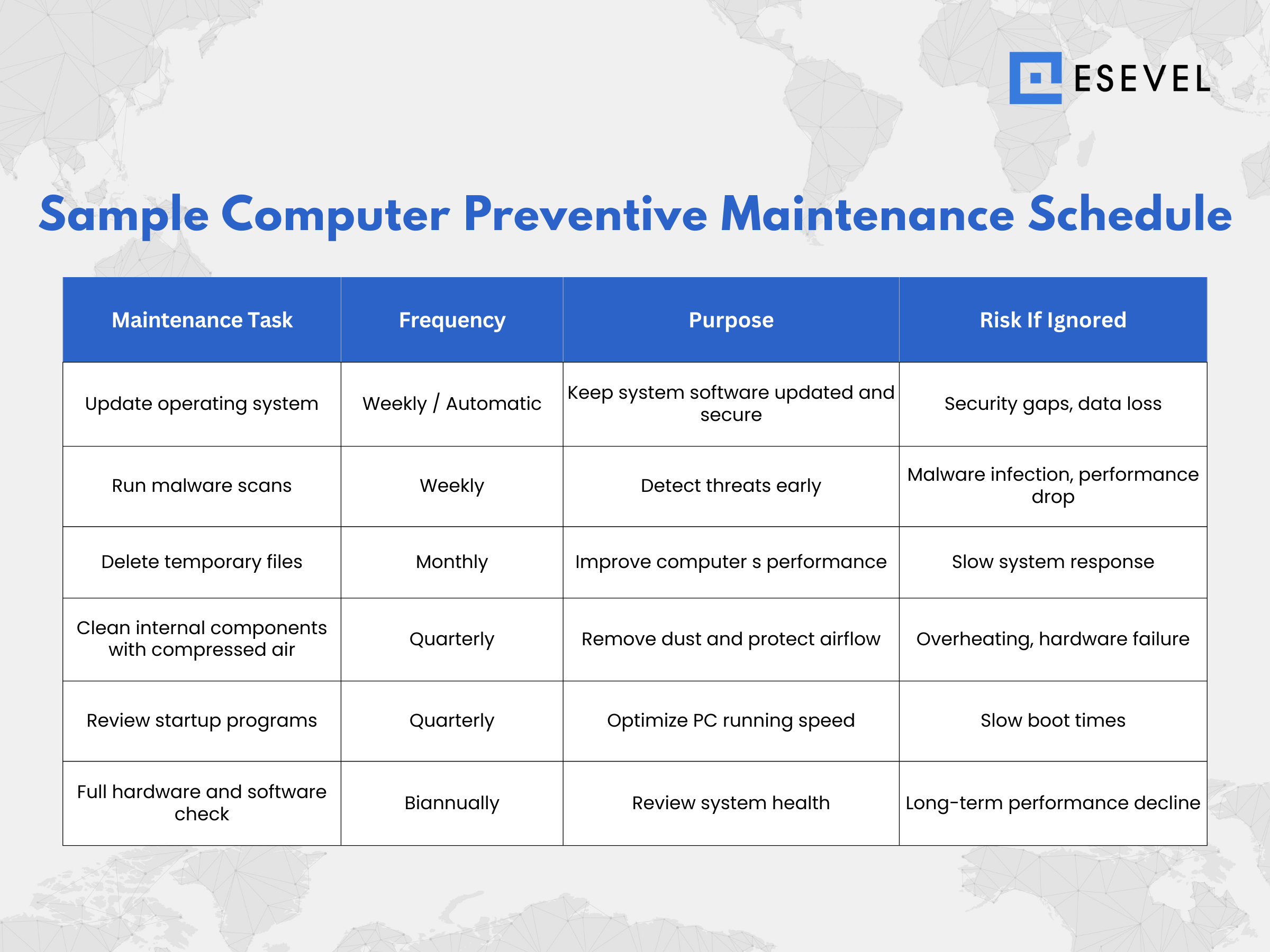
A structured computer preventive maintenance schedule creates consistency, but implementation often raises practical questions. Teams may wonder how often tasks should be performed, which tools to use, or how to balance hardware and software maintenance effectively.
Below are answers to the most common questions about computer preventive maintenance to help you apply these practices with confidence.
Frequently asked questions
How often should computer preventive maintenance be performed
Computer preventive maintenance should be performed monthly or quarterly depending on device usage and business risk.
Can preventive maintenance prevent hardware failure
Yes, regular preventive maintenance reduces the risk of hardware failure by protecting internal components and keeping systems stable.
Does cleaning your computer really improve performance
Yes, cleaning your computer and using compressed air to remove dust improves airflow and protects computer s performance.
Why is keeping software updated important
Keeping the operating system and applications software updated reduces security risks and prevents data loss.
What basic maintenance tasks should every business follow
Every business should run malware scans, delete temporary files, keep systems automatically updated, and review hardware and software regularly.
From routine maintenance to reliable IT operations
Computer preventive maintenance protects devices, but consistency is what protects your business. When hardware and software are monitored properly, updates are automatically updated, and maintenance tasks are tracked, the risk of hardware failure and data loss drops significantly.
As companies grow, managing computer maintenance across multiple employees becomes more complex. Devices are distributed, internal components are harder to monitor, and ensuring the operating system remains software updated requires centralized visibility.
Esevel helps distributed teams manage device procurement, tracking, security, and lifecycle support in one platform. With centralized oversight, keeping your PC running smoothly and maintaining computer s performance becomes easier to scale across locations.