IT deployment services help companies prepare, configure, secure, deliver, and activate employee technology through a managed provider. The service can include device sourcing, configuration, MDM enrollment, asset assignment, shipping, activation, and support.
For distributed teams, this reduces the need for internal IT to coordinate separate suppliers, couriers, configuration tasks, and employee requests across different locations. Instead, a deployment provider can manage some or all of the operational work required to get equipment into employees’ hands ready for use.
This guide explains what IT deployment services include, when companies should use them, and what to evaluate when choosing a provider.
What are IT deployment services?
IT deployment services help companies prepare and roll out employee technology through an external provider. This can include sourcing devices, configuration, MDM enrollment, asset assignment, delivery, and activation support.
Unlike the broader IT deployment process, these services focus on the parts of deployment a company can outsource. For distributed teams, they can reduce the operational work required to get devices ready and delivered across different locations.
What do IT deployment services include?
The exact service scope depends on the provider, but most device focused IT deployment services cover several connected activities.
Device sourcing and allocation
A provider may procure approved laptops, desktops, phones, monitors, and accessories based on employee role, location, availability, and company standards.
For global teams, local or regional procurement can reduce the need for IT to manage individual suppliers in every market. The provider can also help coordinate device alternatives when the same model is unavailable across regions.
Configuration and provisioning
Devices can be prepared before they reach employees.
Configuration may include operating system settings, company applications, security tools, user requirements, and other approved settings. Companies can also create standard configurations for different roles so IT does not need to define every device from scratch.
This helps employees receive more consistent setups across different locations.
MDM enrollment and security
Devices may need to enter an MDM or UEM platform before employees start using them.
Deployment services can support enrollment preparation and help apply requirements such as encryption, security policies, endpoint protection, and approved applications.
Internal IT should still define the standards. The provider helps apply those standards consistently during deployment.
Asset tagging and assignment
Deployment should also create a reliable asset record.
Providers may capture device model, serial number, asset tag, employee, location, purchase information, warranty details, and deployment status.
Recording this data before the device enters active use gives IT visibility from the start instead of trying to rebuild asset records later.
Shipping and delivery
A configured device still needs to reach the right employee at the right time.
Deployment services can include packaging, shipping, tracking, employee address management, delivery exceptions, local carriers, and international logistics where required.
Esevel’s historical operational data shows an average order to delivery time of 6.8 business days across all markets. For IT teams, this kind of visibility helps connect delivery planning with employee start dates.
Activation and deployment support
Delivery does not always mean deployment is complete.
Employees may still experience login issues, missing applications, enrollment problems, or configuration errors when they first use the device.
Deployment support helps confirm that the employee can access the device and required company systems rather than ending the service when the courier marks the package as delivered.
Replacement and post deployment support
Some providers continue supporting the device after activation.
This may include hardware troubleshooting, repair coordination, replacement devices, or other employee IT support.
For distributed teams, keeping deployment and post deployment support connected can reduce the number of separate vendors and handoffs internal IT must manage.
IT deployment service scope
Companies should confirm what a provider actually covers rather than assuming every IT deployment service includes the same capabilities.
| Service area | What the provider handles | Desired outcome |
|---|---|---|
| Device sourcing | Approved hardware and regional availability | The right device is available |
| Configuration | Applications, settings, and employee requirements | Device is prepared before use |
| Security and enrollment | MDM, encryption, and endpoint policies | Device meets company standards |
| Asset assignment | Serial number, employee, location, and status | IT knows who has each device |
| Delivery | Shipping, tracking, and delivery exceptions | Device reaches the employee on time |
| Activation support | Enrollment and first login issues | Employee can start working |
| Post deployment support | Repair and replacement coordination | Device problems cause less disruption |
The key question is not simply whether a provider can ship equipment. It is how much of the work around that shipment the provider can coordinate.
When do companies need IT deployment services?
A company with one office and an onsite IT team may be able to manage most deployments internally. The need for external support usually increases as employee locations, deployment volume, and operational complexity grow.
IT deployment services may make sense when:
- Employees work across multiple countries. IT needs to coordinate availability, suppliers, delivery, and support across different markets.
- Remote onboarding happens frequently. Devices need to reach employees without relying on an office based setup process.
- IT manually configures every laptop. Repetitive preparation consumes internal IT capacity as the company grows.
- Devices regularly arrive after start dates. Procurement, configuration, and delivery are not working as one coordinated workflow.
- Different regions use different processes. Hardware, configuration, or security standards start becoming inconsistent.
- Several suppliers and couriers are involved. Internal teams spend more time coordinating vendors than managing IT standards.
- Deployment status is difficult to track. IT cannot quickly confirm whether a device is ordered, prepared, shipped, delivered, or assigned.
- There is no local IT team. Central IT needs physical execution in locations where the company has employees but no technical staff.
- Large refresh projects stretch internal resources. Deployment capacity needs to increase temporarily without building a larger permanent team.
These signals help determine whether outsourcing part of the deployment workflow could remove meaningful operational work.
How does an IT deployment service provider support deployment?
A deployment provider helps execute the company’s standards rather than replacing its IT strategy.
Internal IT still decides which devices employees use, which security requirements apply, and which applications or access policies are required. The provider handles more of the operational work needed to turn those standards into deployed equipment.
A typical provider supported workflow includes:
- Confirm requirements. Gather the employee, device, location, security, application, and delivery requirements.
- Prepare the device. Source or allocate equipment and apply the required configuration.
- Enroll and secure it. Prepare the device for company management and security policies.
- Record and assign it. Capture asset information and associate the device with the employee.
- Coordinate delivery. Ship the equipment and manage delivery exceptions.
- Support activation. Confirm the employee can use the device and access required systems.
For a deeper explanation of the underlying stages, companies can refer to the full IT deployment process.
The more important buying question is how much of this work should remain with internal IT.
In house deployment vs IT deployment services
Outsourcing deployment does not mean handing control of IT standards to another company.
Many organizations use a hybrid model. Internal IT controls technology standards, security, approved applications, and access policies while a provider handles physical preparation, logistics, and operational execution.
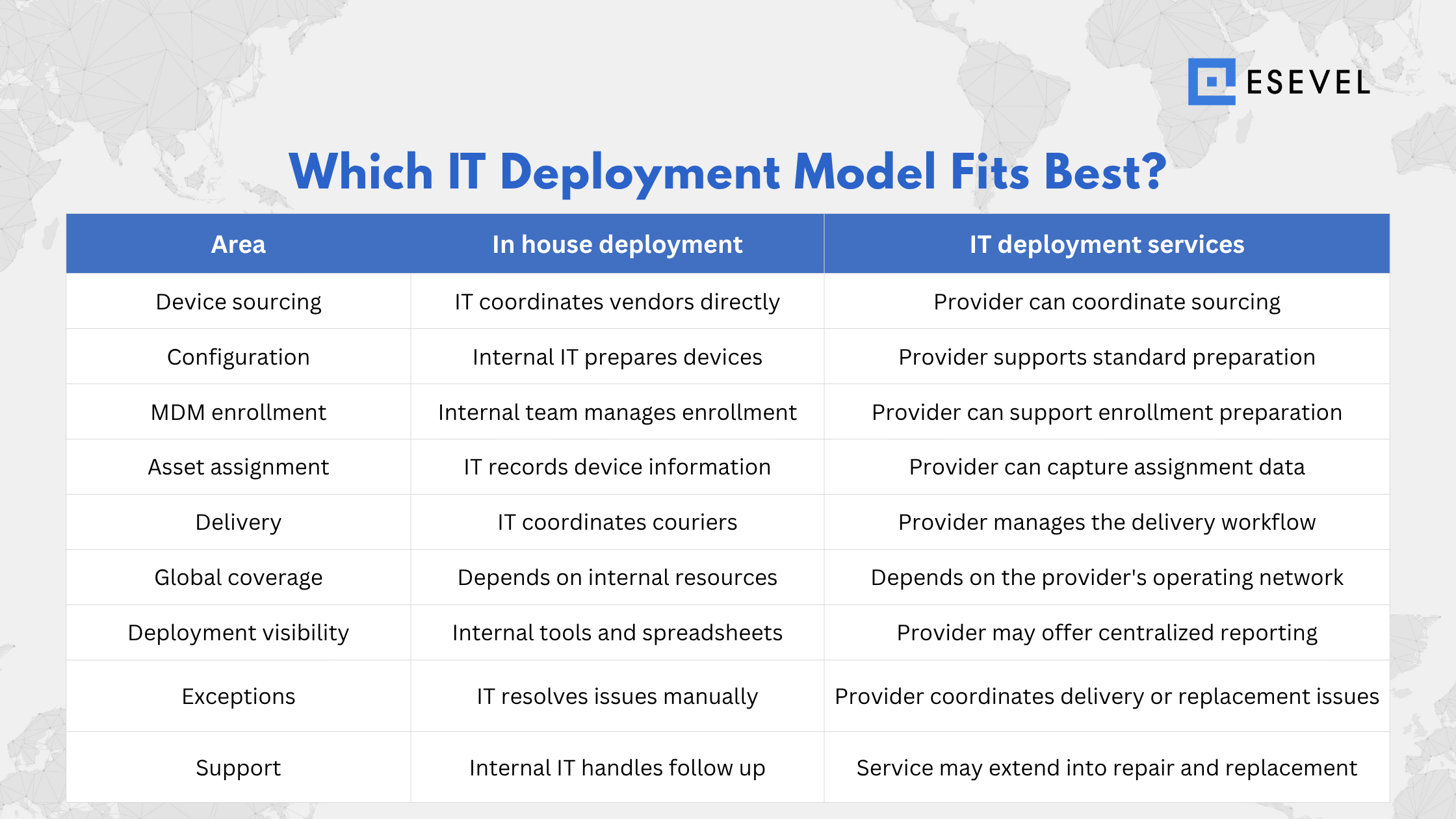
Neither model is automatically better. In house deployment works well when employees are concentrated in a few locations and local IT resources are already available.
Outsourcing becomes more useful when deployment spans multiple regions, vendors, and delivery schedules. Companies can also outsource only the tasks that create the most operational work.
How to evaluate an IT deployment service provider
Choosing the right IT deployment service provider depends on how well their capabilities match your locations, device standards, and internal IT requirements. Focus on the areas that affect deployment consistency, visibility, and support.
Check geographic coverage
Confirm where the provider can source, prepare, deliver, repair, and replace devices. Coverage should match both current employee locations and future hiring markets.
Review device sourcing capabilities
Check whether the provider can supply your approved hardware and manage regional availability, stock shortages, alternatives, warranties, and accessories.
Confirm configuration and enrollment support
Review which setup tasks the provider can handle, including applications, operating system settings, security requirements, and MDM or UEM enrollment.
Check delivery visibility
IT should be able to track key deployment stages such as ordered, configured, shipped, delivered, and assigned.
Ask how deployment exceptions are handled
Check how the provider handles delays, failed deliveries, address changes, unavailable hardware, incorrect devices, and urgent replacements.
Review asset data and integrations
Confirm whether deployment data can connect with asset management, HR, identity, ticketing, or other IT systems.
Check post deployment support
Understand whether support ends at delivery or continues into repair, replacement, recovery, and redeployment.
What changes when IT deployment becomes global?
Global IT deployment adds complexity because hardware availability, shipping, warranties, repair coverage, and local requirements can vary by market. IT still needs to maintain consistent device, configuration, and security standards across locations.
Global deployment services therefore need to balance central IT control with regional execution, including:
- Regional hardware availability
- Local sourcing
- Cross border logistics and customs
- Employee home delivery
- Device model alternatives
- Consistent configuration and security
- Central asset visibility
- Local repair and replacement support
The goal is not to use the same logistics model everywhere, but to keep IT standards consistent while adapting deployment to each market.
FAQs
What do IT deployment services include?
IT deployment services can include device sourcing, configuration, MDM enrollment, security setup, asset assignment, shipping, activation, and post deployment support. The exact scope depends on the provider and the services a company chooses to outsource.
When should a company use IT deployment services?
Companies may use IT deployment services when they hire across multiple locations, manage frequent remote onboarding, lack local IT staff, run large device rollouts, or spend significant internal time coordinating device preparation and delivery.
How are IT deployment services different from device deployment?
Device deployment is the process of preparing and putting employee devices into use. IT deployment services are managed services that help a company execute or coordinate parts of that process through an external provider.
Can IT deployment services support global teams?
Yes. A global provider may coordinate device sourcing, preparation, delivery, assignment, and support across multiple employee locations. Companies should check actual service coverage in the countries where they operate.
Build a more consistent deployment model
IT deployment services should connect device preparation, security, asset assignment, delivery, activation, and support so employees receive equipment that is ready for work. The right service model can also reduce the manual coordination required across vendors, locations, and internal teams.
For global companies, this becomes especially important as hiring expands across different regions. Esevel helps connect procurement, deployment, tracking, and IT support in one operating model so internal IT can keep standards consistent while reducing operational work.
Nguyen Le Nguyen Le is a former Esevel writer / Marketing Consultant who helped build the company’s blog from its early days. From September 2023 to November 2025, she contributed articles that made workplace IT topics clearer and more useful for business readers.
Updated by: Maytiska Omar