In today’s fast-paced, tech-driven world, laptops are the backbone of nearly every business operation. From remote work setups to in-office productivity, modern businesses rely heavily on a well-managed fleet of devices. But simply purchasing laptops isn’t enough—how organizations handle their lifecycle management can make a major difference in costs, security, and overall performance.
Imagine this: a company spends thousands replacing outdated laptops only to face costly security breaches because of neglected data wiping or failing to keep operating systems up to date. Meanwhile, ineffective device management leads to increased downtime, user frustration, and unnecessary e-waste. Clearly, effective laptop lifecycle management isn’t just about maintaining devices; it’s a strategic necessity that impacts costs, security, and environmental responsibility.
When properly executed, lifecycle management ensures devices are used efficiently, secured against threats, and responsibly disposed of at the end of their useful life. This comprehensive approach helps modern businesses cut costs and protect sensitive information while reducing their environmental impact—proving that managing your devices wisely is a smart business move.
What is laptop lifecycle management?
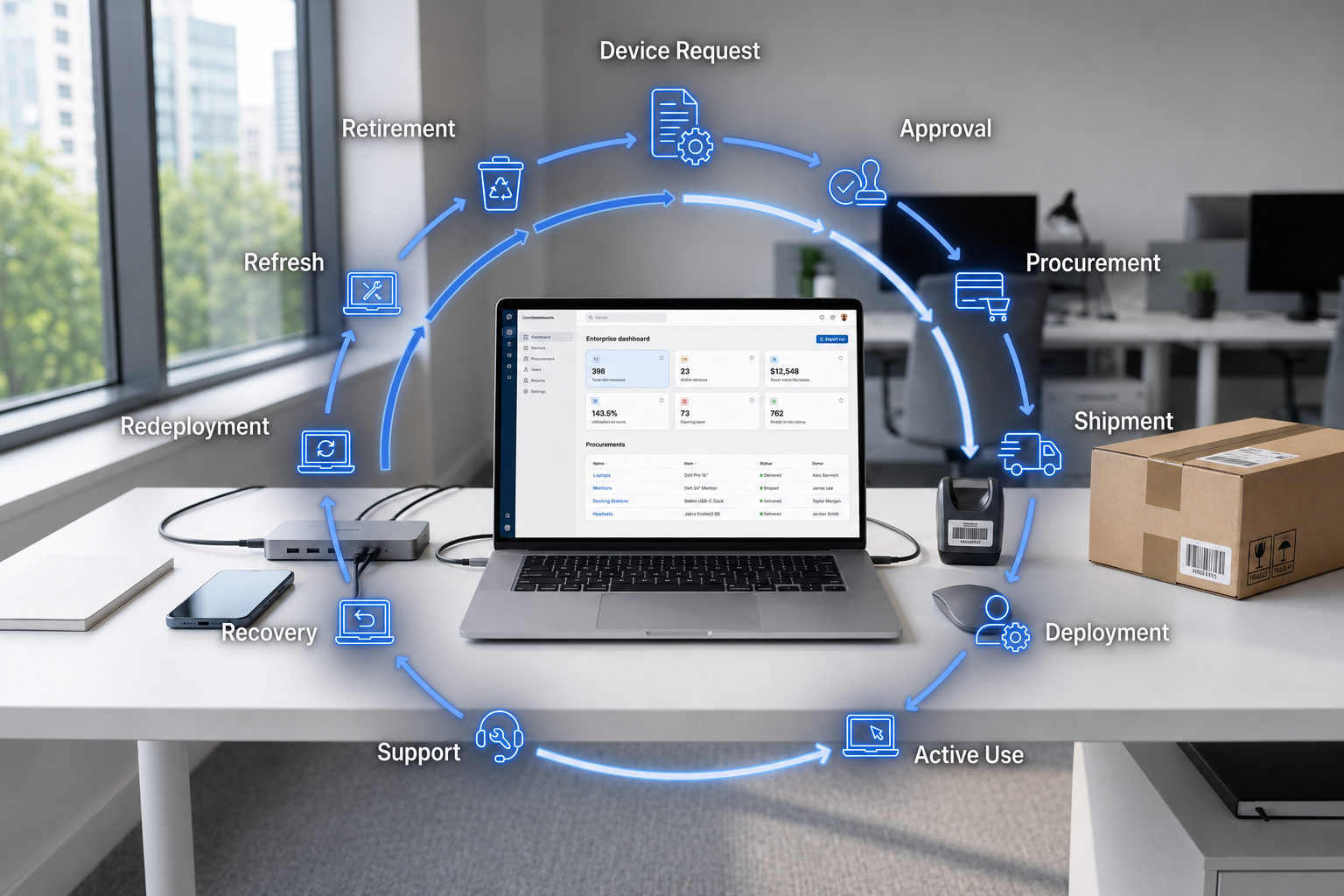
Laptop lifecycle management (LLM) is a strategic approach that oversees a device’s entire journey—from initial procurement to ultimate disposal. It involves planning, deploying, maintaining, upgrading, and recycling or responsibly discarding laptops in a way that maximizes their value and minimizes risks.
At its core, lifecycle management ensures that each device operates efficiently for its intended purpose, providing security and performance while reducing unnecessary costs. It’s a comprehensive process that focuses on every phase a laptop goes through during its life, whether it’s a simple employee smartphone or a high-end workstation.
Laptop lifecycle management is closely related to broader IT asset management (ITAM), which encompasses all hardware and software assets in a company. While IT asset management deals with the tracking and proper utilization of devices, laptop lifecycle management concentrates specifically on laptops and their unique needs, such as operating system updates, hardware upgrades, and secure data wiping. Together, these processes help organizations control costs, improve security, and meet sustainability goals.
Effective lifecycle management not only extends the device’s usability but also aligns with modern business priorities—reducing downtime, protecting sensitive info, and decreasing e-waste. With the right strategies in place, businesses can make their device investing more cost-effective and environmentally responsible—crucial factors in today’s competitive landscape.
Key lifecycle stages
Managing laptops effectively means understanding and optimizing each stage of their lifecycle. From procurement to retirement, each phase offers opportunities to improve performance, reduce costs, and enhance security. Let’s explore the essential stages of device lifecycle management (DLM).
Procurement
This is where everything begins. The procurement process should start with a thorough needs assessment—considering user roles, software requirements, and future growth. Standardizing models and specifications helps streamline procurement and ensures compatibility across your device inventory. Vendor selection also plays a crucial role; choosing reliable suppliers with good warranties and support ensures cost-effective solutions and reduces risks.
Budgeting is key—allocating funds wisely and considering the total cost of ownership ensures you’re not just choosing the cheapest options but those that provide long-term value. Future-proofing devices by selecting versatile operating systems and upgradeable hardware reduces the need for frequent replacements, supporting your lifecycle management strategy.
Deployment & configuration
Once devices are procured, deploying and configuring them correctly is vital. Imaging devices with pre-installed operating systems and necessary security settings ensures consistency and speeds up onboarding. Secure setup includes data protection measures, such as encryption and strong login protocols, to safeguard sensitive information.
Onboarding involves registering devices into your inventory management system, assigning assets to users, and configuring assets for optimal performance. Proper deployment reduces future issues and ensures that devices are ready for productive use from day one.
Operation & maintenance
During the operational phase, maintaining the device’s health is critical. Regular monitoring of hardware performance, patching operating systems, and performing health checks help prevent security breaches and system failures. Automation tools and IoT devices can provide alerts for impending issues, allowing proactive maintenance—saving costs and reducing downtime.
User support is also part of this stage. Providing helpdesk services, troubleshooting, and quick fixes ensures that devices remain efficient—ensuring that devices is crucial for employee productivity and data protection. Tracking device health metrics supports better decision-making and can pinpoint when upgrades or repairs are needed.
Upgrades & repairs
As devices age, deciding whether to upgrade components or replace the entire device becomes important. Upgrading RAM, storage, or adding peripherals can extend device lifespan at a lower cost than full replacement. However, for older hardware experiencing performance issues or near end-of-life, replacement may be more cost-effective in the long run.
Repurposing older devices for less demanding roles, such as secondary workstations or nonprofit donations, is a responsible way to get additional value from assets before retirement. This form of responsible disposal aligns with sustainable practices—minimizing environmental impact and reducing waste.
Decommissioning/retirement
When devices reach the end of their useful life, secure data wiping is essential to protect sensitive information and comply with data protection laws. After ensuring all data is securely erased, devices can be recycled, resold, or repurposed, contributing to circular economy initiatives.
Responsible disposal involves working with certified recyclers and adhering to environmental standards—such as the certification programs like EPEAT or R2. Proper disposal strategies help minimize the environmental impact of e-waste, supporting sustainability goals and corporate social responsibility.
Best practices & strategies
Achieving efficient laptop lifecycle management (LLM) requires more than just executing each stage—you need a set of best practices that maximize device value and minimize risks. Here are proven strategies to help your organization optimize its device lifecycle and support a modern, cost-effective business environment.
Maintain centralized inventory and tracking
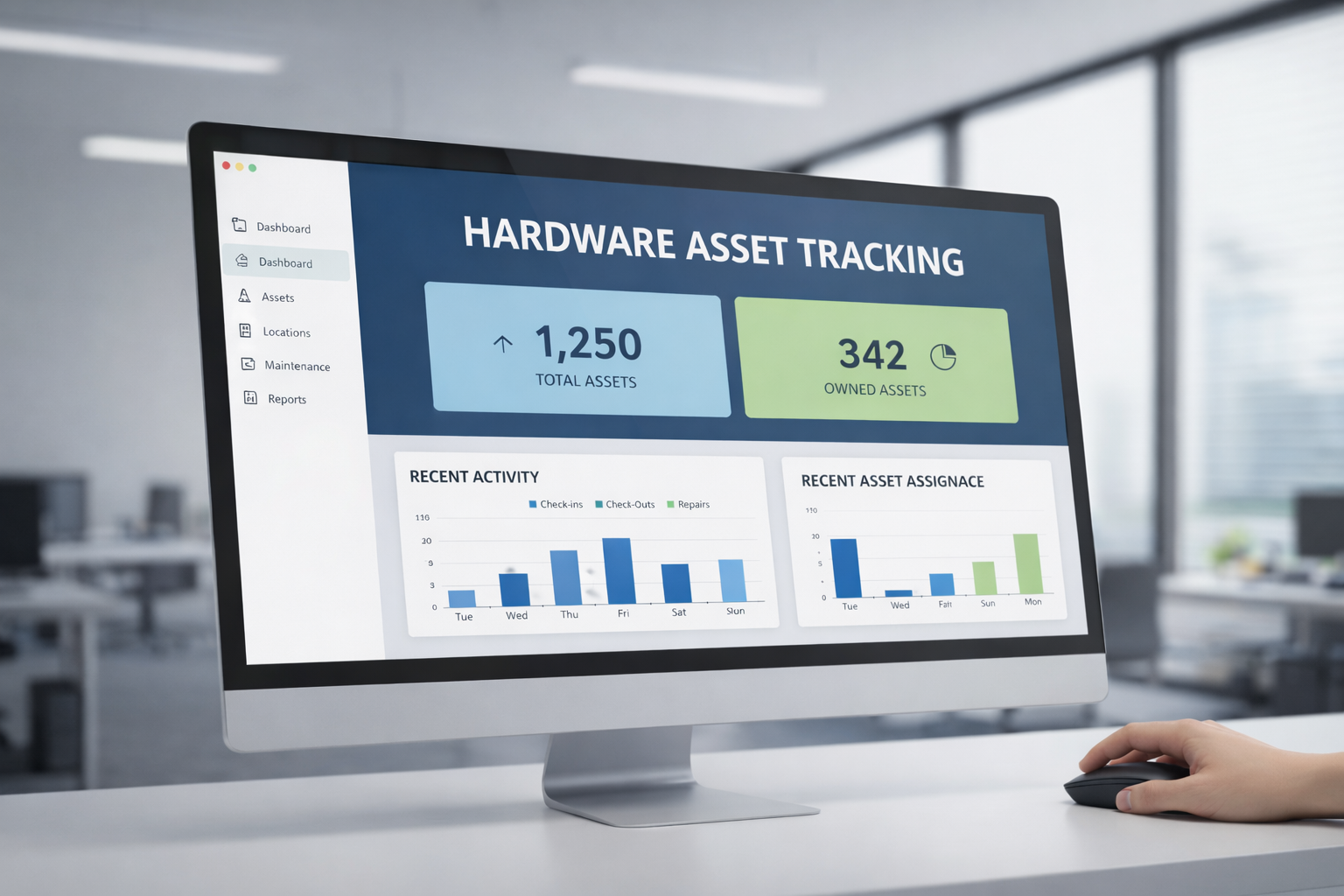
Having a single source of truth for your device inventory is fundamental. Centralized asset management software ensures you can monitor every device’s status—where it is, its health, warranty status, and more. This visibility helps in planning upgrades, repairs, and secure disposal—ensuring that devices is crucial for efficient management and cost savings.
Match lifecycle length to usage and roles
Not all laptops should follow the same lifecycle timeline. High-performance devices for power users or demanding roles might need shorter replacement cycles, while lightweight or secondary devices can have longer lifespans. Matching the lifecycle length to actual usage helps optimize costs and performance, ensuring the right device is in use at the right time.
Plan for warranties and post-warranty support
Warranty periods are a safeguard against costly repairs or hardware failures. Planning for post-warranty support, whether through vendor contracts or managed services, ensures that devices are protected and operating costs stay predictable. This mitigates security breaches and reduces downtime, preserving productivity.
Automate updates and health monitoring
Automation tools enable regular operating system updates, patch management, and health checks—key factors in ensuring device security and efficiency. Automated alerts for potential issues mean problems can be addressed proactively, decreasing the chances of costly failures and protecting sensitive information.
Use repurposing strategies before discarding
Before opting for disposal, consider how older devices can be repurposed—whether for less critical roles or donations. Repurposing devices prolongs their useful life, reduces costs, and supports sustainability. It’s also a responsible way to minimize environmental impact and contribute to circular economy initiatives.
Engage managed refresh or vendor services
Partnering with vendors that offer managed refresh programs simplifies lifecycle management. These services streamline procurement, deployment, and disposal, and often include hardware support and timely upgrades. Using such services ensures cost-effective, secure, and environmentally responsible device management.
Monitor key metrics
Track metrics like cost per device, downtime, user satisfaction, and device performance. Understanding these KPIs helps identify inefficiencies, optimize refresh cycles, and justify investments in newer hardware. Continuous improvement based on data ultimately ensures your lifecycle management strategy is effective and aligned with business goals.
Implementing these best practices supports a robust lifecycle management strategy, creating a cycle of continuous improvement—reducing costs, enhancing security, and promoting responsible disposal. This approach not only safeguards your data but also minimizes environmental impact, aligning with modern business priorities.
Challenges & tradeoffs
While the importance of lifecycle management, especially for laptops, is clear, many organizations encounter obstacles that can hinder success. Being aware of these common challenges enables you to develop strategies to overcome them and improve your device management processes.
Budget constraints versus performance needs
Balancing limited budgets with the desire for high-performance devices is a common challenge. Purchasing cheaper devices may save money upfront but can lead to higher costs over time due to frequent repairs, shorter lifespan, or security risks. Conversely, investing in more durable, cost-effective devices can provide better long-term value, especially when combined with proper lifecycle management.
Legacy systems, fragmented tools, and data silos
Many organizations struggle with outdated or fragmented tools that don’t support integrated lifecycle management. Legacy systems often lack the capability for real-time device tracking or secure data wiping, which can increase security risks. Moving towards modern device management solutions—like device inventory or IoT devices—helps create a unified view and streamlines processes.
Increasing security risks in aging hardware
Older laptops and devices are more vulnerable to security breaches. Outdated operating systems or unpatched vulnerabilities can leave sensitive data exposed. Regular updates, timely repairs, and secure disposal practices, including data wiping, are essential to protect your organization from data breaches and compliance issues.
User resistance and change management
Employees or teams may resist new processes or tools, especially if they involve change or additional steps. Clear communication, user training, and demonstrating benefits are vital to gaining buy-in. Making lifecycle management part of routine operations helps embed these practices into organizational culture.
Determining the “right time” to replace devices
Deciding when to upgrade or replace a laptop isn’t always straightforward. Replacing too early results in unnecessary expenses, while delaying replacements risks security breaches, performance issues, or user dissatisfaction. Establishing clear criteria—like performance metrics or device age—helps in making informed decisions.
Balancing sustainability with device performance
Responsible disposal and recycling are critical for minimizing environmental impact but can be complex due to regulatory requirements or cost considerations. Implementing circular economy strategies—like responsible disposal or asset resale—can turn this challenge into an opportunity for cost savings and sustainability.
Understanding these tradeoffs allows organizations to make more informed decisions and develop proactive strategies that build resilient, cost-effective laptop lifecycle management programs. By addressing these obstacles head-on, your business can maximize device performance, enhance security, and meet sustainability goals.
Implementation roadmap
Turning your laptop lifecycle management (LLM) strategies into action requires a clear, phased approach. Starting small, learning, and then scaling can help ensure success while minimizing disruption. Here’s a straightforward roadmap to guide your organization through effective device lifecycle management.
Phase 1: Pilot with a subset of laptops
Begin by selecting a manageable group of laptops—perhaps in a single department or use case. Implement core practices such as maintaining a centralized inventory, automating updates, and establishing secure data wiping procedures. Use this phase to identify potential issues, test workflows, and gather baseline metrics like downtime, costs, and user satisfaction. This controlled environment helps build confidence and provides insights for broader rollout.
Phase 2: Scale across departments
Based on your pilot results, expand lifecycle management practices to other parts of the organization. Automate processes such as asset registration, monitoring, and upgrades across your device inventory. Integrate with existing systems—like your IT asset management tools—and establish a regular schedule for device health checks and upgrades. Communicate changes clearly to users and provide training to ensure smooth adoption.
Phase 3: Optimize and continuously improve
With a more comprehensive implementation in place, focus on refining your strategies. Use metrics like cost per device, downtime, and user feedback to identify inefficiencies. Incorporate advanced techniques like predictive maintenance, IoT devices, and smart procurement decisions. Regularly review policies, update your lifecycle management strategy, and explore options for responsible disposal to maximize sustainability and cost savings.
Change management, stakeholder involvement, and governance
At each stage, ensure active engagement from stakeholders across IT, finance, and user groups. Communicate the benefits—such as cost savings and improved security—and provide necessary training. Establish governance to review metrics, approve upgrades, and oversee responsible disposal efforts. This collaborative approach helps embed lifecycle management as a core organizational practice.
Measure success with KPIs and early wins
Set clear Key Performance Indicators (KPIs) like reduced procurement costs, extended device lifespan, or lower failure rates. Early wins—such as successful pilot results or quick cost savings—build momentum and justify further investment. Continuous feedback loops allow your team to adapt and improve your device lifecycle management processes.
Following this phased implementation roadmap helps your organization build a resilient and cost-effective device lifecycle management program. As you grow more confident, you’ll be able to better allocate resources, reduce costs, and support a more sustainable, secure technology environment.
Sustainability, circular economy & disposal
For modern businesses, managing laptops isn’t just about cost and performance—it’s also about responsibility. As the digital world grows, so does the environmental impact of e-waste. Implementing sustainable practices in device lifecycle management (DLM) not only helps protect the planet but can also generate cost savings and enhance your brand’s reputation.
Trends in device recycling and remanufacturing
Innovative companies are exploring ways to give old laptops a second life through recycling and remanufacturing. Initiatives like Circular Computing focus on refurbishing and remanufacturing devices, offering higher-quality and eco-friendly alternatives to new hardware. These processes reduce the demand for raw materials, cut energy consumption, and minimize waste—supporting the principles of a circular economy.
The environmental cost of e-waste
E-waste is one of the fastest-growing waste streams globally. Discarded devices contain hazardous materials like lead, mercury, and cadmium, which can leach into the environment if not properly handled. Responsible disposal practices—such as certified recycling—are essential to minimize this impact. Companies that neglect proper disposal contribute to pollution, legal penalties, and reputational damage.
Certifications and standards (like EPEAT)
Standards like EPEAT and R2 certification promote responsible manufacturing and disposal. These certifications require adherence to strict environmental and social criteria, including responsible sourcing, energy efficiency, and recycling practices. Choosing devices with such certifications ensures your lifecycle management efforts align with global sustainability standards.
Secure disposal and data wiping
Secure disposal involves more than just recycling; it’s about ensuring that all sensitive data is thoroughly wiped from devices before they leave your organization. Data wiping, when done properly, prevents breaches of confidential information and complies with data protection regulations. Techniques like certified data erasure, combined with physical destruction if necessary, safeguard your company and support sustainability goals.
Circular economy and responsible reuse
The circular economy emphasizes reusing, refurbishing, and recycling materials instead of disposing of them after a single lifecycle. Responsible device reuse minimizes waste and reduces the demand for manufacturing new devices. Establishing programs for asset resale or donation not only supports sustainability but also adds social value—helping charitable organizations or communities in need.
In summary, integrating sustainability into your laptop lifecycle management isn’t just an ethical choice; it’s a strategic one. By embracing responsible disposal practices and circular economy principles, your business can reduce its environmental footprint, comply with regulations, and drive long-term cost savings.
Conclusion & call to action
Effective laptop lifecycle management isn’t just a best practice—it’s a strategic necessity for modern businesses aiming to balance cost, security, and sustainability. By carefully managing each stage of a device’s life—from procurement to responsible disposal—you can extend the lifespan of your devices, reduce costs, and protect sensitive information all while minimizing environmental impact.
The benefits are clear: substantial cost savings, fewer security breaches, happier users, and a smaller carbon footprint. Whether it’s through smarter procurement, automating routine maintenance, or embracing responsible disposal practices, a well-structured lifecycle management strategy ensures your organization stays resilient and competitive.
Now is the time to act. Start small—perhaps with a pilot program or a single department—and build from there. Measure results, gather feedback, and iterate your processes for continuous improvement. If you want to take your efforts further, consider evaluating lifecycle management tools or partnering with vendors that specialize in device refresh and responsible disposal.
Remember, effective device lifecycle management isn’t a one-time project; it’s an ongoing journey that can transform your organization into a more efficient, secure, and environmentally responsible business.
Ready to get started? Schedule an audit of your current device inventory, explore lifecycle management software options, or contact us at Esevel for expert guidance. Your journey toward smarter, more sustainable device management begins today.
FAQs
1. What is the recommended lifecycle length for laptops?
The ideal lifecycle varies depending on usage and device quality, but generally, a laptop’s optimal lifespan is around 3 to 5 years. Extending beyond this can lead to performance issues and increased security risks, especially if operating systems are no longer supported. Proper lifecycle management ensures you replace or upgrade devices timely to maintain security and efficiency.
2. How much cost savings can be achieved by extending device lifespan?
Significant savings are possible—up to 30-40%—by extending the lifecycle of laptops through regular upgrades and preventative maintenance instead of frequent replacements. This approach reduces procurement costs and minimizes downtime, while also supporting responsible disposal and minimizing environmental impact.
3. When should a laptop be replaced rather than repaired?
A good rule of thumb is to replace a device when repair costs approach or exceed 50% of its value or if hardware performance hampers productivity. Signs include slow operation, frequent crashes, or unsupported operating systems. Timely replacement prevents security breaches and ensures user productivity.
4. How can I ensure secure disposal and data wiping?
Use certified data erasure tools to thoroughly wipe all data from devices before recycling or resale. Follow approved procedures aligned with standards like NIST or ISO. For added security, physical destruction (shredding or crushing) can be employed, especially for sensitive information, ensuring compliance and reducing the risk of data breaches.
5. What tools or software help with lifecycle management?
Popular tools include dedicated device management platforms like Microsoft Endpoint Manager, Jamf for Apple devices, or specialized lifecycle management software that automates updates, monitors device health, and streamlines data wiping. These tools improve compliance, security, and efficiency across device fleets.
6. How do I manage user buy-in and change?
Successful lifecycle management depends on user acceptance. Communicate the benefits—faster devices, enhanced security, environmental responsibility—and involve users early in planning. Offer training and support, and highlight how well-managed devices improve their daily work. Making the process transparent fosters trust and participation.
7. How does sustainability and circular economy fit into lifecycle planning?
Incorporating sustainability means planning for responsible disposal, refurbishment, and reuse. By designing a clear circular economy strategy—using certified recycling, reselling refurbished devices, or donating to charities—you can reduce e-waste, lower environmental impact, and sometimes even generate revenue.
For more tailored advice or to discuss how your organization can improve its device lifecycle management, contact us at Esevel. We’re here to help you build smarter, more sustainable practices that benefit your business and the planet.
Updated by: Maytiska Omar