
A misplaced laptop can cost far more than its hardware value. Picture this: an employee leaves the company, their laptop isn’t properly tracked, and months later, that same device resurfaces — with sensitive company data still intact. The result? A costly data breach, compliance violation, and reputational damage that could have been easily avoided.
Modern businesses depend on laptops more than ever, especially in remote and hybrid work environments. But few pay enough attention to what happens after these devices are no longer in use. Proper asset recovery and disposal ensures not only the protection of sensitive data but also the responsible recovery of financial and material value — while minimizing environmental harm.
In this guide, we’ll unpack what laptop asset recovery and disposal really mean, why they matter, and how your organization can establish a secure, efficient, and sustainable process. Whether you’re an IT manager, procurement lead, or sustainability officer, you’ll walk away with a practical framework for handling laptops at end-of-life — safely, compliantly, and profitably.
Defining asset recovery vs disposal
Before jumping into the process, it’s essential to distinguish between asset recovery and asset disposal — two terms often used interchangeably but representing very different outcomes.
Asset recovery refers to the process of retrieving, assessing, refurbishing, and reselling laptops that have reached the end of their operational use. The goal here is to recover value — either by redeploying within your organization, remarketing externally, or salvaging components. A structured asset recovery process also ensures that sensitive data is erased, and devices are securely transported to certified partners for testing and reconditioning.
In contrast, disposal means the final step of the asset lifecycle, where laptops or components are permanently destroyed or recycled. This includes processes like data destruction, dismantling, and the recovery of raw materials. It’s an essential part of environmental compliance, especially as laptops contain batteries, metals, and electronic components that can harm ecosystems if not handled properly.
In practice, recovery and disposal often overlap — especially when devices in mixed condition (some reusable, some damaged) are processed together. The most effective programs emphasize recovery first, prioritizing reuse or refurbishment whenever possible before resorting to physical destruction or recycling.
By approaching laptop management through a “recovery-first” lens, organizations can reduce waste, cut costs, and demonstrate strong environmental responsibility — without compromising on data security or compliance.
Why laptop asset recovery and disposal matters
Laptops are mobile, powerful, and data-rich — and that makes them both an asset and a liability. Without a proper asset recovery and disposal strategy, companies face a perfect storm of risks and missed opportunities.
Data risk
Laptops frequently travel between offices, homes, airports, and coworking spaces. Each move increases the risk of loss or theft. Even when returned, these devices often store gigabytes of sensitive data — customer files, intellectual property, passwords, or cached credentials. If the data isn’t securely destroyed, it can be recovered easily through basic forensic tools, leading to breaches that can cost millions in damages and erode customer trust.
Residual value
Unlike older data center equipment, laptops often retain strong resale or refurb value. A well-maintained two-year-old laptop can still fetch up to 30–50% of its original price when refurbished. Effective asset recovery services help organizations capture this value through remarketing or internal redeployment, turning what would have been e-waste into recovered capital.
Environmental impact
Each laptop contains lithium-ion batteries, rare earth metals, and plastic components that can be harmful if mishandled. Improper disposal contributes to e-waste pollution and increases a company’s environmental impact. Partnering with certified partners that emphasize environmental responsibility ensures proper recycling, materials recovery, and compliance with e-waste laws — protecting both the planet and your brand.
Compliance risks and regulations
Laws such as GDPR, HIPAA, and various national e-waste directives mandate proper data destruction and traceable disposal. Failing to document your asset disposition (ITAD) process can result in hefty fines, audits, or legal action. Moreover, organizations that can demonstrate secure and sustainable disposal practices gain reputational credibility with investors and customers alike.
In short, a disciplined laptop recovery and disposal strategy is no longer optional. It’s a business necessity that safeguards your data, supports sustainability goals, and strengthens your financial bottom line.
Core pillars of a robust laptop recovery and disposal program
Building an effective laptop asset recovery and disposal program requires more than a checklist — it demands structure, accountability, and secure execution. These core pillars ensure that every laptop is managed responsibly from pickup to final processing.
1. Data sanitization and destruction
The most critical step in the asset recovery process is ensuring that all stored data is permanently erased. Depending on the risk level and device type, organizations can use:
- Software wiping or cryptographic erasure following standards like NIST 800-88
- Degaussing, which demagnetizes storage drives to make data unreadable
- Physical destruction, such as shredding or crushing drives for high-security cases
Verification and documentation should accompany every data destruction activity, ensuring compliance and traceability.
2. Vendor and partner selection
Choosing an experienced and certified ITAD partner is essential. Look for vendors with certifications such as R2, e-Stewards, ISO 27001, or NAID AAA. These credentials verify that your partner follows best practices for data security, environmental responsibility, and safety.
Additionally, assess their operational controls:
- Do they maintain secure facilities and staff background checks?
- Is there a defined chain of custody for each device?
- Can they provide real-time tracking or audit reports?
A trustworthy vendor not only destroys data securely but also helps you recover value where possible.
3. Tracking and chain of custody
Maintaining an unbroken chain of custody is fundamental to prevent loss, theft, or tampering. Every handoff — from employee return to logistics and processing — should be recorded in a management system with timestamps, barcodes, or RFID tracking.
Detailed tracking ensures transparency, supports compliance audits, and reinforces accountability between your organization and the ITAD partner.
4. Value recovery and refurbishment
Many laptops still hold market value after decommissioning. Refurbishment or resale through asset recovery services can offset costs or even generate revenue. Certified partners will test, repair, and resell devices while ensuring data destruction has been completed before resale.
Internal redeployment — assigning wiped laptops to new employees — is another smart way to extend the asset lifecycle and reduce unnecessary procurement costs.
5. Environmental disposal and recycling
For laptops beyond repair, the goal shifts to responsible recycling. Certified recyclers disassemble devices, safely remove hazardous materials like batteries, and recover valuable metals such as copper, aluminum, and gold.
This step not only reduces environmental impact but also supports global sustainability initiatives and compliance with e-waste regulations.
6. Documentation and certificates of destruction
At every stage — from collection to final processing — you must maintain a full audit trail. Reporting and documentation should include:
- Certificates of data destruction
- Asset serial numbers and inventory reconciliation
- Material recovery and recycling summaries
This paperwork proves compliance, demonstrates transparency to auditors, and provides peace of mind that each laptop was processed securely.
Together, these pillars form the foundation of a reliable, transparent, and sustainable laptop recovery and disposal program — one that aligns with both corporate governance and environmental standards.
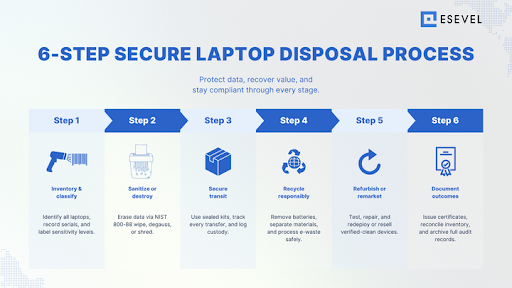
Step-by-step laptop recovery and disposal process
Implementing a structured asset recovery and disposal process ensures that every laptop is handled securely, efficiently, and in full compliance with corporate and environmental policies. Below is a detailed, step-by-step breakdown of how a best-practice program should run.
Step 1: Inventory and classification
Begin by taking a complete asset inventory of all laptops scheduled for recovery or disposal. Include details such as:
- Make, model, and serial number
- Hardware specifications and current condition
- Storage type (SSD, HDD, hybrid)
- Assigned user and department
- Data sensitivity level and operational status
Classify each laptop into categories — reusable, resellable, recyclable, or for destruction — to streamline next steps and ensure appropriate handling.
Step 2: Retrieval and collection
Devices often come from multiple sources: employee offboarding, hardware refresh cycles, or decommissioned offices.
Establish a consistent collection and retrieval process that ensures secure pickup and traceable transport. Whether the devices are returned by courier, in-person drop-off, or bulk shipment, each transfer should be logged and assigned to a responsible party.
For distributed teams, provide employees with clear return kits and instructions to prevent data loss or device damage during shipping.
Step 3: Data sanitization and destruction
Data destruction is the heart of asset recovery and disposal. Choose the method based on the laptop’s data security classification and your organization’s compliance obligations:
- Software wiping: Secure erasure tools overwrite all data following recognized standards like NIST 800-88.
- Cryptographic erasure: Deletes encryption keys, rendering all stored data inaccessible.
- Degaussing: Neutralizes magnetic storage drives, making data irretrievable.
- Physical destruction: Drives are crushed or shredded, ensuring permanent destruction for high-risk devices.
Always require proof of destruction and maintain a log for each serial number. Partnering with certified ITAD vendors ensures adherence to strict protocols.
Step 4: Testing, refurbishment, and resale
After data has been sanitized, laptops in good condition can be tested and refurbished for redeployment or resale. Functional testing, cosmetic repair, and component upgrades (RAM, SSD) extend their lifespan and boost resale value.
Refurbished laptops can be:
- Redeployed internally to new employees
- Donated to schools or nonprofits
- Remarketed through certified resellers for residual value recovery
A strong asset recovery program balances security and sustainability by prioritizing reuse before recycling.
Step 5: Recycling and disposal of non-viable laptops
Laptops that cannot be reused or resold move to the recycling and disposal phase. Certified recyclers dismantle devices to recover valuable materials like copper, gold, and aluminum, while safely handling hazardous components such as batteries or circuit boards.
By partnering with recyclers that follow environmental responsibility standards (like R2 or e-Stewards), companies can ensure materials are recovered responsibly and not exported to non-compliant regions.
Step 6: Secure transport and chain of custody
From pickup to final processing, maintaining a chain of custody is essential. Every handoff must be documented — whether during internal transport, vendor pickup, or shipment to recycling facilities.
Best practices include:
- Using tamper-evident seals or secure containers
- GPS-tracked vehicles for large shipments
- Requiring digital sign-offs for every custody transfer
This ensures traceability, minimizes risk of loss or theft, and satisfies auditors or regulators reviewing your asset management process.
Step 7: Documentation, reconciliation, and certification
Once all laptops are processed, finalize the cycle with thorough reporting and documentation. A complete record should include:
- Certificates of data destruction
- Recycling and material recovery reports
- Final inventory reconciliation
- Proof of responsible recycling or resale outcomes
These records protect your organization in case of audits and demonstrate full transparency across your asset lifecycle.
Selecting the right ITAD and recovery partner for laptops
Choosing the right ITAD (IT asset disposition) or asset recovery partner is one of the most important decisions in the entire disposal process. A qualified vendor not only ensures data security and compliance but also helps you recover value while minimizing environmental impact.
Here are the key criteria to evaluate when selecting your partner:
Certifications and compliance standards
Always start by verifying certifications. Reputable vendors follow internationally recognized standards that demonstrate both operational excellence and accountability. Look for:
- R2v3 (Responsible Recycling) – ensures responsible reuse and recycling of electronics.
- e-Stewards – prevents illegal export and promotes ethical recycling.
- ISO 27001 – verifies strong information security management systems.
- NAID AAA – certifies adherence to strict data destruction and handling standards.
These certifications confirm that your vendor follows safe, auditable, and environmentally responsible practices.
Security, facilities, and personnel
Ask about the vendor’s internal security controls. Their facilities should have restricted access, CCTV surveillance, and documented entry logs. All staff members handling retired assets should undergo background checks and receive regular security training.
If possible, visit the facility or request a virtual walkthrough to assess compliance and professionalism.
Transparency and reporting capabilities
Trustworthy vendors provide complete visibility across the asset recovery process. This includes:
- Real-time dashboards or status updates from pickup to final stage
- Itemized inventory reports for each asset batch
- Certificates of secure data destruction with serial numbers
- Detailed reporting and documentation for audit readiness
This transparency gives you peace of mind and supports internal compliance reviews or external audits.
Refurbishment, resale, and logistics expertise
The best partners don’t just dispose — they recover value. A qualified vendor will test, refurbish, and resell viable laptops through verified remarketing channels or internal redeployment programs.
Additionally, ensure your ITAD partner has strong logistics capabilities. They should offer secure transport, global pickup coverage, and the flexibility to handle large-scale or distributed laptop returns — especially important for organizations with remote or hybrid teams.
Commitment to environmental responsibility
Environmental stewardship should be built into your partner’s DNA. Confirm that they adhere to zero-landfill policies, responsible waste recycling, and provide material recovery metrics (e.g., percentage of devices reused or recycled).
A sustainable ITAD partner helps reduce your organization’s environmental impact while aligning with ESG goals and corporate sustainability reporting.
Red flags to avoid
When evaluating vendors, watch for these warning signs:
- Lack of verifiable certifications or expired credentials
- Refusal to provide chain-of-custody records
- No documentation for data destruction or recycling outcomes
- Outsourced processes to unverified third parties
- Pricing that seems too good to be true (often cutting corners on compliance)
A reliable partner will welcome your questions, provide full transparency, and demonstrate accountability at every step.
In short, your ITAD vendor should act as a certified partner—not just a recycler. They safeguard your data, maximize asset recovery, and ensure the entire process remains secure, sustainable, and fully compliant.
Illustrative examples and scenarios
Understanding how asset recovery and disposal works in practice helps organizations visualize both the risks and rewards. Below are a few real-world and hypothetical examples that show why structured programs — with certified partners and clear governance — make all the difference.
Example 1: Value recovery through certified refurbishment
A global consulting firm decided to retire 1,000 laptops after a company-wide hardware refresh. Instead of sending them directly to a recycler, the IT team partnered with a certified ITAD provider. Each laptop underwent secure data destruction following NIST 800-88 standards, and over 75% of the units were refurbished and resold through verified remarketing channels.
The result? The company recovered nearly 40% of the devices’ original residual value — revenue that was then reinvested into its new laptop procurement. Beyond cost savings, the company also avoided over 15 tons of e-waste, demonstrating measurable environmental responsibility in its annual ESG report.
Example 2: The consequences of a missing device
A midsize financial services firm outsourced its IT disposal to a local, uncertified vendor to save costs. The vendor failed to maintain a chain of custody, and one of the decommissioned laptops never made it to the recycling facility. Months later, a cybersecurity researcher found the laptop for sale online — with sensitive customer data intact.
The fallout was severe: regulatory fines, mandatory data breach notifications, and reputational damage. The company later had to implement a new asset management policy and engage a certified ITAD vendor to rebuild trust with auditors and clients.
This case highlights why skipping verification or choosing a low-cost provider can quickly turn a routine asset disposal into a high-risk data incident.
Example 3: Deciding between refurbishment and destruction
A technology startup needed to dispose of 200 laptops after a round of upgrades. Half of the devices were fully functional but outdated; the rest had damaged screens and degraded batteries.
Working with an experienced ITAD partner, they implemented a split strategy:
- 120 units were securely wiped and refurbished for internal redeployment.
- 80 units were physically dismantled, and recyclable components (aluminum, copper, plastic) were recovered.
This hybrid approach aligned with their environmental impact goals, reduced procurement spending, and ensured complete data security.
Example 4: Global coordination for remote workforce returns
An enterprise with employees across 12 countries needed to retrieve and process laptops after multiple offboarding waves. Coordinating pickup and secure transport across time zones and logistics partners posed challenges.
Their ITAD vendor provided pre-labeled shipping kits with tamper-evident seals and real-time tracking. Each return was logged in the asset inventory system, with serialized reporting at every custody transfer.
The company achieved a 99.8% recovery rate of retired assets and zero data incidents — a strong testament to well-orchestrated asset recovery services supported by modern tracking and documentation systems.
Common pitfalls, trade-offs, and mitigation
Even with the best intentions, many organizations stumble when implementing a laptop asset recovery and disposal program. These pitfalls can lead to data exposure, financial loss, or compliance breaches. Understanding them — and knowing how to prevent them — is essential for long-term success.
Underestimating data remanence risk
One of the most common mistakes is assuming that deleting files or formatting a drive is enough. In reality, sensitive data often remains recoverable through basic forensic tools. This residual data — known as data remanence — is a major source of breach risk.
Mitigation: Adopt certified data destruction methods that comply with NIST 800-88 or equivalent standards. Require vendors to provide destruction logs and certificates of data destruction for every drive processed.
Losing chain of custody during transit
When laptops move between offices, collection points, and vendors, gaps in custody tracking can occur. A single unrecorded transfer or missing signature can lead to untraceable devices — and potential data leaks.
Mitigation: Maintain an unbroken chain of custody by documenting every handoff. Use tamper-proof packaging, unique tracking IDs, and digital sign-offs to verify custody at every stage.
Choosing low-cost or uncertified vendors
Some companies are tempted to cut costs by choosing recyclers without proper certifications. These vendors often lack secure facilities, proper documentation, or compliance with environmental and data regulations — increasing the risk of noncompliance or loss.
Mitigation: Only partner with certified ITAD vendors that hold R2v3, e-Stewards, NAID AAA, or ISO 27001 certifications. These credentials demonstrate that the provider follows strict protocols for both data security and environmental responsibility.
Hidden logistics and handling costs
Improper planning can lead to surprise expenses — shipping, packaging, insurance, or disposal fees. These costs often surface late in the project, undermining ROI or delaying final certification.
Mitigation: Clarify all pricing terms upfront, including transport, destruction, and recycling costs. Choose vendors that offer end-to-end asset recovery services, from collection to final reporting, under a transparent cost model.
Deciding when to destroy vs refurbish
Not all devices need to be destroyed. However, without a clear policy, teams may over-destroy reusable laptops or, conversely, fail to destroy sensitive ones. This inconsistency can result in lost value or security exposure.
Mitigation: Develop a decision framework based on data sensitivity, device age, and residual value. Use a tiered approach:
- Reuse or redeploy if the laptop passes functional testing and secure wiping.
- Recycle if components are non-functional but recoverable.
- Physically destroy only when security risks outweigh potential value.
Vendor noncompliance or missing documentation
Even reputable vendors can occasionally fail to provide full audit documentation or reconcile serial numbers. Missing records make it difficult to prove compliance or close audits.
Mitigation: Require complete, serialized reporting and documentation for every batch of devices. Perform periodic audits or spot checks to verify vendor processes, ensuring full accountability from pickup to final disposition.
By proactively addressing these pitfalls, organizations can strengthen every layer of their asset recovery process — ensuring laptops are managed securely, sustainably, and cost-effectively from start to finish.
Environmental and compliance considerations specific to laptops
Beyond data protection and financial recovery, responsible asset recovery and disposal also plays a vital role in environmental stewardship and regulatory compliance. Laptops contain components that, if improperly handled, can harm ecosystems and violate environmental laws. Addressing these issues ensures your organization meets its sustainability goals while staying fully compliant.
Managing battery disposal and hazardous materials
Laptops typically contain lithium-ion batteries, which are classified as hazardous waste. Improper disposal can cause fires, chemical leaks, or pollution. Other components — such as lead, mercury, and cadmium — also require specialized handling.
Best practices include:
- Partnering only with recyclers certified to handle hazardous e-waste under local and international standards.
- Ensuring that batteries are removed before shredding or smelting.
- Requesting documentation on how hazardous components are separated and processed.
Certified recyclers following standards like R2v3 or e-Stewards guarantee that all materials are managed safely and in compliance with environmental regulations.
Understanding e-waste and recycling regulations
Every region has its own framework for electronic waste management, such as:
- WEEE Directive (EU) – mandates collection, treatment, and recycling of electronics.
- EPA guidelines (US) – outline safe handling and recycling of electronic equipment.
- EPR (Extended Producer Responsibility) programs – hold companies accountable for the entire asset lifecycle of their electronics.
Your organization must align with these laws, particularly if operating in multiple countries. Partnering with a global ITAD company ensures consistency across jurisdictions and helps maintain unified compliance reporting.
Zero-landfill and responsible recycling policies
A growing number of companies now adopt zero-landfill or circular economy policies. Instead of dumping devices, they work with vendors that recover metals, plastics, and components for reuse.
This approach not only reduces environmental impact but also demonstrates a tangible commitment to corporate sustainability goals. It may also qualify your organization for ESG reporting credits or public sustainability certifications.
Documentation and audit readiness
Regulators and auditors increasingly require companies to prove their environmental compliance. Maintaining thorough reporting and documentation is essential.
Each stage of the disposal process should be supported by:
- Certificates of recycling and material recovery reports.
- Proof that hazardous components were processed correctly.
- Quantitative metrics on waste reduction and carbon footprint savings.
These records serve as defensible evidence during audits and bolster your company’s sustainability disclosures.
The connection between compliance and brand reputation
Proper environmental management doesn’t just avoid fines — it strengthens your organization’s reputation. Businesses seen as environmentally responsible are more likely to win stakeholder trust, attract investors, and appeal to sustainability-conscious customers.
By integrating compliance and sustainability into your laptop asset recovery and disposal program, you build a framework that protects both your data and the planet — a balance that defines the future of responsible IT management.
Taking the next step toward responsible laptop recovery and disposal
In a world where remote work, data privacy laws, and sustainability expectations are rapidly evolving, proper laptop asset recovery and disposal is no longer a back-office task — it’s a strategic business function. Every retired laptop represents not just hardware, but a mix of potential risks, recoverable value, and environmental responsibility.
By prioritizing a structured, compliant process, your organization can achieve three vital outcomes:
- Protect data security by ensuring every device undergoes certified data destruction or sanitization.
- Recover financial value by refurbishing or remarketing devices that still have functional potential.
- Meet environmental and regulatory goals by working with certified partners who practice responsible recycling and uphold zero-landfill standards.
If you haven’t yet evaluated your current disposal and recovery framework, now is the time. Begin by auditing your asset inventory to understand what devices are stored, retired, or at risk. Review your vendor relationships — are they certified, transparent, and fully traceable from pickup to final disposition?
From there, consider launching a pilot program with a trusted ITAD provider to test the process. The insights gained from even a small-scale rollout can reveal gaps in your chain of custody, reporting, or security controls.
Ultimately, the goal is simple: to create a lifecycle strategy that treats every laptop responsibly — from deployment to retirement — ensuring that nothing is lost, unaccounted for, or left vulnerable.
A well-executed asset recovery and disposal program reflects a company’s values: secure, sustainable, and future-ready.
Now is the time to turn compliance into a competitive advantage. Audit your disposal process, align with certified experts, and start building a smarter, safer IT ecosystem for your organization.
FAQs
How is laptop asset recovery different from general IT disposal?
Laptop asset recovery focuses on retrieving, refurbishing, and reselling laptops that still hold residual value, while general IT disposal may cover a wider range of assets such as servers, printers, and networking equipment. Because laptops are portable and store sensitive data, they require tighter controls for data destruction, secure transport, and documentation. In short, laptop recovery prioritizes both value recovery and data protection, whereas disposal alone typically focuses on end-of-life destruction.
What is the safest data erasure method for laptop drives?
The safest and most widely accepted method is data sanitization following the NIST 800-88 standard. This can involve software-based overwriting or cryptographic erasure. For devices with highly sensitive information, physical destruction (such as shredding or crushing drives) offers an added layer of security. Always ensure your vendor provides a verifiable certificate of data destruction for every drive processed.
Can we safely refurbish and reuse laptops?
Yes, refurbishing and redeploying laptops is often a smart and sustainable choice — provided all data is securely erased and the devices are tested for functionality. Refurbishment can significantly extend the asset lifecycle and reduce procurement costs. Certified ITAD partners can handle the full process, from data destruction to cosmetic refurbishment and resale, ensuring both compliance and reliability.
What certifications should a laptop disposal vendor have?
At a minimum, look for vendors that hold the following certifications:
- R2v3 (Responsible Recycling) for ethical reuse and recycling.
- e-Stewards for preventing illegal export and environmental harm.
- NAID AAA for secure data destruction.
- ISO 27001 for information security management.
- ISO 14001 for environmental management systems.
These certifications ensure that your partner follows rigorous standards for asset management, environmental responsibility, and data protection throughout the asset recovery process.