Computer device management is the process of controlling, tracking, and supporting company computers throughout their use. Depending on the environment, IT may need endpoint control, accurate asset information, physical device operations, or a combination of all three.
These needs are often grouped together, even though they solve different problems. Endpoint platforms help configure and secure devices, IT asset management systems maintain ownership and status records, and device operations cover tasks such as delivery, repair, replacement, and retrieval.
This becomes more important for distributed teams. Gallup reported in May 2026 that 52% of remote capable U.S. employees worked hybrid and 26% worked fully remotely, increasing the need for remote control, accurate device visibility, and reliable hardware support.
What is computer device management?
Computer device management is the combination of tools and processes used to control, track, support, and coordinate company computers throughout their active use. It commonly covers laptops, desktops, and workstations, although the exact scope depends on the organization.
A useful way to think about computer management is through three layers:
- Control: Configure, secure, update, and remotely act on the computer.
- Visibility: Know what the device is, who has it, where it is, and its current status.
- Operations: Coordinate physical activities such as procurement, deployment, repair, replacement, and retrieval.
Endpoint platforms handle configuration, security, updates, and other remote device management tasks, while asset systems and operational services cover different parts of computer management. Microsoft Intune, for example, lets administrators inspect enrolled devices, deploy scripts, monitor compliance and health, and perform remote actions such as wipe, retire, restart, and sync.
That is different from maintaining wider asset records or arranging a physical repair when an employee’s laptop fails in another country.
What does computer device management include?
The easiest way to understand computer device management is to separate what IT can control, what IT can see, and what IT can make happen physically.
Device control
Device control covers actions performed on the computer itself. This includes enrollment, configuration, security policies, application deployment, patching, compliance monitoring, remote commands, locking, wiping, and troubleshooting.
MDM and UEM platforms typically sit closest to this layer. RMM tools can also provide monitoring, patching, scripting, and remote administration.
Microsoft describes Intune as a cloud endpoint management service for enrolling, configuring, securing, updating, and managing devices and applications across platforms including Windows, macOS, Linux, Android, and Apple devices.
Device visibility
Visibility answers a different question: what does IT actually know about the computer? This includes the assigned employee, model, serial number, location, warranty, cost, status, and lifecycle stage.
Endpoint platforms such as Intune provide part of this picture, including ownership, model, operating system, serial number, compliance state, and primary user. ITAM extends that visibility with broader records such as procurement data, assignment, costs, and lifecycle history.
This remains a common challenge. Flexera’s 2026 State of ITAM Report found that only 36% of organizations reported complete visibility into their IT estate, down from 43% the previous year.
Device operations
Device operations cover the physical work around a computer, including procurement, configuration, delivery, repair, replacement, retrieval, storage, and redeployment.
This layer matters when a software action alone cannot resolve the problem. IT may know that a laptop has a damaged screen, for example, but someone still needs to arrange the repair, provide a replacement if required, and update the device record afterward.
The impact can be measurable. Bunker combined endpoint management with physical procurement and preconfiguration through Esevel and reported 2x faster device provisioning, with laptops shipped directly to employees ready for use.
| Management layer | Main question | Typical capabilities | Best fit category |
| Control | Can IT control the computer? | Policies, applications, patches, remote actions | MDM, UEM, RMM |
| Visibility | Can IT see and understand the computer? | User, location, status, warranty, asset records | ITAM, asset management |
| Operations | Can IT act when something physically happens? | Delivery, repair, replacement, retrieval | Device lifecycle operations |
These three layers often work together, but they solve different problems. Understanding whether your main gap is control, visibility, or operations makes it easier to choose the right mix of device management tools instead of expecting one platform to cover everything.
How is computer device management different from MDM, UEM, RMM, and ITAM?
Computer device management is a broad concept. MDM, UEM, RMM, and ITAM are categories that solve particular parts of it.
| Category | Primary purpose | Strongest for | Usually does not replace |
| MDM | Manage enrolled devices | Policies, security, configuration | Full ITAM or physical operations |
| UEM | Manage different endpoint types | Centralized endpoint control | Hardware lifecycle execution |
| RMM | Monitor and support endpoints remotely | Health, patching, troubleshooting | Full asset governance |
| ITAM | Maintain technology asset information | Ownership, cost, status, lifecycle records | Deep endpoint policy enforcement |
| Device lifecycle operations | Coordinate physical device work | Procurement, repairs, retrieval, redeployment | MDM or UEM security controls |
These boundaries are not absolute. Endpoint platforms increasingly include inventory features, while ITAM systems may connect with service management and automation.
The key question is therefore not simply whether a product calls itself an MDM, UEM, or device management platform. It is which actions your IT team needs it to perform.
How do you choose a computer device management platform?
The right computer device management platform depends on the management gap you need to solve. Start by identifying whether IT needs more control, visibility, physical operations, or better integration between existing systems. Then evaluate platforms against those requirements.
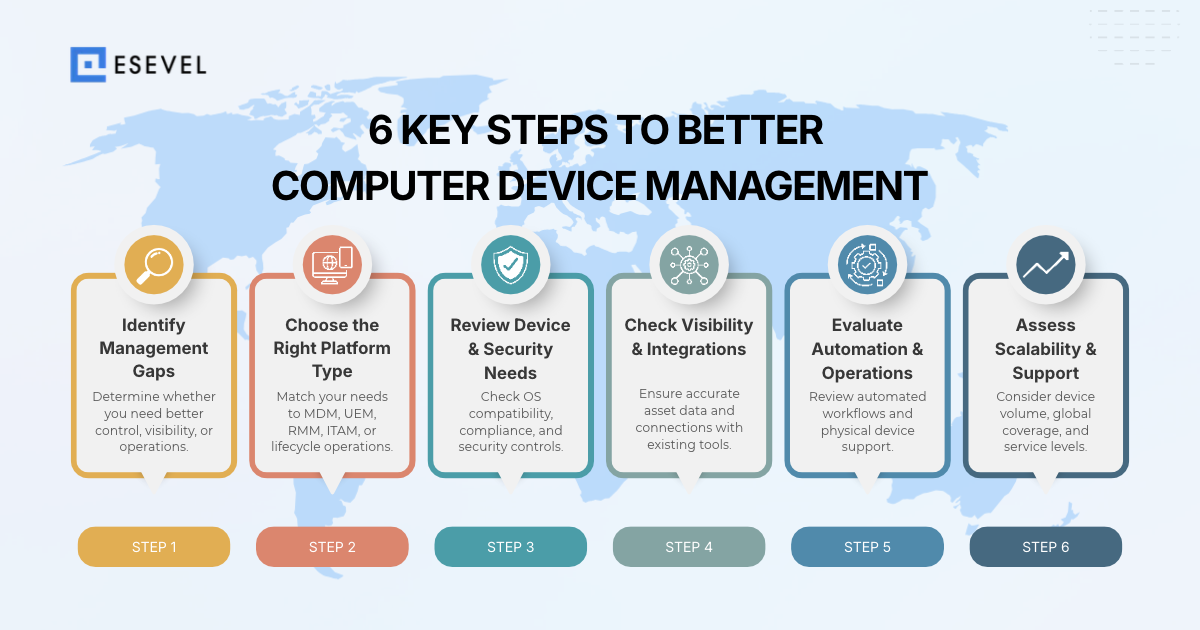
Step 1: Identify the main management gap
Start with the problem, not the product category. If IT struggles to enforce security policies or configure computers remotely, the gap is mainly control. If ownership, location, or warranty data is unreliable, the problem is visibility. If repairs, replacements, or retrievals create manual work, the gap is operational.
Some organizations will need more than one layer.
Step 2: Match the need to the right platform category
Choose the category that best fits the action IT needs to take.
MDM and UEM are strongest for configuration, security, applications, compliance, and remote actions. RMM platforms focus more on monitoring, maintenance, patching, diagnostics, and remote support. ITAM tools provide deeper asset records, while device lifecycle operations cover physical activities such as procurement, repair, retrieval, and redeployment.
Step 3: Check device and security requirements
Confirm that the platform supports the operating systems and computer types your company manages, including Windows, macOS, and Linux where relevant.
Then review requirements such as configuration enforcement, compliance monitoring, encryption visibility, access controls, remote lock and wipe, and audit history.
Step 4: Evaluate visibility and integrations
Check whether IT can see important information such as:
- Assigned employee
- Device location
- Model and serial number
- Warranty
- Management status
- Lifecycle stage
The platform should also fit the systems already in use. Look for integrations with HRIS, identity, MDM or UEM, ITSM, procurement, and asset management tools so important device information does not need to be updated manually in several places.
Step 5: Assess automation and physical operations
Review which workflows can be automated, including enrollment, provisioning, updates, alerts, onboarding, offboarding, and asset record synchronization.
If your requirements also include physical hardware, check whether procurement, delivery, repair, replacement, retrieval, storage, and redeployment are supported in the locations where employees work. These operational capabilities should be evaluated separately from software based endpoint control.
Step 6: Check scalability and support
Finally, consider how well the platform fits the environment you expect to manage over time. Evaluate device volume, number of countries, internal IT capacity, support requirements, response times, and service levels.
A company that already has strong endpoint management may not need to replace it. Adding better asset visibility or a physical device operations layer can be more effective than introducing another system with overlapping capabilities.
The key rule is to choose capabilities based on the action IT needs to take, not the category name printed on the software.
Where can companies find computer device management tools with remote capabilities?
Remote computer management tools exist across several software categories. The right category depends on what IT needs to do remotely.
Endpoint management and UEM
Microsoft Intune is a representative endpoint management platform. It supports device enrollment, configuration, applications, security policies, compliance reporting, updates, scripts, inventory, and remote device actions.
It fits organizations that primarily need centralized control over managed endpoints.
RMM and remote support platforms
RMM platforms such as NinjaOne focus more heavily on ongoing monitoring, patching, diagnostics, automation, and remote technician access.
They fit teams whose main challenge is maintaining and troubleshooting active computers remotely rather than managing procurement or full asset records.
ITAM platforms
ITAM platforms focus on asset inventory, ownership, cost, warranty, assignment, and lifecycle information.
They fit companies whose main issue is knowing what assets exist and maintaining accurate records. IT teams specifically comparing this category can use an IT asset management solutions comparison rather than treating every ITAM product as interchangeable with endpoint management.
Device lifecycle operations
Device lifecycle operations platforms focus on physical actions around hardware.
Esevel, for example, combines device tracking with procurement, deployment, hardware support, retrieval, and redeployment for distributed teams. This type of platform can sit alongside an existing endpoint management system instead of replacing it.
A global IT environment might therefore use Intune for endpoint control, an ITAM system for asset records, and a device operations platform for physical hardware workflows.
How should device management systems work together?
One computer can exist across several systems without every system needing to perform the same job.
A practical architecture gives each system responsibility for particular information. The HRIS may own employee data. UEM can own configuration and compliance state. ITAM can maintain ownership and lifecycle records. ITSM manages support tickets, while a device operations platform records physical events such as deployment, repair, and retrieval.
What matters is that those systems agree on the identity of the device.
Serial numbers, asset IDs, device identifiers, and employee assignments can provide common reference points. Important events should then synchronize across systems when an employee joins, a computer is assigned, someone moves location, hardware needs repair, or an employee leaves.
Integrations help reduce duplicate updates. Microsoft itself documents Intune connections with external services including ServiceNow and TeamViewer, illustrating how endpoint management commonly operates as part of a wider IT environment.
The goal is not one database doing everything. It is clear ownership of each data type and reliable movement of important events between systems.
Which computer device management approach is right for your team?
The right computer device management approach depends on the management gap.
If you need endpoint security and remote control, start with MDM or UEM. If monitoring and troubleshooting are the priority, add RMM or remote support. If asset records are unreliable, strengthen ITAM. If devices also need to be procured, repaired, retrieved, or redeployed, add device lifecycle operations.
For enterprise and distributed teams that need several layers, an integrated stack usually makes more sense than forcing one platform to perform every role. Esevel can complement existing endpoint tools by connecting device visibility with procurement, hardware support, recovery, and other physical workflows.
The framework is simple: control tells IT what it can do to the computer, visibility tells IT what it knows about the computer, and operations determine what IT can make happen physically.
Frequently asked questions about computer device management
What is computer device management?
Computer device management is the process of controlling, tracking, and supporting company computers, from configuration and security to deployment, repair, and retrieval.
What is the difference between computer device management and MDM?
MDM focuses mainly on configuring and securing enrolled devices. Computer device management is a broader term that can also include asset visibility, remote support, hardware operations, and lifecycle activities.
Do companies need both MDM and ITAM?
Companies often need both when they require endpoint control and detailed asset records. MDM handles configuration and security, while ITAM maintains information such as ownership, cost, warranty, location, and lifecycle status.
What is the difference between RMM and device management?
RMM focuses on monitoring, maintenance, patching, diagnostics, and remote support. Device management can describe a broader environment that also includes security controls, asset information, provisioning, and physical device operations.
Can one platform manage the full computer lifecycle?
Some platforms cover several management areas, but companies should verify specific capabilities. A single product does not automatically replace endpoint management, ITAM, remote support, and the physical operations required to deploy, repair, or recover hardware.

Maytiska Omar Maytiska is an experienced content writer and blog specialist with 4+ years of expertise in creating engaging, SEO-driven content. She focuses on IT and digital topics, turning complex ideas into clear, reader-friendly insights. Her work helps position Esevel as a trusted voice in the digital space.