
A solid offboarding checklist is what stands between a clean employee exit and a mess of open accounts, missing laptops, and outdated asset records. It’s the reference point a company uses to complete HR, IT, access, device, and data tasks whenever someone leaves, whether that departure is planned or sudden.
For remote and distributed teams, the stakes are higher: there’s no walking over to collect a badge or unplug a monitor. Device retrieval, access revocation, laptop return, and asset tracking all need to happen with more structure and more visibility than they would in an office.
Before getting into the full checklist, it helps to define what one usually includes.
What is an offboarding checklist
An offboarding checklist is a structured list of tasks a company works through before, during, and after an employee’s last day, spanning HR paperwork, manager handover, access removal, equipment return, data protection, and a final confirmation step.
The depth varies by company: a basic version might stop at HR forms and a goodbye email, while a complete employee offboarding process treats the exit as a coordinated handoff across HR, IT, finance, and the manager.
That’s the value of an employee exit checklist: it turns a one-time event into a repeatable, trackable process. It becomes more important once IT tasks enter the picture, since missed access or device steps create real security and asset risk.
What to include in an offboarding checklist
A complete offboarding checklist should cover HR, manager handover, IT access, device return, data protection, and asset updates. For remote teams, each task also needs a clear owner, timing, and confirmation step so accounts, devices, and records do not get missed.
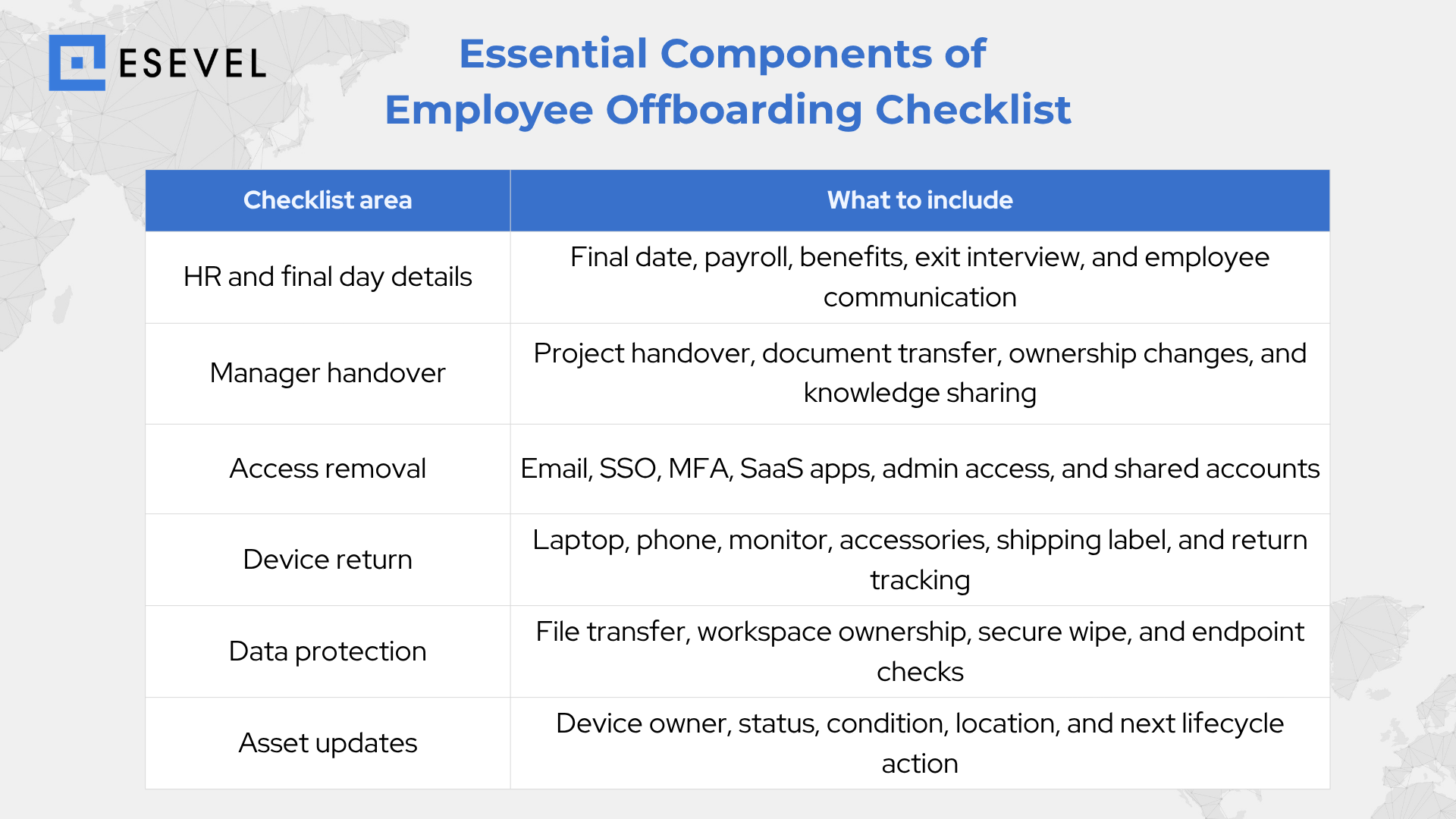
These categories give the checklist structure, but the IT tasks need extra care because missed access, devices, or asset updates can create real security and operational risk.
Why IT tasks need a clear offboarding checklist
Offboarding is not just an HR responsibility. IT needs its own documented process to close access, recover devices, protect company data, and keep asset records current.
This process needs to work for both planned and sudden departures. Without a clear checklist, teams can miss access, devices, data, or asset updates.
Missed access removal creates security risk
Former employees may keep access to email, files, SaaS tools, shared accounts, or admin systems when no one checks every login. Shared accounts and admin privileges are easy to miss because they are not always tied to one clear owner.
Access revocation should be documented as part of the offboarding process. A complete user access removal step should cover apps, systems, SSO, MFA, file permissions, software access removal, SaaS access removal, account deactivation, and final confirmation.
Unreturned devices create asset and data risk
Laptops, monitors, phones, and accessories can stay with a former employee after the final day if return steps are unclear. This is more common for remote teams because the company cannot collect equipment in person.
An unreturned device is not only a missing asset. It may still hold company data or stay connected to internal systems, so device retrieval, laptop return, employee equipment return, and IT asset recovery need clear tracking.
Outdated asset records reduce visibility
When a device is not checked back in, ownership can stay assigned to someone who no longer works at the company. Device inventory may also fail to show what was returned, what is missing, what is stored, or what was redeployed.
A clear asset status update keeps device records accurate after offboarding. It also supports IT asset tracking, device tracking, remote IT asset management, and better decisions about what should happen to each device next.
With those risks in mind, a complete checklist needs to cover HR, IT, access, devices, data, and a final confirmation step.
IT offboarding checklist for access, devices, and data
This is the dedicated IT offboarding checklist: the section built around security, access removal, device control, and asset updates.
Access and account removal
- Deactivate company email and identity accounts
- Remove SSO and MFA access
- Remove SaaS, admin, and shared tool access
- Transfer files, calendars, inboxes, and ownership where needed
- Document completion for audit purposes
Device lock, wipe, and data protection
- Confirm the device is online and lock access if there’s any risk
- Use remote data wipe capabilities when needed
- Perform secure data wiping before reuse, redeployment, or retirement
- Remove company data from personal or unmanaged devices where policy allows
- Confirm endpoint security status
Device return and asset updates
- Confirm all assigned devices and accessories
- Track laptop return or laptop retrieval
- Confirm device condition after receipt
- Update asset status as returned, missing, damaged, stored, redeployable, or retired
- Link the device record to the completed offboarding workflow
IT offboarding gets noticeably more complex when the employee is remote and the device can’t simply be collected in person.
Remote employee offboarding checklist
Remote employee offboarding needs more visibility because the company cannot collect devices in person. HR, IT, and managers need clear return steps, shipment tracking, and confirmation before the process can be closed.
Key steps include:
- Before return: confirm employee location, assigned equipment, return instructions, packaging guidance, and pickup or drop off option.
- During shipping: track shipment status, confirm pickup or drop off, monitor delays, and update HR and IT.
- After receipt: confirm device receipt, check condition, wipe or reset the device, update inventory, and decide the next action.
The return process should not end when the laptop arrives. IT still needs to decide what happens to the device next.
What happens to devices after offboarding
Once a device is back in hand, there’s a lifecycle decision to make. This is where offboarding connects to the broader picture of managing IT assets over time.
Update asset records after recovery
- Change device ownership away from the former employee
- Update asset status as returned, missing, damaged, available, redeployable, or retired
- Record device condition, location, and recovery date
- Keep asset records accurate for IT, finance, and operations
Decide the next device action
- Reuse the device for another employee if the condition allows
- Repair or clean the device before redeployment
- Store it as spare inventory
- Retire it if it’s outdated, damaged, or no longer secure
- Route it through IT asset disposition if it can’t be reused
Connect offboarding with lifecycle management
Good device lifecycle management helps teams avoid lost assets, ghost devices, and unnecessary purchases. Offboarding is not the end of a device’s story. It connects to future onboarding, redeployment, refresh, and retirement.
For distributed teams, this needs clear visibility across device return, secure wiping, asset updates, and the next device action. Without that visibility, teams may recover a laptop but still miss what should happen next.
Platforms like Esevel help distributed teams connect offboarding, device recovery, secure wiping, and lifecycle management in one workflow. This is why an IT ready checklist goes further than a basic HR exit list.
Basic offboarding checklist vs IT-ready offboarding checklist
A basic offboarding checklist usually focuses on HR paperwork, final day steps, and equipment return reminders. It can help teams close the employee exit, but it may not fully cover access removal, device recovery, secure wiping, asset updates, or post-return device decisions.
An IT-ready offboarding checklist goes further. It documents account deactivation, tracks laptop return, confirms secure data wiping, updates device ownership, and decides whether the device should be reused, redeployed, stored, retired, or sent through IT asset disposition.
This matters most for remote and distributed teams. HR tasks help close the employee relationship, but IT tasks close the access, data, and device loops that create security and asset risk.
Common offboarding checklist mistakes
Even with a checklist, teams can still miss steps when ownership, timing, and confirmation are unclear. The most common mistakes usually happen around access removal, device recovery, data protection, and asset updates.
Common mistakes include:
- Revoking access too late or missing shared accounts, admin tools, and SaaS apps
- Treating laptop return as complete before the device is actually received
- Forgetting accessories, phones, monitors, security keys, or peripherals
- Skipping secure data wiping before reuse, redeployment, or retirement
- Leaving recovered devices out of the inventory
- Forgetting to update device ownership, condition, location, and asset status
- Treating remote offboarding the same as office offboarding
These mistakes are why offboarding needs more than a basic HR checklist. IT teams need a process that confirms access removal, device return, data protection, and lifecycle updates before the exit is truly complete.
Employee offboarding checklist template
Use this short template as a starting point. It keeps the most important HR, manager, IT, access, device, and asset tasks in one view.
| Task | Owner | Timing |
| Confirm final working date and notify key teams | HR | Before final day |
| Prepare project, document, and ownership handover | Manager | Before final day |
| List assigned apps, accounts, systems, and equipment | IT | Before final day |
| Confirm remote equipment return instructions | IT | Before final day |
| Revoke email, SSO, MFA, SaaS, and admin access | IT | On or after final day |
| Track device return, wipe data, and update asset status | IT | After device receipt |
This template gives teams a simple starting point. For remote and distributed teams, the most important step is making sure each access, device, data, and asset update has a clear owner and confirmation point.
FAQs
What is an offboarding checklist?
It’s a list of tasks used to complete HR, IT, access, equipment, and handover steps whenever an employee leaves. It helps teams avoid missed tasks both before and after the final day.
What should be included in an employee offboarding checklist?
A thorough checklist covers the final working date, manager handover, exit interview, payroll, access removal, device return, data protection, and asset updates. The exact scope can flex, but those categories are the practical baseline.
What is an IT offboarding checklist?
It’s the IT-specific part of offboarding, covering account deactivation, access revocation, device retrieval, secure data wiping, and asset record updates. It exists to protect company data and recover IT assets after someone leaves.
How do you offboard remote employees?
Remote offboarding means confirming the employee’s location, listing their equipment, sending return instructions, tracking the shipment, wiping devices, and updating asset records. It generally needs more visibility than in-office offboarding, since equipment isn’t collected in person.
Why is device recovery important during offboarding?
Device recovery protects company data, reduces lost assets, and keeps device inventory accurate. Recovered devices can then be reused, redeployed, stored, or retired depending on their condition.
Close every access, data, and device loop
A strong offboarding checklist does more than close HR paperwork. It protects company data, recovers company equipment, and keeps asset records accurate after an employee leaves.
Remote and distributed teams need extra visibility across access removal, device retrieval, secure data wiping, and redeployment decisions. Without that visibility, teams can miss devices, leave records outdated, or lose track of what should happen next.
Esevel helps teams connect onboarding, offboarding, device retrieval, secure wiping, and lifecycle management into one workflow. This helps make sure nothing falls through the cracks between one employee’s exit and the next hire’s first day.

Maytiska Omar Maytiska is an experienced content writer and blog specialist with 4+ years of expertise in creating engaging, SEO-driven content. She focuses on IT and digital topics, turning complex ideas into clear, reader-friendly insights. Her work helps position Esevel as a trusted voice in the digital space.