
Most computer failures are not sudden. They build up over time through missed updates, dust accumulation, unmanaged storage, and inconsistent preventive maintenance.
A structured computer maintenance checklist helps avoid that slow decline. It keeps internal components clean, ensures software updates are installed, protects important files, and maintains system performance without waiting for something to break.
For growing teams, especially those working across locations, pc maintenance is not just about fixing devices. It is about protecting important data, reducing downtime, and keeping every PC running reliably.
This guide provides a practical computer preventive maintenance checklist that balances hardware care, software discipline, and operational consistency.
Why computer maintenance must align with ITAM and UEM
Computer maintenance in growing companies cannot rely on user discretion. In distributed environments, inconsistent pc maintenance leads to patch gaps, unmanaged internal components, and unverified data backups.
A formal computer system maintenance checklist ensures that preventive maintenance becomes policy driven. It establishes baseline requirements across endpoints and connects maintenance tasks to centralized reporting systems.
When aligned with ITAM and UEM, preventive maintenance supports:
- Centralized visibility into system performance
- Enforced patch compliance through software updates
- Standardized antivirus software configuration
- Scheduled malware scans
- Verified data backups for important files
This structure protects important data and reduces exposure to hardware failure, security incidents, and operational disruption.
Core components of a computer preventive maintenance checklist
An enterprise ready computer preventive maintenance checklist must balance hardware integrity, software governance, and lifecycle documentation.
Patch management and software governance
Unpatched endpoints are a primary operational risk. Software updates protect the operating system and applications from known vulnerabilities and instability.
A structured maintenance checklist should include:
- Verification of operating system updates
- Confirmation that endpoints are automatically updated where policy permits
- Review of third party application patch status
- Validation of update reporting from UEM dashboards
Regular software updates reduce risk and support stable system performance. Patch governance is foundational to preventive maintenance at scale.
Endpoint security validation
Preventive maintenance must include verification of endpoint security posture. Antivirus software should remain active, updated, and reporting centrally. Scheduled malware scans should run consistently, and firewall configurations should remain aligned with policy.
Security validation protects important data and reduces the likelihood of data loss. Preventive maintenance ensures that enforcement is documented rather than assumed.
Hardware inspection and environmental control
Physical hardware remains a critical layer in preventive maintenance. Dust accumulation restricts airflow and increases internal temperatures, placing stress on internal components such as processors and storage drives.
Routine inspection should include cleaning vents with compressed air and reviewing devices for overheating symptoms. This process helps extend the lifespan of hardware and maintain optimal performance under daily workload conditions.
When hardware inspection findings are recorded within ITAM systems, refresh planning becomes data driven rather than reactive.
Data protection as part of preventive maintenance
Protecting important files and important data is a fundamental objective of computer maintenance. Data backups must be verified regularly to ensure continuity in the event of hardware failure or security incidents.
A structured maintenance process should confirm that automated backups are functioning, that restore procedures are tested periodically, and that encryption policies remain enforced. Without validation, backups provide only theoretical protection.
Preventive maintenance ensures recovery capability is measurable and reliable.
Performance governance and endpoint health
Degrading system performance affects productivity and support workload. Increased boot times and unmanaged temporary files reduce operational efficiency.
A structured pc maintenance approach should include:
- Monitoring system performance through UEM dashboards
- Reviewing startup application policies
- Removing unnecessary temporary files using managed scripts
- Identifying devices with recurring stability issues
These maintenance tasks keep every pc running within defined performance thresholds. Performance metrics also support proactive refresh decisions.
Integrating preventive maintenance with global hardware lifecycle logistics
Preventive maintenance must extend beyond configuration and cleaning. In distributed organizations, procurement, replacement coordination, repair workflows, and decommissioning require structured oversight.
A standardized computer preventive maintenance checklist supports consistent onboarding configuration, patch and security baseline enforcement, and secure offboarding procedures including documented data wipe prior to redeployment. When maintenance discipline connects with hardware lifecycle logistics, downtime decreases and compliance improves.
ITAM provides asset visibility across regions. UEM enforces configuration and security policies. Coordinated logistics ensure that hardware replacement does not create operational friction in remote locations. Preventive maintenance becomes embedded in lifecycle governance rather than isolated device care.
Sample computer preventive maintenance checklist aligned with IT governance
Below is a structured example linking preventive maintenance tasks to governance layers.
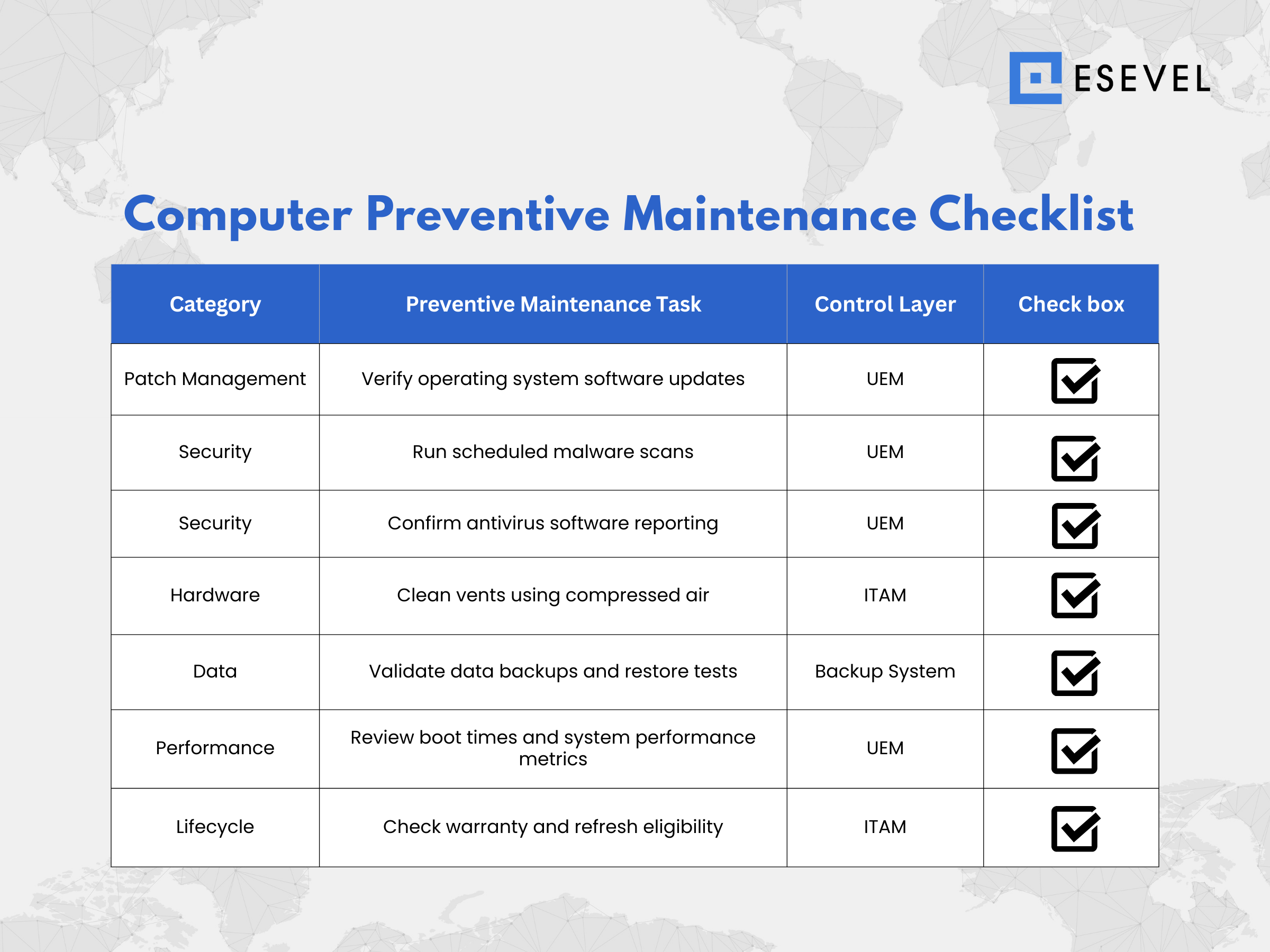
This model demonstrates how maintenance checklist activities align with control systems. Each task supports measurable governance rather than informal upkeep.
Frequently asked questions
What is included in a computer maintenance checklist
A computer maintenance checklist includes patch management, malware scans, hardware inspection, data backups, and performance monitoring integrated into ITAM and UEM controls.
How does preventive maintenance extend the lifespan of devices
Routine cleaning of internal components, structured software updates, and ongoing performance monitoring reduce hardware stress and extend the lifespan of endpoints.
Why are data backups part of preventive maintenance
Data backups protect important files and important data from hardware failure, accidental deletion, or security incidents.
Can UEM automate preventive maintenance tasks
Yes, UEM platforms can automate software updates, malware scans, compliance enforcement, and system performance reporting.
How does preventive maintenance improve system performance
Consistent preventive maintenance reduces boot times, removes unnecessary temporary files, and maintains optimal performance across managed devices.
From maintenance checklist to lifecycle governance
A computer preventive maintenance checklist creates discipline at the endpoint level, but scaling across distributed teams requires centralized lifecycle oversight.
When procurement, configuration, patch governance, repair coordination, and asset recovery are integrated, preventive maintenance becomes measurable and predictable. Downtime decreases, compliance improves, and system performance remains consistent across regions.