IT onboarding prepares employees with the devices, access, setup, and support they need to work from day one. For remote and global teams, this often starts with one simple question: will the new hire get the right laptop on time?
Faster laptop delivery can reduce onboarding time, but delivery alone is not enough. A device still needs procurement approval, configuration, asset assignment, support access, and lifecycle tracking before the employee can work without friction.
That is why IT onboarding should connect device procurement, device onboarding, laptop delivery, remote IT asset management, and device lifecycle management in one workflow. When companies hire across countries, manual coordination breaks down fast.
What is IT onboarding
IT onboarding is the process of preparing hardware, software, access, security settings, and support for a new employee. It focuses on IT readiness, not only the HR side of onboarding.
For remote employee onboarding, device onboarding is one of the most important steps. The new hire needs the right laptop, required accessories, approved software, secure access, and a clear support path before the start date.
Once the definition is clear, the next issue is why the process breaks when teams hire across locations.
Why IT onboarding breaks for distributed teams
IT onboarding becomes harder when employees work outside one office. Devices need to move across countries, vendors, support paths, and local delivery networks. If IT, People Ops, finance, and vendors do not share the same status view, small delays can turn into day one problems.
Global hiring creates device procurement gaps
Global hiring creates pressure on device procurement because new hires may need laptops in different countries. One region may have approved models in stock, while another may have limited supply or longer vendor lead times.
Laptop procurement also becomes harder when teams rely on different local vendors. IT may need to compare models, confirm availability, check accessories, approve budgets, and coordinate delivery before the employee starts.
The main issue is not only buying the device. The real issue is knowing whether the device is approved, sourced, shipped, configured, and ready for the right person in the right location.
International delivery creates timing risk
International laptop delivery for employees can face courier delays, customs steps, local tax handling, or address issues. These delays are harder to manage when updates sit with vendors instead of IT.
Laptop delivery also needs context. A package may be in transit, but People Ops still needs to know whether it will arrive before the start date. IT needs to know whether setup is complete. The employee needs to know what to expect and who to contact for help.
Laptop same day delivery can help where local ready stock is available. But same day delivery should not become the whole strategy. Speed only helps when the device is also configured, assigned, and ready to use.
Manual tracking creates readiness gaps
Manual tracking creates gaps because onboarding data often sits in several places. Procurement may track the order. HR may track the start date. IT may track setup. Vendors may track delivery. Finance may track payment.
When these records are not connected, teams may miss key questions:
- Has the laptop shipped
- Has the employee received it
- Has IT configured the device
- Has the device been assigned in the asset record
- Does the employee know where to get support
These gaps show why ready stock delivery should be framed around readiness, not only speed.
Manual IT onboarding vs lifecycle driven IT onboarding
Manual IT onboarding depends on follow ups and scattered updates. Lifecycle driven IT onboarding connects procurement, delivery, setup, tracking, support, and lifecycle records in one process.
| Manual IT onboarding | Lifecycle driven IT onboarding |
| Manual laptop ordering | Standardized device procurement |
| Delayed delivery updates | Shipment and delivery visibility |
| Devices arrive unconfigured | Devices arrive configured and assigned |
| Spreadsheet based tracking | Remote IT asset management software |
| Reactive support | Structured onboarding workflows |
| No lifecycle record | Device lifecycle management from day one |
| Delivery treated as the finish line | Readiness treated as the finish line |
This comparison shows the main shift. The goal is not just to deliver a laptop. The goal is to make the employee ready to work.
That shift also improves IT team efficiency because fewer tasks need to be chased manually.
Ready stock delivery should support day one readiness
Ready stock delivery helps most when it supports the full IT onboarding process. The goal is not only to ship a laptop faster. The goal is to make sure the employee can start work with the right device, setup, access, and support.
Why ready stock helps
Ready stock can reduce waiting time when approved models are already available in the employee’s country or region. This gives IT more control over timing and reduces the need for last minute sourcing.
Ready stock can also help teams standardize device onboarding. If IT already knows which models are approved, which accessories are required, and which setup steps apply, the team can move faster with fewer decisions.
This can help reduce onboarding time because IT does not need to start from zero for every new hire. Procurement, laptop delivery, and setup can follow a clearer path.
Why delivery alone is not enough
A shipped device may still be unconfigured. If the laptop arrives without required software, security settings, access setup, or support instructions, the employee still cannot work smoothly.
A delivered laptop may also be missing from the asset record. That creates problems later because IT may not know who owns the device, where it is, or what lifecycle stage it is in.
Delivery only creates real readiness when IT can confirm that the device is:
- Delivered: the laptop has reached the employee or the right local handoff point
- Configured: required software, security settings, and access tools are ready before use
- Assigned: the device is linked to the right employee, role, location, and asset record
- Secure: the device follows company security settings before the employee starts work
- Supported: the employee knows how to get help if setup or access issues appear
- Ready to use: the laptop, accessories, software, access, and support path are complete
This is why ready stock delivery should not stand alone. It works best when it connects with procurement, configuration, asset tracking, and support.
What an effective IT onboarding workflow should include
An effective IT onboarding workflow gives IT, People Ops, finance, vendors, and employees one clear path from device request to day one readiness. It should cover the key steps before the employee starts, without turning every hire into a manual coordination task.
Device request and procurement approval
The workflow should start with the employee’s role, location, start date, and device needs. IT should confirm the approved laptop model, required accessories, budget owner, and procurement path early.
This helps device procurement and laptop procurement move with less back and forth. For global teams, it also helps IT check local availability or ready stock before delivery becomes urgent.
Configuration and delivery readiness
Once the device is sourced, IT should prepare it for work. This can include required software, security settings, access tools, and remote support instructions.
Laptop delivery should also stay visible until the employee confirms receipt. Device onboarding works better when configuration and delivery move together, so the laptop arrives ready for use.
Assignment and lifecycle record creation
The device should be assigned to the employee before it becomes active. IT should record the serial number, owner, location, condition, and current status in the asset record.
This supports remote IT asset management from day one. It also connects IT onboarding with device lifecycle management, so future support, recovery, redeployment, and refresh planning do not start from missing data.
A compact workflow gives teams the structure they need. The next step is comparing it with manual IT onboarding, where these steps often depend on scattered follow ups.
How faster device onboarding improves IT team efficiency
A better onboarding workflow reduces manual work for IT, People Ops, finance, vendors, and employees. It gives teams clearer ownership and fewer loose ends.
Where efficiency improves
IT team efficiency improvement often comes from removing small manual tasks that repeat with every hire. These tasks may look minor, but they build up when hiring grows across countries.
A stronger workflow helps teams reduce:
- Follow ups between HR, IT, finance, vendors, and employees
- Repeated setup work for every new laptop
- Urgent day one support tickets
- Missing asset records after deployment
- Confusion around device delivery status
- Support gaps across countries
In one customer story, a distributed company cut onboarding time by 75 percent after connecting device sourcing, customs clearance, delivery, and configuration in one workflow. The company also saved more than 20 hours a month by reducing manual coordination across procurement, setup, shipping, and asset tracking.
The lesson is simple: faster delivery helps, but the bigger impact comes from connecting the work around delivery. When procurement, setup, shipping, and asset tracking work together, IT teams spend less time chasing updates and more time making sure employees are ready to work.
Why this matters as teams scale
More hires create more device requests. More locations create more delivery paths. More vendors create more coordination work.
Without workflow visibility, IT teams spend too much time chasing status. They need to ask whether a laptop was ordered, shipped, delivered, configured, assigned, and supported.
A lifecycle driven workflow helps improve IT team efficiency because the process becomes easier to repeat. IT can focus less on manual coordination and more on keeping employees ready to work.
Efficiency improves further when onboarding connects with remote IT asset management.
Connect IT onboarding with remote IT asset management
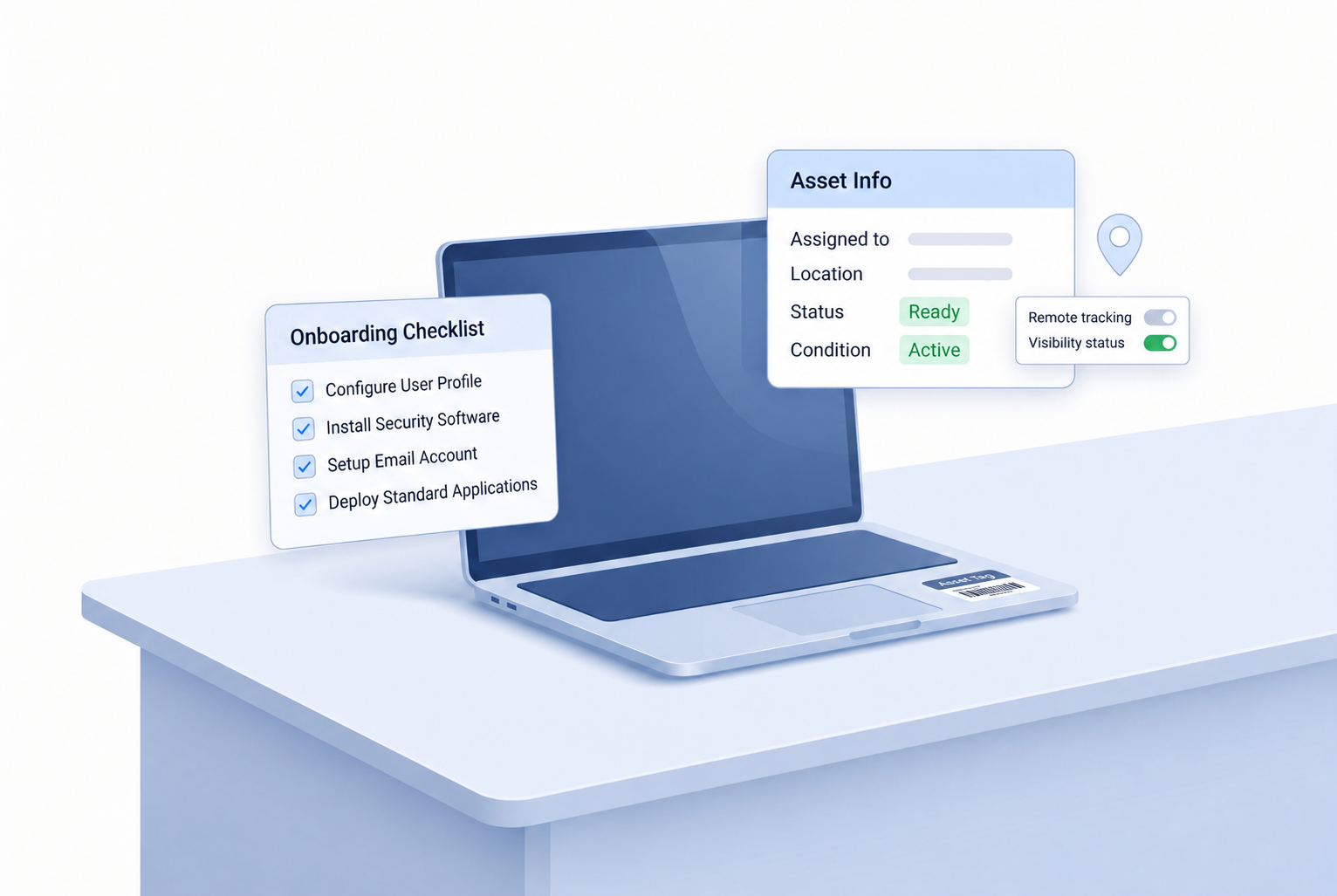
IT onboarding should connect with remote IT asset management from the moment a device is requested. This helps IT track the laptop before it reaches the employee, while it is in use, and when it needs support, recovery, or refresh.
What IT teams should track from the start
IT teams should track the device owner, employee location, delivery status, configuration status, device condition, support history, and lifecycle stage. These details help IT see whether the device is ready, active, under support, or waiting for another action.
Remote IT asset management software can keep this data in one place. Some teams may also compare remote employee monitoring software, but the focus should stay on company device visibility, endpoint status, security oversight, and asset control, not employee surveillance.
How onboarding supports offboarding later
Good offboarding starts with clean onboarding records. If IT knows who has the device, where it is, and what condition it is in, remote employee returning equipment becomes easier to manage later.
The same record also helps IT decide what happens after recovery. A returned device may be repaired, redeployed, refreshed, or retired, depending on its condition and lifecycle stage.
IT onboarding checklist for faster device readiness
A checklist helps IT and People Ops standardize device onboarding before the employee starts. It also makes the process easier to repeat as hiring grows.
Use this new hire equipment checklist to reduce missed steps:
- Confirm employee location and start date
- Select the approved laptop model and accessories
- Check ready stock availability
- Start procurement and approval early
- Configure the device before delivery
- Track shipment and employee receipt
- Assign the device to the employee
- Record serial number, owner, location, and condition
- Connect the device to support, recovery, and lifecycle records
This checklist supports remote employee onboarding because it connects the device, setup, delivery, support, and asset record before day one.
A checklist helps standardize the workflow, but proof points can show why this approach matters in real teams.
IT onboarding as part of device lifecycle management
IT onboarding is only the first stage of the device lifecycle. Once the employee starts, the device still needs support, updates, repair decisions, recovery, redeployment, refresh, and retirement.
This is why device lifecycle management should start during onboarding. When IT creates a clean asset record from day one, the team can manage the device more easily later instead of rebuilding context during support, offboarding, or refresh planning.
For global teams, connected lifecycle workflows help IT manage procurement, laptop delivery, configuration, tracking, support, recovery, and refresh with clearer visibility. This keeps onboarding focused on readiness while giving IT control beyond the employee’s first day.
FAQs
These questions reinforce the main point: IT onboarding should lead to day one readiness and long term device control.
What is IT onboarding?
IT onboarding prepares the devices, software, access, security settings, and support a new employee needs to work. For distributed teams, it also includes device procurement, laptop delivery, configuration, and tracking.
How does laptop delivery affect IT onboarding?
Laptop delivery affects whether employees can start work on time. But the device must also be configured, assigned, secure, and ready to use before delivery creates real readiness.
How can companies reduce onboarding time for remote employees?
Companies can reduce onboarding time through ready stock availability, early procurement, device configuration, shipment visibility, and asset assignment. These steps help remote employee onboarding move from scattered tasks to a repeatable workflow.
What should a new hire equipment checklist include?
A new hire equipment checklist should include the laptop model, accessories, software, access, shipping details, asset record, and support path. It should focus on IT readiness before the start date.
Why should IT onboarding connect with device lifecycle management?
Every onboarding device later needs support, recovery, redeployment, refresh, or retirement. Lifecycle visibility helps IT manage devices beyond the first day and avoid starting from zero when a device needs action.
Build IT onboarding around device readiness
IT onboarding should not end when a laptop ships. It should end when the employee has the right device, setup, access, support path, and asset record needed to work from day one.
Faster ready stock delivery matters most when it connects to procurement, configuration, tracking, support, recovery, and lifecycle management. That is how IT teams reduce onboarding delays without creating new visibility gaps later.
Esevel helps global teams reduce IT onboarding delays through connected device lifecycle workflows. If your team wants faster onboarding with better device visibility, start by building your process around readiness, not just delivery.

Maytiska Omar Maytiska is an experienced content writer and blog specialist with 4+ years of expertise in creating engaging, SEO-driven content. She focuses on IT and digital topics, turning complex ideas into clear, reader-friendly insights. Her work helps position Esevel as a trusted voice in the digital space.