Hardware in modern organizations isn’t static. Devices arrive, move, degrade, get replaced—and eventually retire. Without a good lifecycle approach, you’ll waste money, introduce security gaps, and face operational instability.
Many companies overlook key stages of the hardware lifecycle or treat it as an afterthought. The result is rogue assets, untracked spares, data leaks, and unexpected refresh costs.
But with a thoughtful hardware asset lifecycle strategy, you get clarity, control, and optimized costs across all stages. In this guide, I’ll walk through why lifecycle matters, best practices in each phase, supporting tools, challenges, trends, and FAQs.
Understanding the hardware asset lifecycle
The Value of a Lifecycle Approach
A hardware asset lifecycle approach treats each device as a “living asset” that goes through stages. You plan its acquisition, deployment, upkeep, and final retirement. It ensures that decisions are proactive—not reactive.
Without it, you’ll often:
- Replace devices too early (wasting useful life)
- Let aging devices linger beyond support
- Lose track of ownership, warranties, or compliance
- Miss cost saving opportunities
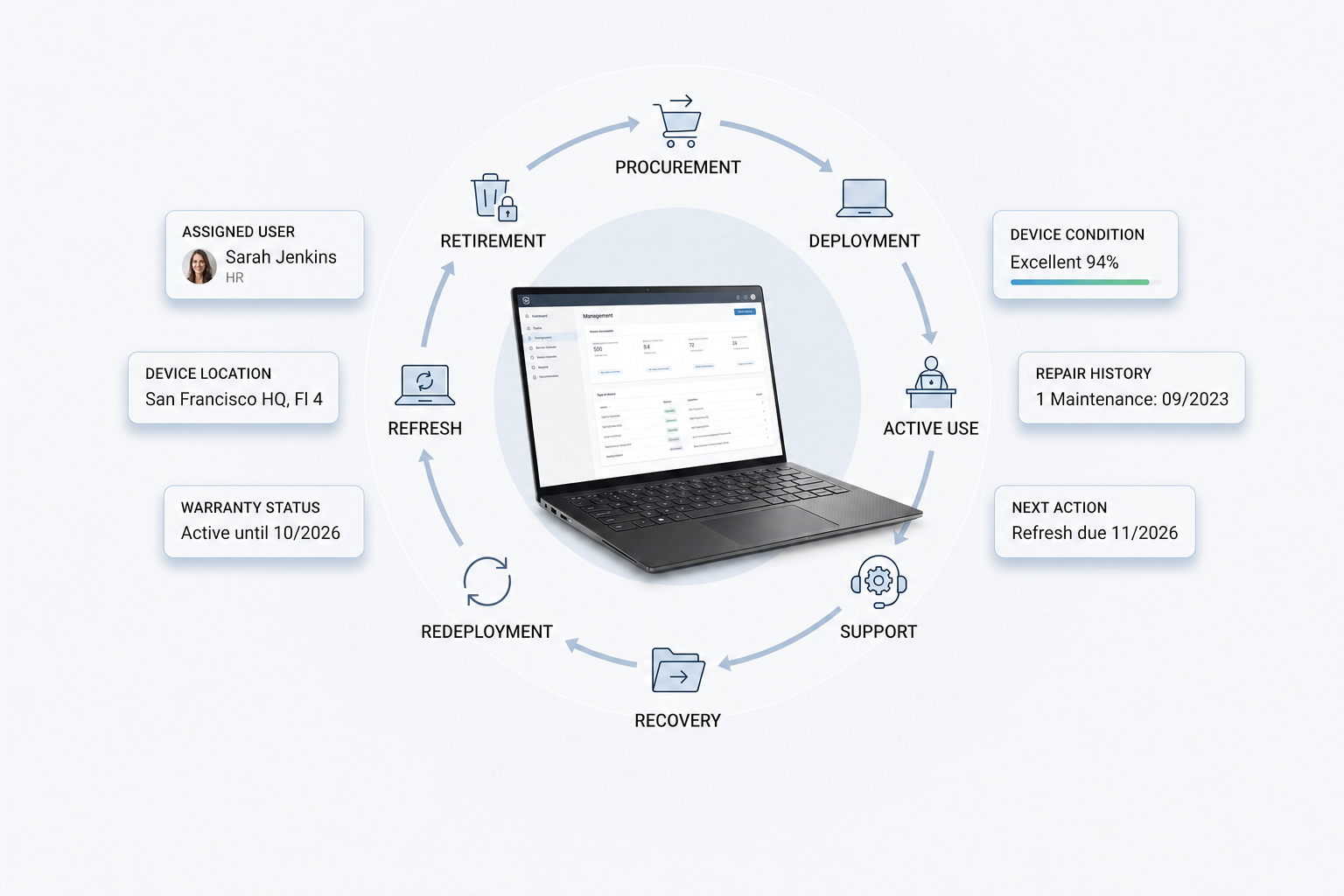
Typical lifecycle stages
While different organizations may use slightly different labels, a robust hardware asset lifecycle generally includes:
- Planning/forecasting
- Acquisition (or requisition & procurement)
- Deployment/use (assignment, operation)
- Maintenance/optimization
- Decommissioning/disposal
Some sources expand or split stages further (e.g. “retire” vs “disposal”) but this five-stage model matches well with ITAM frameworks.
At each stage, you should have policies, workflows, data, and checks. Over time, you refine the process so it becomes a structured system—not ad hoc.
Best practices for planning and forecasting
Good lifecycle management begins before you even buy a device.
Align with business goals and demand
Your hardware plan must reflect what the business needs. Ask:
- Which projects or growth initiatives demand more compute or devices?
- Which teams are expanding or changing?
- Are there new security or compliance requirements coming?
Don’t plan hardware in isolation.
Use data-driven forecasts
Look at historical trends: usage, refresh cycles, failure rates. Use that to forecast when to replace or upgrade. That helps you avoid overbuying or underprovisioning.
Budget for refresh cycles
Plan for hardware replacement from day one. Don’t wait until devices fail. Build a refresh schedule (e.g. every 3–5 years) and allocate funds accordingly.
Establish procurement guidelines and standardization
Standardize device types, configurations, and vendors when possible. If every department uses wildly different models, support and maintenance costs skyrocket. Define acceptable specs and procurement policies.
Best practices for acquisition
Once you’ve planned, the acquisition stage is where you execute thoughtfully.
Standardize configurations and vendor choices
Use baseline configurations and limit variability. This helps with imaging, spare parts, support, and vendor negotiation.
Use total cost of ownership (TCO) models
Look beyond the sticker price. Include:
- Support/warranty costs
- Maintenance and repair estimates
- Power, energy, and infrastructure cost
- Depreciation, resale or disposal costs
TCO gives you a better long-term picture.
Leverage warranties, service contracts, and vendor programs
Negotiate support, extended warranties, or trade-in programs. Many vendors offer volume discounts or refresh programs.
Tagging and registration at acquisition
As soon as a device arrives, tag it (barcode, QR, RFID) and register it in your asset register. Don’t wait. Early registration reduces “untracked asset” risk.
Best practices for deployment and use
This stage is where devices enter service.
Consistent configuration and imaging
Use automated imaging, baseline security settings, and standard software stacks. Consistency reduces trouble tickets and support overhead.
Record assignments and metadata
Immediately update asset records: who owns the device, where it is, status, location, and related fields. Without this, your data diverges from reality.
Monitor usage and support contracts
Track how intensively devices are used. Monitor warranty and service contract expiry dates. If a device is underused or sitting idle, consider redeployment.
Enforce change management and updates
Any major change (hardware swap, major upgrade) should go through change management. Ensure firmware, drivers, patches are up to date to reduce failure risk.
Best practices for maintenance and optimization
Over the active life of devices, maintenance is critical to prolong useful life and avoid surprise failures.
Preventive maintenance and health checks
Schedule regular inspections, firmware updates, diagnostics, stress tests, and checks of critical components.
Monitor performance and detect anomalies
Use monitoring tools to flag unusual behavior (temperature jumps, disk errors, memory faults). Proactive detection avoids downtime.
Prioritize critical assets
Devices that are central to business (servers, firewalls, core infrastructure) deserve more frequent checks and higher maintenance priority.
Automate alerts and thresholds
Set up alerts for warranty expiration, service thresholds, or anomalies. Automate when possible so IT staff don’t have to chase everything manually.
Reallocate underutilized hardware
If something is lightly used, reclaim it. Move hardware from inactive users to ones who can benefit or repurpose for testing, training, or backup roles.
Best practices for decommissioning and disposal
Retiring hardware is more than just unplugging it. It must be done carefully and securely.
Define end-of-life criteria
Decide when to retire: age threshold, support expiration, failure rates, performance degradation. Don’t wait until devices break.
Chain of custody and secure data wiping
Track who receives the device, who handles it, when. Use certified data erasure (or secure wiping) before it leaves active service. Compliance (GDPR, industry standards) often requires it.
Reuse, refurbish, remarket vs recycle
If possible, refurbish and redeploy components. Sell or donate devices still usable. Only recycle or destroy what absolutely cannot be repurposed. This also supports sustainability goals.
Update asset records
Once a device is decommissioned, update your asset register, mark it disposed, log method (sale, recycle, donation), and keep audit trail.
Cross-cutting practices: governance, audits, policies
Some practices must span across all lifecycle stages.
Define roles and accountability
Assign clear ownership: who approves acquisitions, who handles deployment, who audits, who handles disposal. Without roles, things fall through cracks.
Conduct regular audits and verification
Regular audits validate that your register matches reality. Spot checks, full physical audits, reconciliation. Many guides stress that audits are core to lifecycle practices.
Maintain policies and governance frameworks
Document how each stage works. Set rules, thresholds, exceptions. As hardware, business, or compliance needs evolve, revisit and update policies.
Lifecycle review checkpoints and continuous improvement
At key stages, pause and review: were forecasts accurate? Did acquisitions go off-template? Use feedback loops to improve your process.
Tool and automation support
You can’t manage lifecycle well without good tool support and automation.
Features to look for in lifecycle tools
- Tracking & registration across stages
- Alerts & workflows (for e.g. refresh, warranty expiry)
- Dashboards & analytics (age, cost, performance trends)
- Trigger-based refresh recommendations
- Integration with ITSM/CMDB/procurement systems
Strong lifecycle tools let you see all assets and stages in one view.
Tradeoffs: complexity, cost, training
Such systems can be complex to implement, costly, and require staff training. Start simple and scale features as you mature. Don’t try to deploy every feature at once.
Challenges and trade-offs
Lifecycle management isn’t smooth sailing. Be aware of these challenges.
Variability and unpredictable usage
Devices often live longer or shorter than expected. Usage patterns change. Your forecasts will always have error margins.
Legacy or aging assets
Older devices may lack support or spare parts. They can become unpredictable or security risks.
Cost vs benefit of maintenance vs replacement
Sometimes it’s cheaper to replace rather than repair. You need models to decide that tradeoff.
Regulatory and data disposal constraints
Disposal must follow data protection laws (GDPR, HIPAA) and environmental e-waste regulation. Noncompliance is risky.
Complexity across distributed environments
Remote workers, many locations, travel kits, mobile gear—all complicate lifecycle control and tracking.
Trends and evolution
Lifecycle strategies are adapting to new realities. Some emerging trends:
Predictive maintenance and ML forecasting
Machine learning can predict failure or performance decay, improving refresh timing. This moves you from reactive to predictive lifecycle management.
IoT/edge device lifecycles
With more IoT and edge devices, lifecycle needs to capture small sensors, gateways, and embedded gear—not just servers or laptops.
Sustainability and circular economy
Reuse, refurbishment, and material reclamation will be more central. Lifecycle models will integrate “how many times can I redeploy this device?” and carbon cost of disposal.
Unified lifecycle across hardware, software, cloud
True lifecycle management will blur lines between hardware, software, and cloud. A “device” will have associated software and cloud services that follow the same lifecycle logic.
FAQs
1. When should hardware be refreshed or replaced?
That depends on age, failure rate, performance degradation, support contract status. Many organizations plan refresh every 3–5 years, but critical assets may be replaced earlier.
2. What is a good audit frequency?
Spot audits monthly or quarterly, full audits semiannually or annually. For critical devices, more frequent checks make sense.
3. How do you manage leased vs owned hardware in lifecycle?
Leased hardware has a known return date. Track it like any other device—tag, monitor, and ensure you return it properly (wiping, condition). The disposal stage becomes “return” rather than “destroy.”
4. How to ensure secure disposal and compliance?
Use certified data erase or destruction methods, track the chain of custody, keep disposal receipts, and align with local e-waste law or data protection mandates.
Lifecycle mastery: your competitive advantage
Hardware asset lifecycle is not just a process—it’s foundational to controlling cost, risk, and operational stability. When you manage all stages consciously—from planning to disposal—you turn hardware from a liability into a strategic asset.
To recap:
- Lifecycle thinking demands foresight, not just reacting
- Tagging, data, and governance carry you through all stages
- Tools, integration, and workflow automation help you scale
- Challenges exist, but smart tradeoffs, audits, and feedback make you resilient
At Esevel, we design complete hardware lifecycle solutions that cover procurement, distribution, use, support, and secure disposal. If your distributed team needs help structuring its hardware lifecycle, let’s talk about tailoring workflows and software to your growth stage.