In today’s hybrid and distributed work environment, keeping track of every laptop, monitor, server, and mobile device has become a serious challenge. This is where hardware inventory management comes in.
At its core, hardware inventory management refers to the process of tracking, managing, and maintaining an accurate record of all physical IT assets—such as computers, network equipment, and peripherals—throughout their life cycle. From procurement to deployment and eventual disposal, every hardware asset must be accounted for to ensure smooth operations, cost control, and data security.
The growing complexity of IT environments has made hardware inventory management more critical than ever. Remote and hybrid work setups, cloud adoption, and rapid hardware refresh cycles have all led to an explosion of devices across organizations. Without a structured inventory management system, it’s easy to lose visibility—resulting in misplaced devices, security vulnerabilities, or wasted budgets.
Whether your organization manages hundreds or thousands of endpoints, effective hardware inventory management ensures that every asset is visible, secure, and performing at its best.
Why hardware inventory management matters
Cost savings through visibility
Companies often over-purchase hardware simply because they lack visibility into what they already own. By maintaining an accurate and real-time inventory, IT teams can identify underutilized devices, reassign assets efficiently, and avoid unnecessary purchases. This directly translates to reduced capital expenditure and optimized resource allocation.
Security and compliance
An untracked device is a potential risk. Hardware inventory management allows IT administrators to identify devices that have reached end-of-life or are missing critical security patches. Knowing every serial number, operating system, and owner helps ensure no rogue or outdated device connects to the network, minimizing exposure to breaches or compliance violations.
Lifecycle optimization
Every piece of equipment has a finite lifespan. By managing hardware through its full life cycle, organizations can plan procurement, maintenance, and disposal more effectively. Hardware inventory data also supports warranty management, refresh planning, and sustainability initiatives such as device recycling.
Reduced downtime and better IT support
When help-desk or service desk teams have instant access to device history and specifications, troubleshooting becomes faster and more accurate. They can immediately identify a tracked hardware device, verify its configuration, and diagnose issues remotely—reducing downtime and improving employee productivity.
Key features to look for in hardware inventory management software
Modern hardware inventory management software goes far beyond simple record-keeping. The best solutions combine automation, analytics, and integrations to create a single source of truth for IT operations.
Automated asset discovery
Look for tools that include asset discovery capabilities. These can automatically detect devices connected to your network using agent-based or agentless methods. This automation ensures new devices are added to the system instantly, helping teams avoid blind spots.
Centralized data and integration
A good management platform integrates with your HR systems, endpoint management tools, and ITSM solutions. This ensures each asset is tied to a user, location, or department. When a new employee joins or leaves, the system automatically updates assignments, helping you manage assets seamlessly across the organization.
Custom dashboards and reports
The ability to create inventory reports and visual dashboards is a key differentiator. Look for software that lets you monitor device age, warranty status, and usage trends. Custom alerts for end-of-life or missing devices enable proactive maintenance and security actions.
Support for the full lifecycle
From procurement to disposal, effective inventory tools track every step. Key lifecycle events include assignment, maintenance, refresh, and decommissioning. This ensures you can make informed decisions about when to replace, repair, or retire assets.
Scalability and flexibility
Whether you’re managing 50 devices or 5,000, scalability matters. A cloud-based solution allows global teams to access real-time inventory data and collaborate across regions. Some organizations may prefer on-premises deployment for tighter control—so it’s important to choose a tool that fits your infrastructure and compliance needs.
Top hardware inventory management tools at a glance
Here’s a look at some leading software options that help organizations gain full visibility and control over their hardware assets.
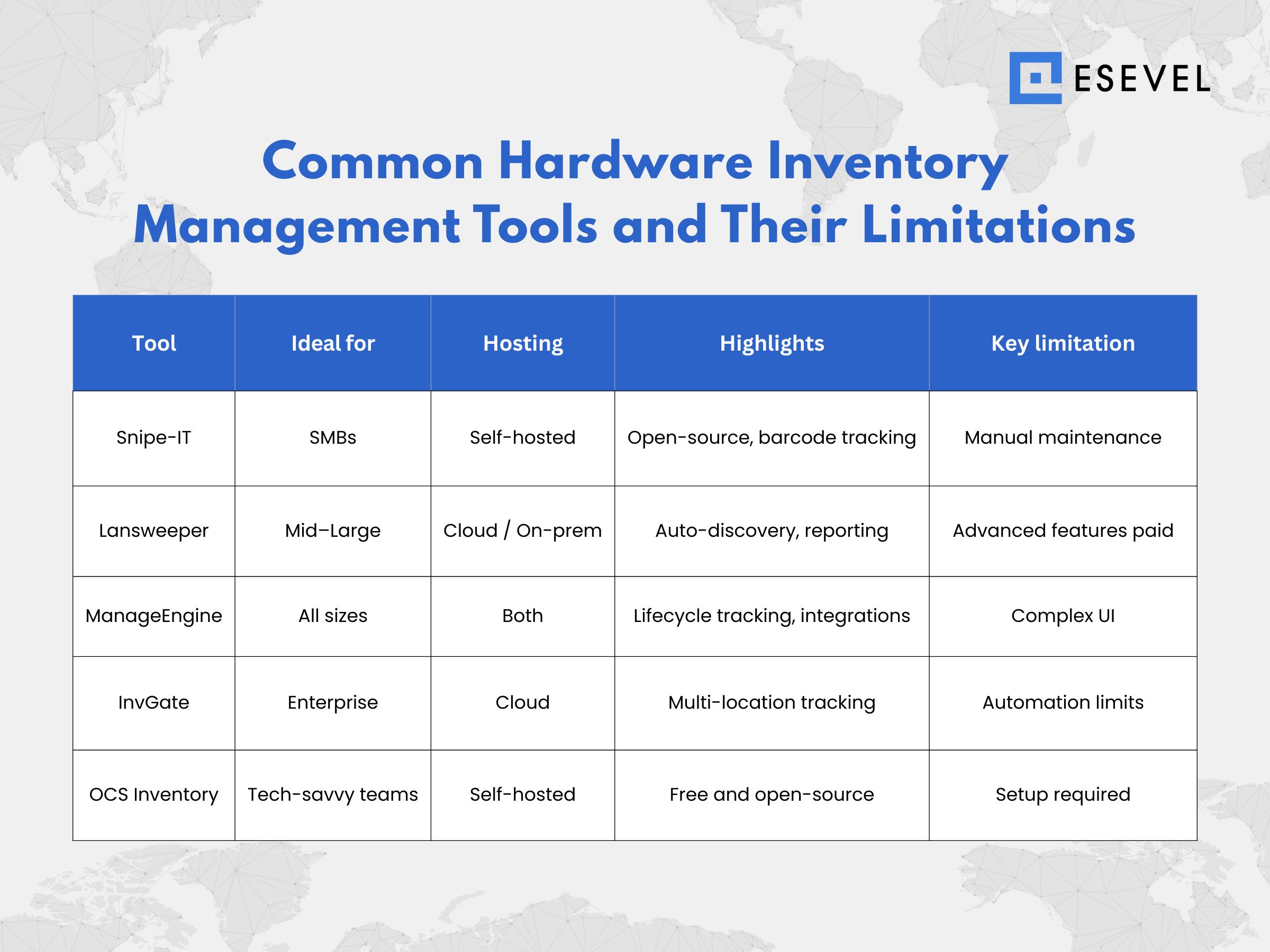
1. Snipe-IT
Best for: Small to mid-sized businesses looking for open-source flexibility.
- Key features: Asset tagging, barcode/QR tracking, warranty and license tracking, check-in/check-out workflow.
- Pros: Free to use, customizable, self-hosted.
- Cons: Requires technical setup and ongoing maintenance.
2. Lansweeper
Best for: Mid-sized to large enterprises needing automated discovery.
- Key features: Agentless and agent-based scanning, real-time device detection, software and hardware inventory, comprehensive reporting.
- Pros: Strong automation and integrations.
- Cons: Paid tiers required for advanced analytics and integrations.
3. ManageEngine AssetExplorer
Best for: IT teams seeking a cloud or on-premises solution with deep integrations.
- Key features: Lifecycle tracking, asset assignment, inventory dashboards, license and contract management.
- Pros: Excellent integration with service desk tools.
- Cons: Interface can be complex for smaller teams.
4. InvGate Assets
Best for: Enterprises managing large distributed teams.
- Key features: Multi-location tracking, automated discovery, customizable dashboards, cloud-based reporting.
- Pros: Great usability and user access controls.
- Cons: Lacks advanced automation in lower-tier plans.
5. OCS Inventory NG
Best for: Organizations wanting a fully open-source, customizable solution.
- Key features: Multi-OS support, network scanning, detailed reporting.
- Pros: Free and community-supported.
- Cons: Steeper learning curve and limited vendor support.
Implementation best practices
Rolling out hardware inventory management software successfully requires planning and consistency. Here’s how to do it right:
1. Conduct a baseline audit
Start by reviewing existing inventory data—spreadsheets, manual logs, or departmental lists. This gives you a baseline to validate once your system goes live.
2. Define clear goals and metrics
Set measurable goals, such as improving asset visibility by 30% or reducing hardware loss by half. Establish KPIs like device count accuracy, lifecycle duration, and cost per device to evaluate progress.
3. Choose the right deployment model
Assess whether a cloud-based or on-premises solution fits your environment best. Cloud options provide flexibility and automatic updates, while on-prem setups offer tighter control over security.
4. Integrate with existing systems
Link your inventory platform with management tools such as HR software, endpoint management, and procurement systems. This ensures smooth data synchronization and eliminates double entry.
5. Customize and train your team
Tailor data fields to capture relevant details—like serial numbers, warranty dates, or assigned users. Conduct training so IT staff understand how to use dashboards, reports, and alerts effectively.
6. Monitor and review
Schedule regular audits and update workflows as your device fleet grows. Use inventory management software to automate reports and flag aging or unpatched devices before they cause problems.
Frequently asked questions
What size of organization needs hardware inventory management software?
Any organization managing more than a handful of devices benefits from it. Even startups quickly outgrow spreadsheets once remote employees or multiple office locations are involved.
Can I start with spreadsheets and upgrade later?
Yes, but manual tracking becomes unreliable as your device count increases. Transitioning to a digital system early ensures accuracy and scalability.
How do inventory tools tie into lifecycle management?
They track each asset from purchase to retirement, recording key events like assignments, repairs, and refreshes. This data supports budget planning and sustainability goals.
How long does implementation take?
Cloud-based tools can be deployed in a few hours, while self-hosted or enterprise-grade platforms may take several weeks to fully integrate and configure.
Building a smarter inventory future
Managing your organization’s hardware doesn’t just mean knowing what you have—it’s about leveraging that visibility to make smarter, data-driven decisions. With the right hardware inventory management software, IT teams gain real-time insights, improve security posture, and reduce costs through better asset tracking.
To get started:
- Audit your existing hardware assets.
- Choose a scalable inventory management tool that fits your environment.
- Integrate it with your IT workflows and automate data collection.
- Review your reports regularly to identify trends and inefficiencies.
At Esevel, we help distributed teams simplify and centralize their IT operations through comprehensive device procurement, deployment, and hardware inventory management. Our management platform gives you full visibility into global assets—helping you maintain compliance, control costs, and scale effortlessly.Ready to take control of your IT inventory? Download our Hardware Inventory Checklist or schedule a consultation with Esevel to see how we can help your team stay efficient, secure, and future-ready.