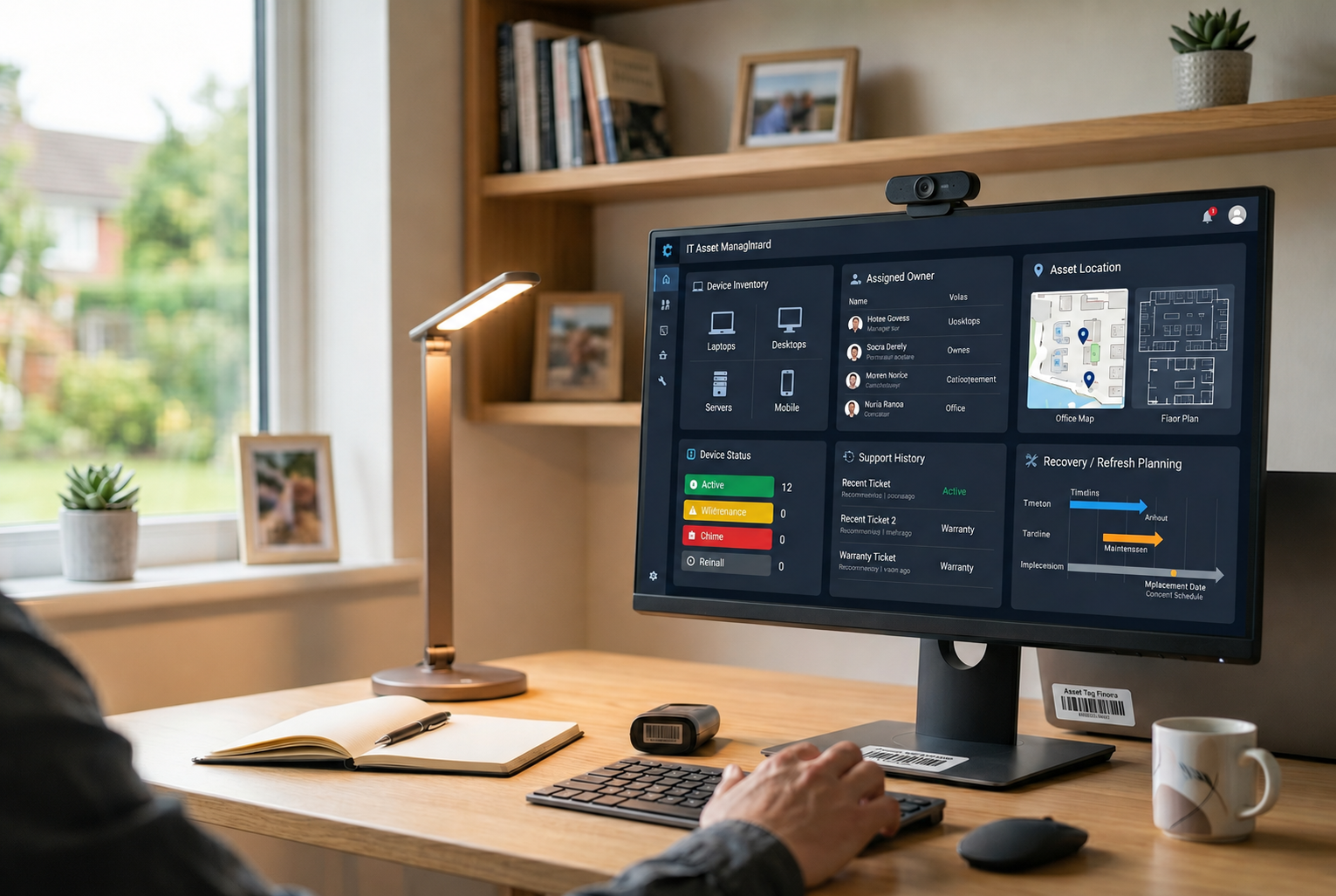
UPS can be a practical option for sending company laptops to employees across domestic and international locations. But for startups with hybrid or remote workforces, choosing a courier is only one part of the process.
IT teams also need to coordinate employee start dates, device preparation, battery compliance, customs documentation, delivery exceptions, and asset records. A delayed shipment can affect onboarding, while poor tracking can leave IT unsure which employee has which device.
This guide explains how enterprise IT teams can use UPS for laptop shipping while keeping delivery, compliance, and device operations under control.
Can businesses ship laptops with UPS?
Yes. UPS accepts laptop shipments when the device, packaging, and lithium ion battery meet applicable shipping requirements.
UPS recommends fully powering down the laptop, preventing accidental activation, and securing the device against movement during transportation. Damaged, defective, or recalled batteries may require different handling and should not enter a standard shipping process.
International shipments can also introduce customs, tax, documentation, and destination specific requirements.
How much does it cost to ship a laptop with UPS?
UPS laptop shipping costs vary by route, service, weight, dimensions, and added fees. The table below uses examples from UPS’s 2026 U.S. Daily Rate and Service Guide, so actual business rates may differ by market and contract.
| Cost component | Example UPS charge | What it means for enterprise IT |
| Base transportation | Varies by route, service, and weight | Usually the main shipping cost and changes according to the employee destination and delivery speed. |
| Residential delivery | $6.95 for international air services | Can apply when a company laptop is delivered directly to an employee’s home. |
| Signature required | $7.70 per package | Adds delivery confirmation for higher-value company equipment. |
| Declared value | $5.10 for $100.01–$300 | Above $300, UPS charges $1.70 per $100, or portion thereof, of the total declared value. |
| Address correction | $25.25 | Incorrect or incomplete employee addresses can increase both shipping cost and onboarding delays. |
| International additional handling | $36.35 | Can apply when a package meets UPS criteria for special handling. |
| Customs disbursement | 2.5% of duties and taxes, minimum $17.50 | Can apply when UPS advances duties or taxes on behalf of the customer. |
| Undeliverable international shipment | Applicable costs + $10 | Failed delivery can create additional charges as well as extra coordination for IT. |
Enterprise IT teams should focus on the total delivery cost, not just the base courier rate. Home delivery, shipment protection, customs, address errors, and failed deliveries can all increase what the company ultimately pays.
Use the UPS Calculate Time and Cost tool with the actual origin, employee destination, packed dimensions, weight, and service level to estimate a specific route.
When does UPS work well for enterprise laptop shipping?
UPS can work well when companies need flexible delivery options across employee locations.
It may suit businesses that need:
- Domestic and international delivery options
- Faster services for time sensitive onboarding
- Shipment tracking across multiple destinations
- Delivery directly to employee homes
- Existing UPS business account rates
- Different service levels based on urgency and budget
For enterprise IT, however, the carrier should fit into a wider device workflow. Someone still needs to prepare the laptop, assign it to the employee, maintain the asset record, coordinate customs, and confirm receipt after delivery.
How should enterprise IT choose a UPS service?
The best UPS service depends on where the employee is located, how quickly the laptop needs to arrive, and how much delivery time the company can build into the onboarding process.
A new hire starting in two weeks may not need the same service as an employee whose replacement laptop is required the next day.
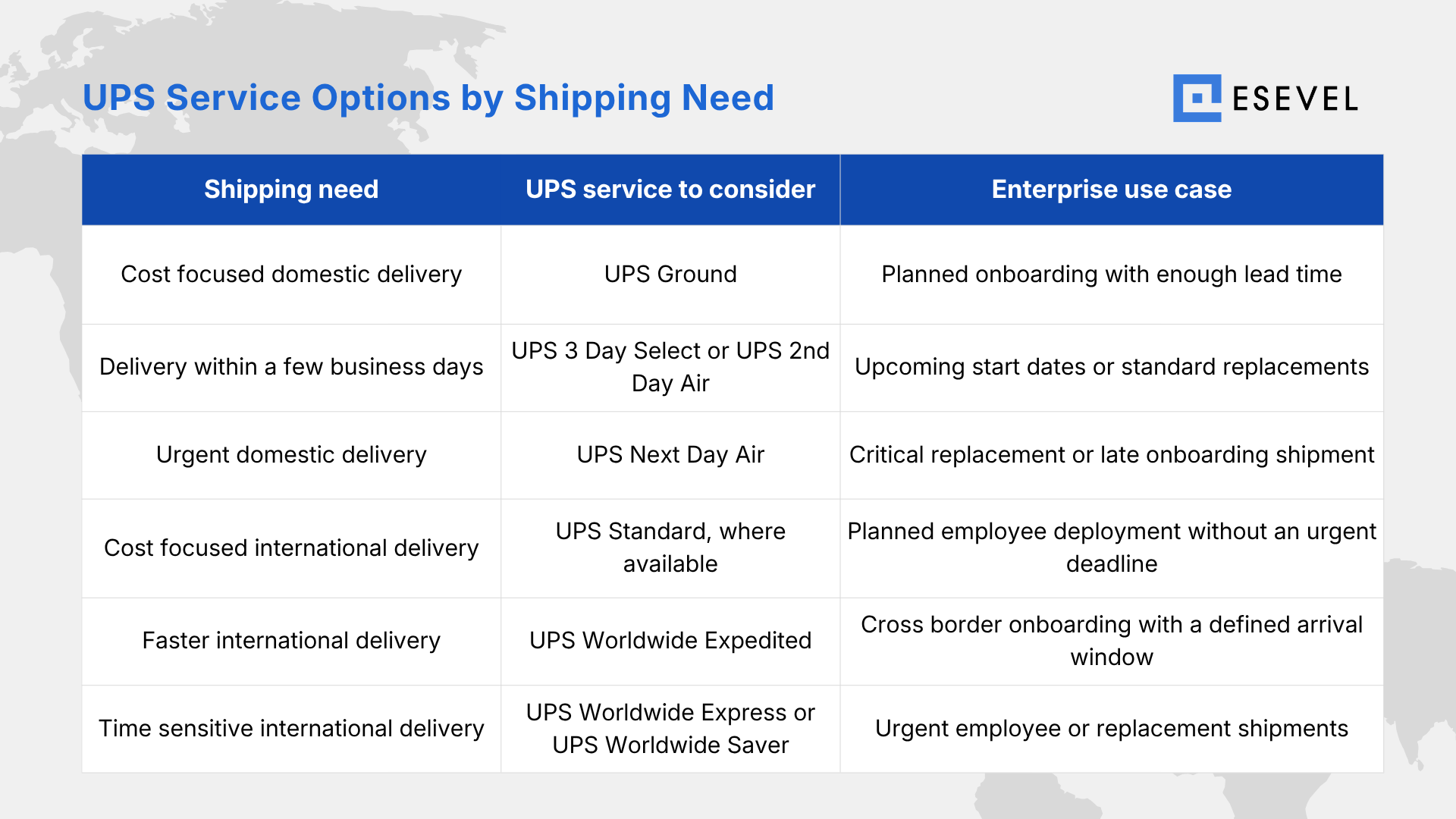
The fastest service is not always the best choice. Enterprise IT should allow enough time for device preparation, customs clearance, employee availability, and possible delivery exceptions before selecting a service.
What should IT teams consider before shipping laptops with UPS?
For a company laptop, successful delivery is more than getting a package from one location to another. IT teams also need to coordinate the shipment with the employee’s start date, device preparation, asset assignment, and delivery confirmation.
Before handing a laptop to UPS, confirm:
Employee deadlines. New hires may need laptops before a fixed start date, while replacement devices can be even more urgent.
Different destinations. Domestic and international routes can have different services, delivery times, customs processes, and import requirements.
Different countries can also create different customs, delivery, and compliance requirements across shipping routes
Customs ownership. International shipments need accurate documentation and someone responsible for responding to clearance requests.
Asset visibility. UPS tracking shows where the package is, but IT still needs to know which device is inside and which employee owns it.
Device security. Company laptops may require configuration, encryption, security settings, and employee assignment before shipment.
Delivery exceptions. Incorrect addresses, unavailable recipients, customs holds, or damaged packages can create additional work for IT teams.
At scale, the challenge is no longer simply booking UPS shipments. It is maintaining a repeatable process around each device movement.
What are the UPS rules for laptop batteries?
Most company laptops contain lithium ion batteries, making battery compliance an important part of the shipping process.
UPS advises shippers to fully power down laptops and protect them from accidental activation during transportation.
Check the battery before shipping
IT teams should inspect the device before it enters the shipping workflow.
A damaged, defective, or recalled lithium battery may face additional restrictions. If the battery condition is uncertain, confirm the applicable UPS requirements before creating the shipment.
Prevent accidental activation
Do not send the laptop in sleep mode. Shut it down completely and make sure the power button cannot activate during transportation.
This becomes particularly important when the laptop travels by air.
Larger deployments may need additional checks
Shipping one company laptop is not necessarily the same as sending several devices together.
Battery quantity, packaging configuration, labels, documentation, and transportation method can affect the requirements. Enterprise IT teams planning larger deployments should verify the rules for the actual shipment volume instead of applying a single laptop process to every shipment.
How should company laptops be packaged for UPS?
For businesses that ship laptops regularly, packaging should be standardized rather than decided separately for every employee.
UPS recommends protecting laptops against movement and considering double boxing when additional protection is needed.
Protect the laptop
Fully power down the device, then wrap it with protective material such as bubble wrap or foam. Protect the screen, corners, hinges, and outer casing.
UPS also suggests placing a protective layer between the keyboard and screen while the laptop is closed.
Keep accessories separate
Chargers, adapters, mice, and other accessories should be wrapped separately so they cannot press against or scratch the laptop.
Consider double boxing
The original manufacturer packaging can provide useful protection, but it may not always be designed for individual courier handling.
UPS recommends considering an additional outer shipping box. When double boxing, enough cushioning should separate the inner and outer boxes to prevent movement during transportation.
For distributed companies, using an approved packaging standard can reduce inconsistency across office locations and repeated employee shipments.
What changes when company laptops cross borders?
International UPS shipments add customs and import requirements to the delivery process.
IT teams should prepare this information before the laptop leaves the origin country, particularly when delivery is tied to an employee start date.
As companies expand into more markets, a consistent international procurement process can help connect purchasing, documentation, delivery, and device records across countries.
Prepare a commercial invoice
UPS identifies the commercial invoice as an important document for international goods shipments.
Laptop shipment information may include:
- Sender and recipient details
- Product description
- Quantity
- Product value
- Country of origin
- Harmonized tariff classification
- Reason for export
Avoid vague descriptions such as “electronics.” Specific product information helps customs authorities identify and classify the shipment.
Decide who handles duties and taxes
International shipments may generate import duties, taxes, or customs fees.
The business should decide whether the company or employee is responsible for these charges before delivery. Asking a new employee to unexpectedly pay import costs can delay receipt and create a poor onboarding experience.
Check local requirements before shipment
Some destinations may require importer details, tax identification, permits, declarations, or additional battery documentation.
These requirements can vary by country, so enterprise IT teams should confirm them for the actual destination rather than relying on one international shipping process everywhere.
How enterprise IT teams can standardize UPS laptop shipping
Sending one laptop can be handled as an individual courier task. Repeated employee shipments need a consistent operating process.
A typical enterprise workflow can include:
- Confirm the employee and deadline
Verify the address, contact details, start date, and required arrival date. - Assign the laptop
Connect the serial number and asset record to the correct employee. - Prepare the device
Configure security settings, required software, access, and employee setup. - Inspect the battery
Confirm that the battery is compliant and shows no signs of damage or defect. - Package the equipment
Protect the laptop and accessories using a consistent packaging standard. - Choose the UPS service
Match the service level to the destination, deadline, and budget. - Prepare customs details
Add the required product, value, origin, classification, and export information for international shipments. - Attach shipping documents
Apply the label, commercial invoice, and any required battery documentation. - Monitor the shipment
Track delivery and respond quickly to customs or delivery exceptions. - Confirm receipt
Verify that the employee received the laptop and update its owner, location, and status in the asset record.
The final step connects courier delivery with IT operations. A successful UPS delivery should also become an accurate device record.
UPS shipping VS device lifecycle management
UPS can transport a company laptop from one location to another, but courier delivery represents only one stage in device lifecycle management
| Device stage | What UPS can handle | What enterprise IT still manages |
| Procurement | Not part of standard courier delivery | Device selection, purchasing, and vendor coordination |
| Preparation | Transport related requirements | Configuration, security policies, software, and employee access |
| Shipping | Pickup, transportation, tracking, and delivery | Employee assignment, delivery deadline, and device record |
| Customs | Support the clearance process | Accurate product, value, importer, and compliance information |
| Asset tracking | Package status during transit | Device owner, serial number, location, condition, and lifecycle status |
| Support | Not part of standard delivery | Setup issues, repairs, and replacements |
| Returns | Transport when arranged | Offboarding, recovery, and return coordination |
| Redeployment | Ship to the next location | Secure wipe, inspection, reconfiguration, and reassignment |
The key difference for enterprise IT is visibility. UPS tracking shows where a package is, while device lifecycle management keeps the laptop connected to its employee, location, condition, and next action.
Esevel helps distributed IT teams connect laptop delivery with asset records, employee assignments, support, recovery, and redeployment. UPS handles the physical shipment, while IT keeps visibility across the device lifecycle.
FAQs about UPS laptop shipping
Can businesses ship laptops through UPS?
Yes. UPS accepts laptop shipments when applicable packaging and lithium battery requirements are met.
Can UPS ship company laptops with lithium batteries?
Yes. Laptops with compliant lithium ion batteries installed can generally be shipped when UPS requirements are followed.
How much does UPS charge to ship a laptop?
Costs vary by weight, dimensions, destination, service, declared value, and applicable surcharges.
Can companies ship laptops internationally through UPS?
Yes. International shipments may require customs documentation, duties, taxes, and destination specific compliance.
Should businesses double box laptops for UPS shipping?
It can provide additional protection. UPS recommends considering double boxing, particularly when manufacturer packaging may not be sufficient for parcel delivery.
Build a more consistent laptop delivery model
UPS can manage the transportation layer, but growing remote and hybrid teams still need to connect device preparation, employee assignment, delivery, tracking, support, recovery, and redeployment.
A consistent operating model reduces the need to manage every laptop as a separate courier transaction and gives IT leadership better visibility into how company devices move across the workforce.

Maytiska Omar Maytiska is an experienced content writer and blog specialist with 4+ years of expertise in creating engaging, SEO-driven content. She focuses on IT and digital topics, turning complex ideas into clear, reader-friendly insights. Her work helps position Esevel as a trusted voice in the digital space.