Imagine this: you retire a company laptop, but it still holds years of sensitive customer records, internal plans, and financial data. You think you “deleted everything,” but a savvy attacker could still recover files. That’s the moment when asset disposal methods become a security and financial decision, not just a throw-away move.
In this article, I’ll walk you through how to dispose of assets like laptops in a way that protects your data, meets regulatory demands, and saves value where possible. You’ll see real trade-offs among wiping, destruction, resale, recycling—and how to choose the right path for your startup.
By the end, you’ll get a decision roadmap that integrates into your IT lifecycle—and a glimpse at how a platform like Esevel can help streamline and audit your process across distributed teams.
Why comparing disposal methods matters for laptops
For startups and growing companies, laptops aren’t just tools — they’re repositories of intellectual property, financial information, and employee data. When these devices reach the end of their useful life, the disposal process becomes a balancing act between data protection, cost recovery, and sustainability.
Disposing of company assets incorrectly can have ripple effects across your financial statements and reputation. A misplaced drive can expose confidential data. Poor recycling practices can lead to regulatory penalties. And if you skip documentation, your accounting records and audit trails suffer.
That’s why comparing different asset disposal methods matters. Understanding how each method affects data security, environmental compliance, and even your balance sheet helps you make informed, defensible decisions — especially when auditors or investors start asking questions.
Platforms like Esevel make this easier by integrating disposal workflows directly into your fixed asset accounting system. They help companies track devices that are no longer in use, manage certificates of destruction, and record the disposal in the journal entries automatically.
Before you make that final call, let’s walk through the most common methods used to safely and properly retire laptops.
Overview of common asset disposal methods (for laptops)
Not all disposal methods are created equal. Depending on your goals — data protection, resale value, sustainability, or simplicity — you’ll need to choose the right method or even combine several. Here are the main ones companies use today:
Data sanitization or wiping
This is a software-based disposal method that erases data from storage devices so it cannot be recovered. Specialized tools overwrite data multiple times, ensuring that even advanced recovery software can’t restore it.
- Best for: Laptops that still have functional value and can be reused or resold.
- Key benefit: Retains asset value while eliminating risk of data leakage.
- Accounting note: You’ll likely see a capital gain or loss once you subtract the accumulated depreciation from the asset and record the transaction.
Physical destruction
Physical destruction methods — such as shredding, crushing, or incineration — permanently destroy the hardware. It’s the go-to option for devices containing sensitive or classified data.
- Best for: Devices with high-risk data or damaged drives.
- Key benefit: Zero chance of data recovery.
- Tradeoff: Destroys any residual value and adds disposal costs.
Companies often log this as a fully depreciated asset in their books. Even if no value remains, the accountant still records the disposal to clear it from the ledger.
Reuse, refurbishment, or resale
Some laptops can find a second life. Refurbishing and reselling devices not only extend their lifespan but also generate residual value and possible tax benefit through donated assets programs.
- Best for: Devices in good condition with minimal security risks.
- Key benefit: Supports sustainability goals and recovers part of the investment.
- Consideration: Must include secure data sanitization before transfer.
Recycling and materials recovery
When a laptop is beyond repair, recycling allows recovery of valuable metals and components. Certified recyclers handle hazardous materials like batteries and circuit boards according to environmental standards.
- Best for: Devices at end-of-life or non-functional.
- Key benefit: Environmentally responsible, compliant with e-waste laws.
- Challenge: Usually incurs service and logistics fees.
Hybrid or cascading approach
Many asset managers adopt a hybrid strategy: sanitize reusable parts, refurbish or resell what’s viable, and recycle the rest. This approach maximizes value and minimizes environmental impact.
Platforms like Esevel support this proper asset disposal flow by coordinating each stage — from sanitization to vendor certification — while keeping your accounting records clean and audit-ready.
Side-by-side comparison: Methods compared
Each asset disposal method offers unique advantages and tradeoffs. Choosing the right one depends on what matters most to your business — security, cost recovery, or sustainability. Let’s break down the major factors that determine which method fits your laptops best.
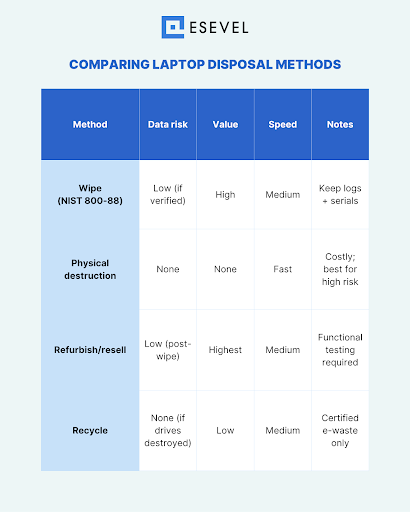
Data security and risk of data remanence
Data security is the top priority when disposing of company laptops. Even after deletion, fragments of data (known as data remanence) can remain on hard drives or SSDs.
- Data sanitization/wiping: Low risk when verified; effective if performed with certified software.
- Physical destruction: Eliminates all data, making recovery impossible.
- Refurbishment/resale: Medium risk unless the device has been securely wiped.
- Recycling: Depends on whether drives are destroyed before material recovery.
For organizations managing sensitive or regulated data — like HR files or financial records — destruction or certified wiping should be non-negotiable. Esevel’s device lifecycle management platform integrates secure data wiping into every offboarding workflow, ensuring full compliance and verifiable audit trails.
Residual value and revenue potential
When you dispose of laptops, you’re not just removing assets — you’re making financial statements decisions. Some methods recover part of the investment, while others simply remove the cost from your books.
- Resale/refurbishment: Highest residual value; can offset replacement costs.
- Data wiping: Keeps hardware usable for secondary markets.
- Destruction/recycling: No residual value, though recycling may yield minor material recovery credits.
In accounting records, the company records the disposal by subtracting the accumulated depreciation from the asset. The difference between the book value and the sale or scrap proceeds results in a capital gain or loss, which flows into the income statement.
Platforms like Esevel can automatically sync disposal events with your fixed asset accounting system, simplifying how CFOs track both tangible and financial outcomes.
Cost (process, vendor fees, transport)
Cost varies depending on the method, vendor, and scale:
- Data wiping: Low to moderate cost; software and labor involved.
- Destruction: Higher due to logistics and physical equipment.
- Refurbishment: Moderate; includes testing and re-imaging.
- Recycling: Low to moderate; may involve transport or certified disposal fees.
When choosing a disposal method, consider both the direct expense and the time it takes your IT and finance teams to execute it. Automated solutions like Esevel reduce manual work by coordinating logistics, vendor communication, and documentation from a single dashboard.
Environmental impact and sustainability
Sustainability is no longer optional — it’s part of corporate responsibility and branding.
- Recycling: Reduces landfill waste, supports material recovery.
- Refurbishment/resale: Extends device life, reducing demand for new hardware.
- Destruction: Generates e-waste and higher carbon impact unless materials are later recycled.
A proper asset disposal plan aligns with both local environmental laws and your company’s sustainability commitments. Esevel’s global partners follow certified recycling standards, ensuring components and assets that are no longer functional are disposed of responsibly.
Speed and operational simplicity
Sometimes you just need devices gone — fast.
- Destruction: Fastest, straightforward, but final.
- Wiping/refurbishment: Slower but retains value.
- Recycling: Depends on vendor pickup schedules.
If your IT team manages a distributed workforce, coordinating device returns can become a bottleneck. Esevel’s device tracking and management service helps streamline this step, handling return logistics and confirming completion through chain-of-custody records.
Regulatory compliance and auditability
Laptops often store data subject to privacy or financial regulations. Mishandling disposal could violate data protection laws or industry standards.
- Wiping/destruction: Meets compliance if performed by certified vendors.
- Recycling/refurbishment: Requires documented proof of data sanitization.
For any audit, you’ll need evidence — certificates of destruction, recycling reports, and asset logs that reconcile with your accounting records. Esevel simplifies this by consolidating all documentation into a unified audit trail accessible to your finance or compliance teams.
Decision factors and criteria
Choosing the right asset disposal method isn’t just about security—it’s a business decision that affects your finances, sustainability goals, and compliance posture. Every laptop that reaches end-of-life deserves an intentional plan that balances value recovery with risk mitigation. Let’s explore the factors that should shape your disposal strategy.
Device age, condition, and repairability
The first question is simple: how old is the device, and what’s its physical condition?
- Newer or lightly used laptops can often be refurbished, reused internally, or sold in secondary markets.
- Older or damaged units are better candidates for recycling or destruction.
From an accounting standpoint, knowing the device’s depreciation status helps determine if it’s a fully depreciated asset or still has book value. A device past its useful life might no longer appear on your balance sheet, but it still needs to be recorded in the disposal process to maintain clean accounting records.
Platforms like Esevel make this easier by automatically tagging device age, warranty status, and usability. This data helps asset managers decide whether refurbishment or recycling is the better option.
Data sensitivity classification
Not all data is created equal. The level of sensitivity determines how strict your disposal procedure should be.
- High sensitivity: Contains personal or financial data; requires destruction or certified wiping.
- Medium sensitivity: Internal operational data; may allow for secure refurbishing.
- Low sensitivity: General information or open data; could be eligible for resale.
Esevel helps companies classify assets during offboarding workflows, ensuring that the disposal method aligns with your internal data security policies and compliance standards.
Market demand for used laptops
Resale potential can influence your strategy. Some laptop models maintain strong market demand even after two or three years, especially if they’re from premium brands.
Before deciding, evaluate:
- Market resale rates for similar models
- Refurbishment costs vs. resale value
- Vendor buyback programs or bulk resale opportunities
If resale value outweighs destruction costs, refurbishment makes sense. Otherwise, recycling may be the smarter option for efficiency and compliance. Esevel’s procurement network can help identify resale opportunities and ensure that any disposal of assets is logged and certified.
Cost versus benefit tradeoff
Sometimes the numbers speak for themselves. Destruction provides certainty but comes at a cost. Resale creates revenue but takes time and verification. The right balance depends on your financial goals and operational bandwidth.
A clear disposal process can minimize unnecessary spending. For example:
- Refurbishing in bulk can lower unit costs.
- Using certified recyclers can reduce transport fees.
- Coordinating through a single platform like Esevel eliminates redundant vendor contracts.
Remember: each decision affects both your income statement and the efficiency of your IT team.
Local regulations and environmental laws
Laws around e-waste management, data protection, and cross-border transport vary widely. Some countries mandate that only licensed recyclers handle electronics, while others impose strict limits on exporting e-waste.
Companies must ensure that their asset disposal refers to compliant processes and certified vendors. Non-compliance can result in fines, data breaches, and reputational damage.
Esevel’s globally compliant vendor network ensures that every laptop, battery, and component is handled according to local environmental and data-protection laws. This helps distributed companies maintain consistent global standards, even across multiple jurisdictions.
Implementation and best practices
A thoughtful asset disposal process ensures your company not only meets compliance requirements but also captures residual value and maintains security. Implementation isn’t just about executing the right disposal method — it’s about creating a repeatable, auditable system that aligns IT, finance, and sustainability goals.
Here’s how to do it effectively.
Inventory and classification
Start with a complete inventory of your devices. Identify each laptop by make, model, storage capacity, and condition. Classify them based on data sensitivity, usability, and residual value.
This stage helps determine whether the device should be sanitized, refurbished, or destroyed. Maintaining clear records also supports your accounting records by ensuring that every disposed asset is properly documented and reconciled with your financial statements.
Platforms like Esevel automate this tracking, letting IT and finance teams see every laptop’s lifecycle status — from active use to assets that are no longer deployed — all in one dashboard.
Choosing and vetting vendors
Not all IT disposal vendors offer the same level of assurance. Before engaging a partner, evaluate them for:
- Certifications: Look for R2, e-Stewards, or ISO 27001 compliance.
- Transparency: Vendors should provide full documentation of processes.
- Chain-of-custody: Confirm tracking from pickup to final disposition.
Selecting the right partner ensures proper asset disposal and reduces risks of data leaks or environmental violations. Esevel simplifies this step by connecting companies to certified vendors worldwide and maintaining digital proof for audits.
Process sequencing
Follow a logical, secure sequence for every device:
- Sanitize data – Wipe drives using certified software to ensure irretrievability.
- Refurbish if viable – Restore devices in good condition for internal reuse or resale.
- Recycle responsibly – Send unusable parts to certified recyclers for materials recovery.
This “sanitize → refurbish → recycle” workflow reduces waste while ensuring data security. Esevel integrates this sequence directly into its IT management platform, helping you manage every step automatically and verify completion in real time.
Safe component removal
Before recycling, certain parts — such as lithium-ion batteries, circuit boards, and storage drives — need to be removed safely. Mishandling these components can create fire hazards or environmental contamination.
Certified vendors know how to handle these safely, but documenting this process is critical. Include component details in your fixed asset accounting system to ensure full traceability of what’s recycled, destroyed, or resold.
Esevel’s vendor network handles safe component removal and disposal across 88+ countries, giving distributed teams confidence that every step is completed according to local regulations.
Documentation and certificates
Proper documentation closes the compliance loop. Every action taken during disposal should be verifiable:
- Certificates of data destruction
- Recycling or donation receipts
- Disposal logs linked to journal entries in your accounting records
These documents serve as proof during audits and reinforce your financial statements’ accuracy. Esevel automatically collects and centralizes all certificates in one portal, saving hours of manual reconciliation for finance and IT teams.
Chain-of-custody and tracking during transit
Laptops often move across countries before they’re recycled or refurbished. A secure chain-of-custody ensures the devices aren’t tampered with during transit.
Best practices include:
- Using sealed containers and barcoded tracking labels
- Logging every handoff between locations or personnel
- Requiring signed receipts upon final delivery
Esevel’s logistics partners maintain continuous tracking visibility, giving asset owners assurance that every device has been handled according to compliance requirements and safely removed from the operational fleet.
Illustrative scenarios and examples
To bring these asset disposal methods to life, let’s look at how different laptop cases might play out in a real business setting. Each scenario shows how data sensitivity, asset condition, and financial considerations affect the final decision.
Example: Laptop with moderate specs and non-sensitive data
A marketing employee’s laptop is three years old, still performs well, and contains mostly public or low-risk data.
- Best disposal method: Data sanitization followed by refurbishment or resale.
- Reasoning: Secure wiping clears data risk, while resale or donation extends the device’s lifespan.
- Accounting view: The finance team records the disposal by subtracting the accumulated depreciation from the asset. If the resale value exceeds its book value, the result is a small capital gain, which is reflected in the income statement.
- Operational note: Esevel’s platform automatically coordinates the sanitization and resale process, ensuring full documentation for the accounting records.
This method achieves both sustainability and financial efficiency — ideal for startups seeking to stretch every dollar.
Example: Laptop with high sensitivity data despite usability
Consider a finance manager’s laptop that contains confidential spreadsheets, payroll data, and client records. The hardware still works perfectly, but the information it stores is highly sensitive.
- Best disposal method: Certified data sanitization or physical destruction.
- Reasoning: The risk of data remanence outweighs any potential resale benefit.
- Implementation: Esevel ensures proper asset disposal by arranging certified destruction through trusted vendors and storing the certificate of destruction for audits.
Even if the device is fully depreciated, you must still document its removal from your balance sheet to maintain accurate fixed asset accounting.
Scenario: Low-value laptop at end-of-life
A five-year-old laptop has broken components and outdated specs. The cost of repair is higher than the resale value.
- Best disposal method: Recycling and materials recovery.
- Reasoning: Environmentally responsible, aligns with corporate sustainability goals, and prevents hazardous waste.
- Vendor requirement: Ensure recycling partners are licensed and provide certificates of recovery for financial statements verification.
Esevel’s global hardware support handles safe component removal, ensuring that assets that are no longer usable are recycled responsibly and in compliance with local e-waste laws.
Hypothetical trade-off: Cost of destruction vs residual sale value
Imagine you have a batch of 50 laptops, each still worth $100 if resold, but destruction costs $30 per unit. You’re dealing with moderate data sensitivity.
- If security risk is low, wiping and resale generate $5,000 in revenue.
- If risk is moderate to high, paying $1,500 for destruction may be worth the peace of mind and regulatory protection.
This decision hinges on your company’s data classification policy and risk tolerance. Esevel’s dashboard helps CFOs visualize such trade-offs by showing cost, compliance level, and disposal status in one unified report.
Environmental and regulatory considerations
While cost and data security often dominate disposal decisions, environmental responsibility and regulatory compliance are equally critical. The way your company disposes of laptops can affect your sustainability reputation, audit readiness, and even legal standing.
Let’s explore the key environmental and regulatory aspects every startup should consider.
Handling battery disposal (lithium-ion)
Every laptop contains a lithium-ion battery — a component that must be handled with care. If disposed of improperly, it can cause fires, chemical leaks, or environmental contamination.
- Best practice: Remove batteries before recycling or destruction.
- Regulatory note: Many regions (such as the EU, Singapore, and Australia) require specialized collection for lithium batteries.
- Operational tip: Certified recyclers or IT disposal vendors, such as those in Esevel’s network, follow strict handling and packaging guidelines to ensure compliance.
Proper battery management not only avoids safety risks but also demonstrates environmental accountability in your financial statements and corporate sustainability reporting.
Hazardous elements in laptop components
Laptops contain materials such as lead, mercury, cadmium, and brominated flame retardants — all of which are considered hazardous waste.
If your organization fails to ensure proper asset disposal, these elements could leach into the environment, violating e-waste laws and creating reputational damage.
Working with vendors certified under R2 or e-Stewards standards ensures these hazardous components are handled safely and recycled according to local and international regulations. Esevel’s asset managers verify that these standards are met in all regions, protecting your company from potential penalties.
E-waste laws, recycling mandates, and export restrictions
E-waste regulations differ across jurisdictions. For instance:
- The EU’s Waste Electrical and Electronic Equipment (WEEE) directive enforces strict recovery and recycling targets.
- The U.S. Environmental Protection Agency (EPA) mandates proper tracking and reporting of electronics disposal.
- Asia-Pacific countries, including Indonesia and Singapore, impose import/export restrictions on used electronics to prevent illegal dumping.
For companies operating across borders, it’s crucial to align with all relevant rules. Esevel’s global compliance management simplifies this by automatically assigning certified vendors who adhere to local disposal and transport regulations — reducing the administrative burden for distributed IT teams.
Corporate sustainability goals and circular economy incentives
Disposal decisions aren’t just about compliance anymore — they’re part of a broader circular economy strategy. Many startups are integrating sustainability into their brand identity, and responsible disposal of assets plays a key role in that effort.
- Circular reuse: Refurbishing extends product life and reduces demand for new materials.
- Recycling credits: Some countries offer tax benefits or incentives for companies that donate or recycle hardware responsibly.
- Brand impact: Consumers and investors increasingly value transparent sustainability efforts.
Esevel supports these initiatives by giving startups visibility into their sustainability metrics — such as the percentage of refurbished vs recycled assets — so they can report tangible progress toward their corporate goals.
Building a smarter asset disposal strategy
At this point, it’s clear that asset disposal methods aren’t just about getting rid of old laptops—they’re a critical part of your organization’s security, sustainability, and financial integrity. Whether you’re running a fast-growing startup or managing a global distributed workforce, creating a structured disposal strategy keeps your business compliant, efficient, and future-ready.
FAQs
Which disposal method is safest for laptop data?
Physical destruction is the safest option because it permanently eliminates the hardware that stores data. However, certified data wiping can be just as secure when performed with the right tools and verified documentation. Esevel’s disposal partners use both options, depending on your risk tolerance.
Can we reuse or resell a laptop after sanitization?
Yes. Once a laptop has been properly wiped and verified, it can be reused internally, resold, or even donated. Always document the process and obtain proof of data sanitization to maintain compliance.
What is the difference between wiping and destruction?
Wiping removes data from the drive through software-based overwriting, preserving the hardware for reuse. Destruction physically damages the device so that no data can ever be recovered, but it eliminates resale potential.
What certifications should a vendor have for laptop disposal?
Look for R2 (Responsible Recycling), e-Stewards, or ISO 27001 certifications. These standards ensure environmental responsibility and secure data handling. Esevel works exclusively with certified vendors who meet these international benchmarks.