Many laptops can still turn on after years of use, but that does not always mean they should stay in service. For IT teams, the better question is not only how long will a laptop last, but how long it can support secure, reliable, and productive work.
A laptop’s lifespan is about how long the device can function. Its lifecycle is about how long the company should keep using, supporting, replacing, and recovering it.
This difference matters because a working laptop can still create business problems. It may be slow, difficult to support, outside security requirements, expensive to repair, or no longer suitable for the employee’s role.
Use this shorter version:
How long will a laptop last for work?
A business laptop usually lasts three to five years, but the right replacement timing depends on workload, device condition, security support, and repair history.
For IT teams, the better question is not whether the laptop still turns on. It is whether the device can still support secure, reliable, and productive work without creating too many support issues or downtime.
Average laptop lifespan by business use case
A business laptop usually lasts three to five years, but the right replacement timing depends on the employee’s role, workload, device condition, and security requirements. A laptop that still turns on may no longer be the right device for work if it causes slow performance, frequent support tickets, or security gaps.
Use this table as a practical review guide, not a fixed replacement rule.
| Business use case | Typical review point | What IT should check |
|---|---|---|
| Light admin work | 4 to 5 years | Battery health, browser performance, basic app support, and security updates |
| Sales and customer success | 3 to 4 years | Video call quality, battery life, webcam, microphone, portability, and remote support needs |
| Design and creative work | 2 to 4 years | Memory, graphics performance, display quality, storage, and software compatibility |
| Engineering and development | 3 to 4 years | CPU, RAM, storage, build speed, endpoint security tools, and app performance |
| Remote and hybrid work | 3 to 5 years | Battery life, camera, connectivity, endpoint management, repair options, and replacement access |
These timelines help IT teams decide when to review a device, but they do not replace lifecycle data. The next step is to look at the factors that affect how long a laptop can support secure and productive work.
Laptop lifespan vs laptop lifecycle
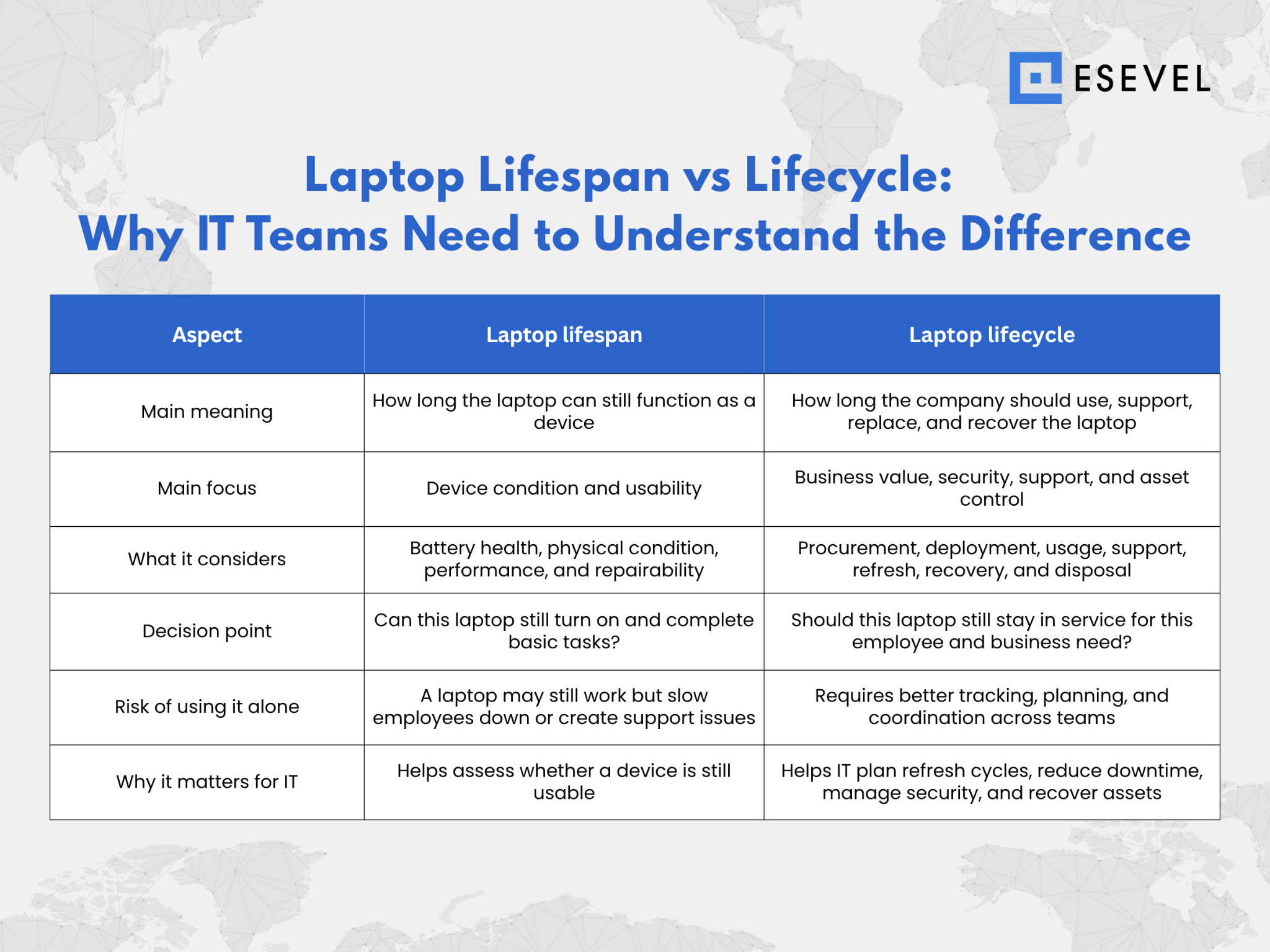
A laptop may still work, but it may no longer be the right device for secure and productive business use. This is the key difference between lifespan and lifecycle.
Laptop lifespan focuses on whether the device can still function. It looks at battery health, performance, physical condition, and repairability.
Laptop lifecycle focuses on how the company manages the device as a business asset. It includes procurement, deployment, usage, support, refresh, recovery, and disposal.
For IT teams, lifecycle planning is more useful than lifespan alone because it connects device condition with ownership, security, budget, support, and replacement planning.
What affects how long a laptop lasts
Laptop lifespan depends on more than brand or model. In business environments, daily usage, maintenance, software requirements, and employee workload often matter more than age alone.
Hardware condition
Hardware condition is one of the clearest signs of whether a laptop can stay in service. Battery health, screen condition, keyboard reliability, ports, storage, memory, and repair history all affect whether the device can still support daily work.
If the same laptop needs repeated repairs, IT teams should review whether replacement is more practical than continued support.
Software and security support
Software support is just as important as hardware condition. A laptop that cannot run a supported operating system, receive security updates, or support required business applications may create unnecessary risk.
Compatibility with endpoint management tools also matters. IT teams need to manage, secure, update, and monitor devices consistently, so older laptops that fall outside management standards become harder to control.
Employee workload
Employee workload can shorten or extend a laptop’s useful business life. A device used for light admin work may stay productive longer than a device used for design, engineering, development, or data heavy tasks.
Role based performance expectations should guide laptop planning. A laptop that works for one employee may not be suitable for another, even if both devices are the same age.
When should IT replace a laptop?
IT teams should not wait until every device fails before replacing it. The best replacement decision balances performance, security, cost, and employee experience.
Signs a laptop should be replaced
Knowing when to replace a laptop helps IT teams avoid unnecessary downtime. The goal is to replace devices before they create repeated problems for employees and support teams.
Common signs include:
- Slow performance that affects daily work, especially during meetings, multitasking, or business applications
- Battery problems, where the device no longer supports normal use without frequent charging
- Frequent repair or support tickets, which show that the device is becoming expensive to maintain
- Inability to run required software, including operating systems, security tools, and business applications
- Security or operating system support concerns, especially when updates are no longer reliable or available
A laptop does not need to be completely broken before it is replaced. If it regularly slows employees down or creates security and support issues, it may already be past its useful business life.
Repair or replace decision
Repair may still make sense when the issue is simple, the device is still within warranty, and the laptop can continue supporting the employee’s work after the fix. For example, replacing a battery or repairing a minor hardware issue may be practical for a newer device.
Replacement is often more practical when the laptop is older, has repeated issues, needs costly repairs, or no longer supports required software. It may also be better to replace the device when downtime affects employee productivity more than the repair cost suggests.
The decision should be business focused, not just technical. IT teams should consider repair cost, downtime, warranty status, employee impact, security requirements, and expected remaining use.
Replacement decisions become easier when companies define a clear laptop replacement cycle.
Managing laptop replacement and lifecycle for remote and global teams
Laptop replacement works best when it is part of lifecycle planning, not a separate task. For remote and global teams, IT needs a clear way to review aging devices, plan replacements, coordinate procurement, and recover old laptops across locations.
Set a review cycle before devices fail
Many companies review business laptops around the 3 to 5 year mark, but this should be treated as a review point, not a fixed rule. Some laptops may stay productive longer, while others may need review sooner because of workload, battery health, repair history, or software support.
The goal is not to replace every device at the same age. It is to check whether the laptop still supports secure, reliable, and productive work before it creates downtime.
Use lifecycle data to guide replacement
The best replacement decisions come from lifecycle data. IT teams should know which laptops are active, assigned, aging, under repair, unused, missing, or ready for recovery. IT teams should also review laptop useful life when planning replacements, especially when device age, repair costs, residual value, and long term budget impact need to be considered.
This visibility helps teams avoid replacing devices too early or too late. It also helps IT understand whether a laptop should stay in service, be repaired, be reassigned, or be retired.
Connect refresh planning with procurement and recovery
Laptop refresh planning should connect with procurement, delivery, support, offboarding, wiping, redeployment, and disposal. Without this connection, replacement becomes reactive and old devices may be lost, unused, or hard to recover.
For distributed teams, this connection is even more important because devices move across countries, employees, and support environments. Esevel helps companies manage this process by connecting procurement, deployment, tracking, support, replacement, and recovery in one workflow, so IT teams can plan refresh cycles with better visibility and less guesswork.
Common mistakes in laptop refresh planning
Many teams delay laptop replacement because the device still works. That can seem cost effective in the short term, but it may create higher support costs and lower productivity over time.
Mistake 1: Waiting for devices to fail
Waiting for devices to fail creates downtime, urgent procurement, and avoidable support pressure. A planned refresh gives IT time to prepare replacements, coordinate delivery, and update asset records before the device becomes a problem.
Mistake 2: Using the same cycle for every employee
Different roles need different replacement timing. A light admin user may not need the same cycle as a designer, developer, analyst, or engineer.
Role based planning helps companies avoid replacing some laptops too early and others too late.
Mistake 3: Not connecting refresh with offboarding
Laptop refresh planning should connect with offboarding, recovery, and redeployment. Without clear ownership visibility, companies may lose track of laptops that could be reused, repaired, or reassigned.
Avoiding these mistakes requires a refresh plan that connects lifespan, lifecycle, role needs, and asset recovery.
How to create a laptop refresh policy
A laptop refresh policy gives IT teams a clear rule for when devices should be reviewed, replaced, repaired, recovered, or redeployed. It helps companies avoid case by case decisions and keeps laptop replacement more consistent across teams.
A practical laptop refresh policy should define:
- Device age review, so IT knows when each laptop should be checked
- Role based performance requirements, because different employees need different device standards
- Battery health checks, to identify devices that no longer support normal work
- Repair history thresholds, so repeated issues can trigger replacement review
- Security and software support criteria, to ensure laptops can still receive updates and run required tools
- Warranty status, so IT can decide whether repair or replacement makes more sense
- Recovery and redeployment steps, so replaced devices can be reused, retired, or disposed of properly
- Approval process for early replacement, for devices that fail before the planned refresh cycle
This policy works best when it connects with procurement and budget planning. When IT knows which laptops are nearing review, teams can prepare replacements before performance, security, or support issues become urgent.
FAQs
How long will a laptop last for work?
A work laptop usually lasts three to five years, depending on the employee’s role, workload, device condition, battery health, security support, and repair history. IT teams should review laptops before slow performance, support issues, or security gaps affect daily work.
How long will a Mac laptop last?
A Mac laptop can often last four to six years in business use when the hardware is well maintained and still receives software and security updates. However, IT teams should still review battery health, app compatibility, repair costs, and employee workload before extending its use.
How long will a refurbished laptop last?
A refurbished laptop can last two to four years, depending on its age, condition, battery health, warranty, and previous usage. It can be useful for light work, temporary employees, or spare inventory, but IT teams should check performance and security support before assigning it.
When should IT replace a laptop?
IT should replace a laptop when it becomes slow, unreliable, unsupported, expensive to repair, or no longer suitable for the employee’s role. Frequent support tickets, poor battery life, security limitations, and expired warranty coverage are common signs that replacement should be reviewed.
How can companies manage laptop replacement across remote teams?
Companies can manage laptop replacement across remote teams by tracking device age, owner, location, condition, warranty, support history, and recovery status in one system. This helps IT plan refresh cycles, check spare or recovered devices before buying new ones, and replace laptops before they create downtime.
Build a laptop lifecycle that supports growth
The useful business lifecycle of a laptop is not the same as its lifetime. Just because a device is working, doesn’t mean it should be running.
When replacing laptops, IT teams should consider performance, security, support cost, employee experience, and refresh planning.
Esevel helps organizations manage laptops through the entire IT lifecycle including procurement, deployment, tracking, support, replacement, recovery and disposal. Greater lifecycle visibility allows IT teams to plan laptop refreshes and support growth more efficiently without the guesswork.

Maytiska Omar Maytiska is an experienced content writer and blog specialist with 4+ years of expertise in creating engaging, SEO-driven content. She focuses on IT and digital topics, turning complex ideas into clear, reader-friendly insights. Her work helps position Esevel as a trusted voice in the digital space.