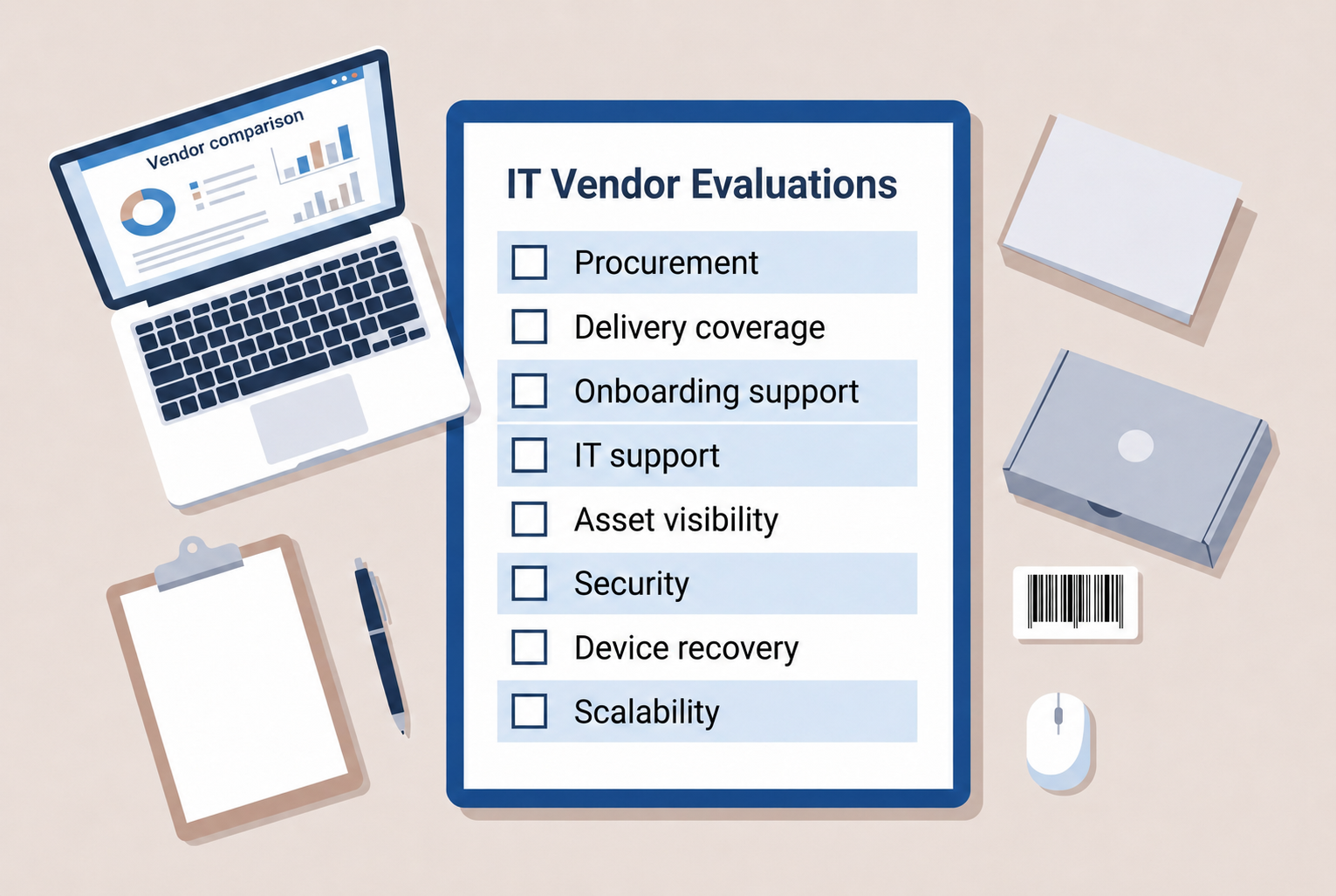
Choosing an IT vendor starts with defining your requirements and comparing every provider against the same criteria. A vendor evaluation should include service scope, procurement, delivery coverage, support, security, asset visibility, lifecycle capabilities, SLAs, cost, and evidence that the vendor can meet those requirements.
That evidence matters because vendors can introduce operational and security dependencies. Verizon’s 2026 Data Breach Investigations Report found that third-party supply chain breaches accounted for 48% of breaches, highlighting why vendor capabilities and risks need to be verified before signing a contract.
For distributed teams, the evaluation should follow the full employee device journey, from sourcing and delivery to support, tracking, recovery, and redeployment. This checklist helps you compare vendors based on how well they can support that work, not just price or sales claims.
This checklist helps you evaluate each vendor across the full employee device journey, so you can compare fit based on operational capability rather than price or sales claims alone.
What Should You Look for in an IT Vendor?
An IT vendor provides technology products or services such as hardware, software, procurement, IT support, device logistics, or lifecycle services. Some vendors cover one part of the process, while others support several stages from procurement through recovery.
Because service scope varies, a consistent checklist helps IT, Procurement, Security, and People Ops compare vendors against the same requirements. It also makes it easier to assess capabilities, evidence, risks, and whether a vendor can support your locations and service needs.
NIST’s 2026 supplier due diligence guidance also emphasizes researching and verifying supplier information before acquisition decisions. That means vendor evaluation should go beyond claims made during a sales process.
Instead of asking only, “Can you support this?” ask, “What evidence shows you can support it at our locations, volume, and required service level?”
The checklist below applies that question across the areas that matter most for device operations.
IT vendor checklist for choosing the right partner
A useful IT vendor checklist should follow what actually happens to employee technology. Start with procurement, then evaluate delivery, readiness, ongoing support, visibility, security, recovery, and long term cost.
1. Does the vendor’s service scope match your needs?
Check: Look at whether the vendor provides procurement, setup, software support, hardware support, asset tracking, device recovery, and lifecycle services.
A broad service scope is useful when several activities need shared ownership, but more services are not automatically better. The aim is to match the vendor’s responsibilities to the work your team actually needs covered.
Ask:
- Which services do you provide directly?
- Which services depend on partners?
- Where does your responsibility start and stop?
- What happens after a device is delivered?
Red flags: Vague service boundaries, unknown subcontractors, or no clear owner once a transaction is complete.
Once service scope is clear, check whether the vendor can reliably source the technology your employees need.
2. Can the vendor support your procurement requirements?
Check: Review device sourcing, approved catalogs, manufacturer choice, accessories, quotes, order tracking, stock alternatives, and supplier coordination.
Procurement capability is more than having products available today. The vendor should be able to support approved device standards even when inventory changes.
For example, Esevel currently lists more than 2,000 laptops and peripherals in its procurement catalog and supports procurement and delivery across 88 countries.
Ask:
- Can you source our approved models?
- What happens when a model is out of stock?
- Can you recommend approved alternatives?
- Can we track each order?
Red flags: Limited sourcing options, uncontrolled substitutions, or no order visibility.
Sourcing is only useful if the vendor can also get the device to the employee.
3. Can the vendor deliver where your employees work?
Check: Verify countries served, regional sourcing, local fulfillment, direct to employee delivery, shipment tracking, and replacement logistics.
Do not accept “global coverage” at face value. Ask which countries are actively supported, how fulfillment works in each region, and whether service depends on cross border shipping or local execution.
Esevel, for example, currently states that its global device operations cover 88 countries through a partner network supported by regional hubs.
Ask:
- Which countries can you serve?
- Where do you use local partners?
- How do you track delivery?
- What happens when delivery fails?
Red flags: No country level detail, unclear regional ownership, or no process for failed deliveries.
Delivery should then connect directly with employee onboarding rather than becoming the end of the workflow.
4. Can the vendor support employee onboarding?
Check: Evaluate new hire requests, start date tracking, device delivery, HR coordination, readiness confirmation, and urgent onboarding.
A device arriving at an employee’s home does not automatically mean onboarding is complete. The employee needs the correct device, configured and ready when work starts.
GetGo provides a useful example. After moving device onboarding to Esevel, its onboarding time dropped from two weeks to two days, an 80% reduction.
Ask:
- How early do you need new hire requests?
- Can you work against employee start dates?
- How are delays escalated?
- Who confirms readiness?
Red flags: No start date tracking, no escalation process, or treating delivery as successful onboarding.
That makes device configuration the next criterion to evaluate.
5. Can devices be configured before employees receive them?
Check: Review provisioning, MDM enrollment, software installation, user setup, security policies, and readiness checks.
Preconfigured devices reduce the amount of manual work required after delivery and help employees start with a more consistent environment.
Ask:
- What can you configure before shipment?
- Can devices be enrolled in our MDM?
- Which tasks still require internal IT?
- How do you confirm the device is ready?
Red flags: No documented provisioning workflow, no readiness validation, or every device requiring manual internal setup.
Once employees are working, vendor responsibility shifts from onboarding to ongoing support.
6. Can the vendor provide remote and local IT support?
Check: Look at helpdesk access, remote troubleshooting, hardware repair, onsite support, replacements, escalation, and support hours.
Distributed employees cannot always hand a damaged laptop to an internal IT desk. The vendor needs a practical way to troubleshoot, repair, or replace hardware where employees are located.
Ask:
- Which support channels are available?
- Where can you provide local support?
- How are repairs coordinated?
- What happens when an issue cannot be resolved remotely?
Red flags: Software troubleshooting only, no hardware escalation, limited geographic coverage, or no ticket visibility.
Support also depends on knowing exactly which devices employees have.
7. Will the vendor improve asset visibility?
Check: Evaluate whether the vendor tracks device ownership, employee assignment, location, serial number, warranty, status, support history, and recovery.
Procurement and asset data should not live in separate workflows. Ideally, a purchased device becomes a tracked asset without someone rebuilding its record after deployment.
Ask:
- When is the asset record created?
- Can purchases become tracked assets automatically?
- Can we see employee, location, warranty, and device status?
- Can we export our data?
Red flags: Spreadsheets as the only source of truth, records created long after deployment, or no connection between procurement and asset status.
Visibility is valuable, but buyers also need to know how the vendor protects the systems and information it handles.
8. Does the vendor meet security and compliance requirements?
Check: Review data handling, access controls, endpoint security, certifications, audit trails, incident response, supplier dependencies, and subprocessors.
NIST’s 2026 supplier due diligence framework highlights areas such as supplier provenance, resilience, foundational cyber practices, supply chain tiers, and foreign ownership or control as considerations for ICT supplier assessments.
Certifications such as ISO 27001 or SOC 2 can provide useful evidence, but requirements should reflect your own risk profile rather than becoming a universal checkbox.
Ask:
- What security evidence can you provide?
- Who can access our data?
- How are incidents reported?
- Which subcontractors or partners are involved?
Red flags: Unsupported certification claims, unclear data access, missing security documentation, or unexplained third parties.
Security responsibilities should also continue when an employee stops using the device.
9. Can the vendor recover and redeploy devices?
Check: Review device retrieval, employee coordination, secure wiping, condition assessment, storage, repair, redeployment, and disposal.
Offboarding often exposes gaps that are invisible during procurement. A vendor that can send a device to an employee but cannot reliably retrieve it leaves IT with an incomplete lifecycle.
Ask:
- Can you retrieve devices directly from remote employees?
- How is chain of custody recorded?
- Can returned devices be securely wiped?
- Can suitable devices be prepared for reuse?
Red flags: No recovery workflow, no secure wiping process, or leaving employees to organize returns themselves.
A good recovery process also shows whether the vendor can continue supporting you as the team grows.
10. Can the vendor scale with your team?
Check: Consider employee growth, order volume, support volume, new countries, regional capacity, and new device categories.
A vendor that works for 50 employees in two locations may not work for 500 employees across multiple regions. Ask what changes operationally as volume and geographic complexity increase.
Ask:
- What changes when our volume increases?
- How do you add new countries?
- Which processes remain standardized across regions?
- Where is manual coordination still required?
Red flags: A new workflow for every country, no capacity planning, or heavy dependence on ad hoc coordination.
Scale should then be supported by measurable service commitments. The better comparison is therefore not only purchase price. It is the cost of keeping a usable device supported throughout its lifecycle.
How should you score an IT vendor?
A simple scoring system can make vendor comparisons easier:
- 0: Does not meet requirement
- 1: Partially meets requirement
- 2: Meets requirement
- 3: Strong fit
Do not give every criterion the same importance. Security requirements, mandatory country coverage, required device availability, data ownership, essential support, and critical SLAs may deserve more weight than optional integrations or reporting features.
Risk should also remain separate from the capability score. A vendor can score highly overall but still introduce unacceptable security, contract, supplier dependency, or geographic risk.
Finally, require evidence for high scores. Documentation, customer references, demonstrations, security reports, sample reports, SLAs, and confirmed country coverage are stronger than verbal assurances.
Score capability, but approve evidence.
The scorecard can identify the strongest vendor, but teams should still watch for common evaluation mistakes before making the final decision.
What do customers value most in an IT vendor?
Vendor capabilities matter during evaluation, but the real test comes after the contract is signed. In Q2 2026 Esevel customer survey of 15 respondents, 100% rated the Esevel Support Team as “Very Useful” or “Most Useful.” Lifecycle management also ranked highly, with 93% giving the same ratings for services including onboarding, procurement, retrieval, storage, and redeployment.
Asset visibility was another important area. 80% of respondents rated inventory management, including asset visibility and tracking, as “Very Useful” or “Most Useful.” Customers also gave Esevel an average 9.1 out of 10 for confidence in how sensitive user data is handled during service fulfillment.
The sample is small, but the results highlight an important point for vendor evaluation: value does not come from procurement alone. Support, lifecycle coordination, visibility, and trust continue to matter long after a device is purchased.
What should a strong IT vendor help you achieve?
A strong IT vendor should make employee technology operations more predictable. That can mean more consistent procurement, reliable device delivery, better Day One readiness, faster support, clearer asset visibility, secure device recovery, more opportunities for redeployment, and better cost control.
For distributed teams, the bigger outcome is consistency across locations. Esevel currently describes its operating model as connecting procurement, deployment, management, retrieval, and redeployment across 88 countries through one global device lifecycle framework.
Vendor success should therefore be measured by the outcome of the employee technology workflow, not simply by whether a transaction or support ticket was completed.
That outcome based view also answers many of the common questions buyers have when evaluating IT vendors.
Frequently asked questions about IT vendors
What is an IT vendor?
An IT vendor is a company that supplies technology products or services such as hardware, software, procurement, IT support, managed services, device logistics, or lifecycle services to another organization.
How do you choose an IT vendor?
Start by defining your requirements, then evaluate every vendor against the same criteria. Compare capability, geographic coverage, security, support, lifecycle services, cost, and risk, and require evidence for important claims before making a final decision.
What should be included in an IT vendor checklist?
An IT vendor checklist should cover service scope, procurement, delivery coverage, onboarding, support, asset visibility, security, device recovery, scalability, SLAs, and total lifecycle cost.
These questions provide a useful starting point, but the final decision should still reflect how your employees and IT operations actually work.
Choose an IT vendor for the work that happens after purchase
Choosing an IT vendor should go beyond comparing products, prices, and helpdesk promises. Evaluate how well each provider can support procurement, delivery, onboarding, security, asset visibility, hardware support, recovery, and the rest of the device lifecycle.
Esevel connects these activities through global device procurement, deployment, tracking, support, retrieval, and redeployment across its device lifecycle platform and service network.
Use the IT Vendor Evaluation Checklist above to compare shortlisted vendors against the same requirements, evidence, risks, and scoring criteria, and identify gaps in your current vendor setup.

Maytiska Omar Maytiska is an experienced content writer and blog specialist with 4+ years of expertise in creating engaging, SEO-driven content. She focuses on IT and digital topics, turning complex ideas into clear, reader-friendly insights. Her work helps position Esevel as a trusted voice in the digital space.