IT workflow automation helps teams replace manual IT processes with structured workflows for device procurement, onboarding, tracking, support, offboarding, recovery, and refresh. This keeps repeatable IT work consistent, visible, and easier to control as device volume grows.
Without automation, distributed teams often rely on spreadsheets, chat messages, and manual follow ups to manage devices across locations. This creates outdated records, missed handoffs, unclear ownership, and more room for error.
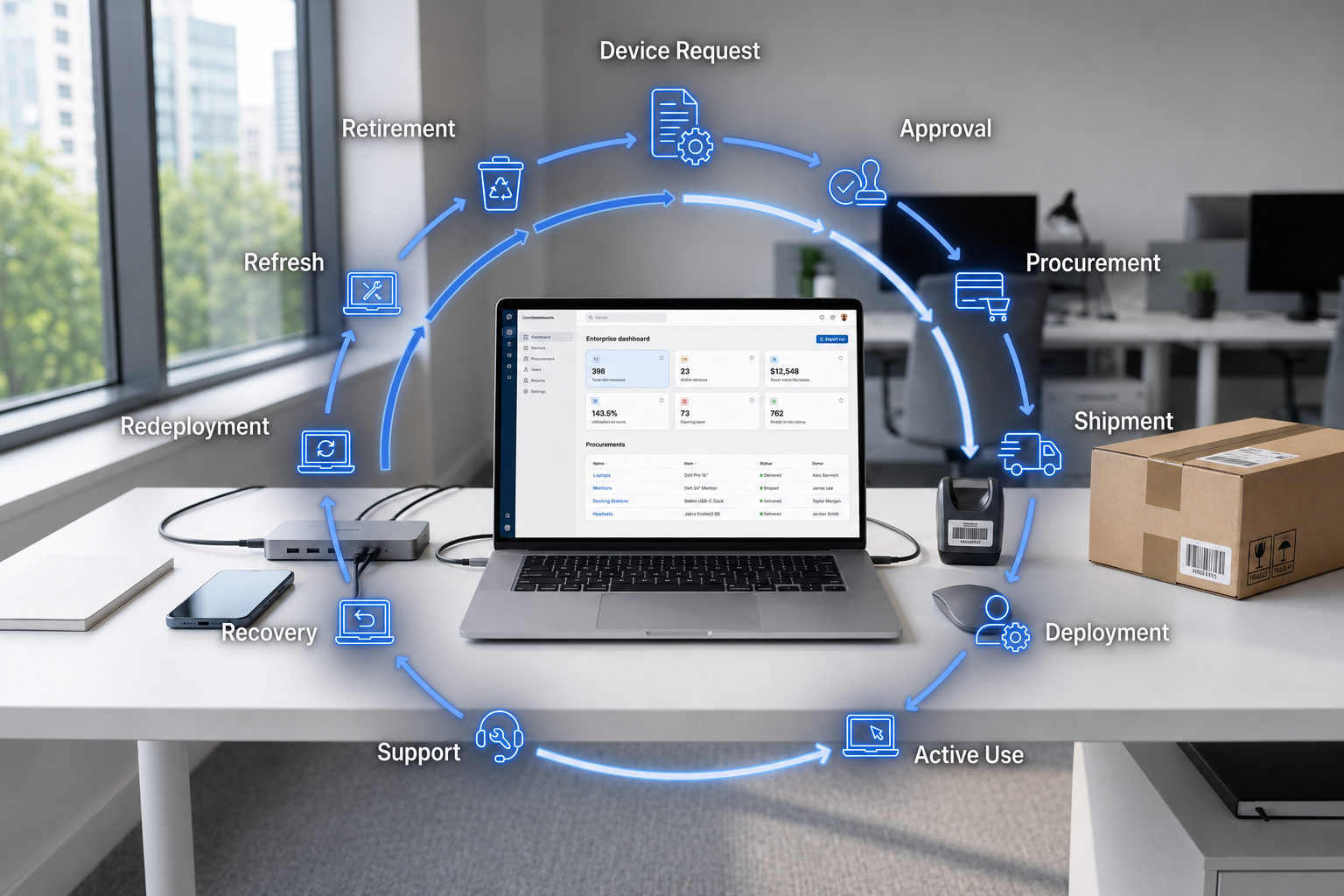
By connecting workflows across the device lifecycle, IT teams can standardize processes, improve asset visibility, and manage every device from procurement to recovery with better control.
What is IT workflow automation
IT workflow automation is the use of structured workflows to manage repeatable IT tasks with less manual effort. It turns manual steps into clear processes with assigned owners, status updates, and connected records.
In device management, IT workflow automation can support device provisioning, IT asset tracking, onboarding automation, offboarding automation, remote IT support, and device recovery. The goal is not only faster IT automation, but better control across IT process automation, IT operations automation, and the full device lifecycle.
The definition is simple, but the real value becomes clear when manual IT workflows start to break down.
Where manual IT workflows break down in device management
Manual IT processes become harder to manage when teams grow across countries, vendors, and work setups. More employees mean more device requests, setup tasks, asset records, support needs, and recovery steps. When teams rely on spreadsheets, email threads, and chat messages, it becomes harder to track ownership, status, and the next action for each device.
Procurement and laptop ordering
Laptop ordering often starts with a message from People Ops, HR, or a hiring manager. IT then checks stock, confirms requirements, coordinates with vendors, and follows up manually.
Without a shared workflow, teams may not know whether a device has been approved, ordered, shipped, delivered, or prepared for use. This creates delays before the employee even starts.
Employee onboarding and provisioning
Employee onboarding often depends on manual laptop assignment, device provisioning, app setup, and access checks. A device may arrive on time, but it may not be fully configured or linked to the right employee record.
Onboarding automation helps teams track whether the device, apps, and access are ready before day one. This reduces missed steps and gives IT and People Ops clearer visibility into employee readiness.
Asset tracking and support coordination
IT asset tracking becomes unreliable when ownership, location, condition, and support history depend on manual updates. As devices move across employees, homes, offices, and countries, records can quickly become outdated.
This affects remote IT support because support teams need device context to respond well. When IT asset management data connects with support history, teams can troubleshoot faster and avoid asking the same basic questions again.
Offboarding and recovery
Offboarding often starts when HR manually tells IT that an employee is leaving. From there, IT needs to revoke access, start device recovery, track return status, and decide whether the device should be repaired, redeployed, refreshed, or retired.
Without offboarding automation, recovery depends on follow ups and spreadsheet updates. Devices can be delayed, forgotten, or left out of redeployment planning.
These gaps show why teams need automated workflows that connect device tasks, ownership, and status across the full lifecycle.
Manual IT processes vs automated workflows
A comparison helps IT leaders see why automation is not only about speed. It changes how teams manage devices, tasks, ownership, and accountability.
| Manual IT processes | Automated workflows |
| Requests move through email and chat | Requests follow a structured workflow |
| Asset records need manual updates | Device status updates through workflow steps |
| IT checks ownership by hand | Devices are linked to employees and locations |
| Onboarding readiness is unclear | Device provisioning and delivery status are visible |
| Offboarding relies on follow ups | Device recovery tasks are triggered and tracked |
| Reporting depends on spreadsheets | Lifecycle reporting uses connected device data |
| Works for small teams | Scales across remote and global teams |
Manual tracking creates delays because teams need to search for information across messages, spreadsheets, and tools. Automated workflows give teams clearer task ownership and make it easier to see what has happened, what is pending, and what needs action.
IT workflow automation also helps teams standardize work across countries. When teams automate manual processes across procurement, onboarding, support, offboarding, and recovery, they improve asset visibility and device lifecycle visibility at the same time.
Once the difference is clear, the next question is what IT workflow automation should actually cover.
How IT workflow automation supports device lifecycle management
IT workflow automation should support the full device journey, not only one task such as ticket routing or device setup. The strongest workflows connect procurement, deployment, support, recovery, and refresh so teams can manage every device with clearer ownership, status, and next actions.
For distributed teams, this matters because device work often spans different countries, vendors, delivery timelines, and support paths. Workflow automation helps teams standardize these steps while keeping ownership, status, and next actions visible.
Procurement requests and approvals
Procurement workflows should route device requests to the right owner and connect approvals with purchasing status. This helps IT, People Ops, and finance stay aligned before a device is purchased.
A useful workflow should show whether a request is pending, approved, ordered, shipped, or ready for setup. This reduces back and forth and helps teams manage global IT operations with better asset visibility.
Device provisioning and onboarding readiness
Device provisioning should connect with onboarding automation so IT can track setup before the employee starts. Teams need to know whether the laptop has been configured, assigned, shipped, and prepared with the right tools and access.
This is especially important when devices move across regions, vendors, and delivery timelines. Automated workflows help teams standardize repeatable setup steps while still supporting local needs.
Asset status and support history
Asset status should update as devices move through real workflows. A device may be shipped, assigned, active, under repair, recovered, redeployed, refreshed, or retired.
Support history should also connect to the device record. This gives remote IT support better context and improves IT asset tracking across locations.
Offboarding, recovery, and redeployment
Offboarding workflows should trigger the right tasks when employees leave. This includes access review, device recovery, return tracking, and follow up.
Recovered devices should not disappear from the workflow. A strong lifecycle process should show whether a device needs wiping, repair, redeployment, refresh planning, or retirement.
What to look for in an IT workflow automation solution
The right solution should help teams automate repeatable work while keeping device data connected across the lifecycle. It should support IT process automation and IT operations automation without creating another disconnected tool.
Core capabilities to evaluate
A strong IT workflow automation solution should include:
- Centralized device records
- Employee and device assignment tracking
- Automated task routing
- Approval workflow support
- Global workflow support
- Asset visibility across locations
- Recovery workflow tracking
- Lifecycle reporting
These capabilities help teams manage remote device management more consistently. They also make it easier to see ownership, status, and next actions across distributed teams.
Questions IT leaders should ask
IT leaders should evaluate whether the solution supports real device operations. A workflow tool may automate tasks, but it still needs to connect device records, ownership, and lifecycle status.
Useful questions include:
- Can it connect device requests with procurement and deployment?
- Can it show who owns each device and where it is?
- Can it support remote device management across countries?
- Can it trigger offboarding and recovery tasks?
- Can it show device lifecycle visibility from procurement to refresh?
These questions help teams choose automation that supports real IT operations, not just task completion.
IT workflow automation checklist for distributed teams
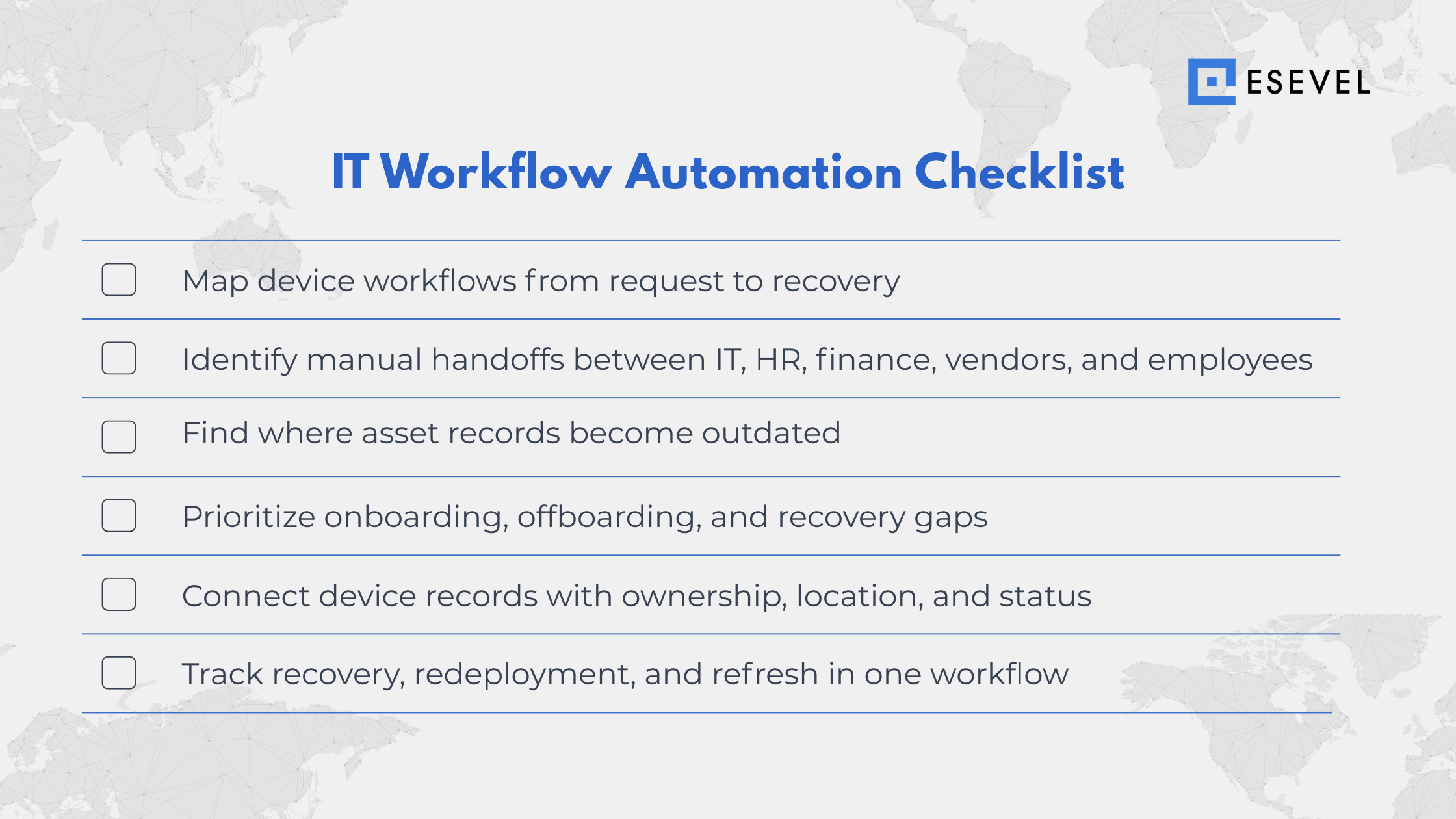
Use this checklist to assess whether current manual processes are ready to be automated. It can help IT leaders and People Ops teams identify where work slows down, where records become outdated, and where better visibility is needed.
This checklist should reveal which manual IT processes create the most delay. It should also show which workflows need standardization and which teams need shared access to status updates.
A checklist can expose gaps, but the real improvement comes from building connected lifecycle workflows.
Frequently asked questions about IT workflow automation
These questions clarify how IT workflow automation supports device management for distributed teams. They also show why automation works best when it connects to the full device lifecycle.
What is IT workflow automation?
IT workflow automation is the use of structured automation to manage repeatable IT tasks with less manual effort. In device management, it can support device provisioning, asset tracking, support coordination, offboarding, and recovery.
How does IT workflow automation help device management?
IT workflow automation helps device management by standardizing tasks across procurement, deployment, support, recovery, and refresh. This gives IT teams better device lifecycle visibility and reduces the need to manage every step manually.
What manual IT processes should companies automate first?
Companies should start with repeatable workflows that create delays or errors. Common areas include device requests, onboarding, asset status updates, support handoffs, offboarding tasks, and device recovery.
What is the difference between IT automation and IT workflow automation?
IT automation can refer to any automated IT task, such as running a script or updating a system. IT workflow automation connects multiple tasks into a structured process with clear steps, ownership, and status visibility.
Why do distributed teams need IT workflow automation?
Distributed teams need IT workflow automation because they manage more countries, devices, vendors, and handoffs. Automation helps global IT operations maintain asset visibility, reduce manual follow up, and keep device workflows consistent across locations.
Build IT workflows that scale with every device
IT workflow automation should not be treated only as a time saving tool. Its real value is helping teams standardize repeatable IT work, reduce manual errors, and manage devices across the full lifecycle with better visibility.
Manual IT work breaks when companies scale across countries, vendors, and remote employees. Teams need connected workflows that link procurement, deployment, tracking, support, recovery, redeployment, and refresh.
Esevel helps distributed teams bring these device workflows into one lifecycle approach. By connecting global device procurement, deployment, tracking, support, recovery, redeployment, and refresh, teams can reduce manual handoffs and manage global IT operations with more control.

Maytiska Omar Maytiska is an experienced content writer and blog specialist with 4+ years of expertise in creating engaging, SEO-driven content. She focuses on IT and digital topics, turning complex ideas into clear, reader-friendly insights. Her work helps position Esevel as a trusted voice in the digital space.