MDM compliance means checking managed devices against company defined requirements such as operating system version, encryption, password settings, patch status, and enrollment status.
A device is compliant when it meets the required conditions. If it fails one or more checks, IT can notify the employee, correct the configuration, deploy an update, or escalate the issue. Access may also be restricted when the risk justifies it.
For distributed teams, the goal is not simply to mark devices compliant or noncompliant. IT needs a consistent process to define requirements, evaluate devices, detect problems, remediate them, control access where necessary, and monitor compliance over time.
What is MDM compliance?
MDM compliance is the process of evaluating managed devices against an organization’s required device conditions and assigning a compliance status based on the result.
This is different from broader mobile device management. MDM covers functions such as enrollment, configuration, application management, and remote control. Device compliance focuses specifically on whether a managed device currently satisfies the requirements IT has defined.
Those requirements should reflect the organization’s security baseline and operational needs. NIST guidance for enterprise mobile devices includes areas such as centralized management, encryption, configuration requirements, and maintaining devices throughout their lifecycle.
What makes a device compliant or noncompliant?
A compliant device meets the conditions assigned to it. A noncompliant device fails one or more required checks.
The exact conditions depend on the operating system, device ownership model, business requirements, and capabilities of the MDM platform.
| Compliance condition | Compliant example | Noncompliant example |
| Operating system | Meets the minimum supported version | Running an outdated version |
| Encryption | Required encryption is enabled | Encryption is disabled |
| Password or PIN | Meets company requirements | Missing or insufficient |
| Patch status | Required updates are installed | Important updates are missing |
| MDM enrollment | Device is enrolled and reporting | Enrollment is missing or lost |
| Required software | Required application is installed | Application is missing |
| Device integrity | Device meets integrity requirements | Device is rooted or jailbroken |
Compliance status is therefore not a general statement that a device is completely secure. It indicates whether the device meets the specific conditions IT has chosen to evaluate.
What should an MDM compliance policy check?
A useful MDM compliance policy should focus on conditions that IT can evaluate consistently and act on when something fails.
Operating system and updates
IT should check whether devices meet minimum OS and patch requirements, and flag devices that fall behind.
The 2026 Verizon DBIR found that vulnerability exploitation accounted for 31% of initial access, while only 26% of vulnerabilities in CISA’s Known Exploited Vulnerabilities catalog were fully remediated in 2025.
This makes patch status an important MDM compliance condition, especially for remote devices.
Device security
Device security checks should confirm that managed devices meet the company’s minimum protection requirements. Common conditions include:
- Encryption: Confirm that device encryption is enabled.
- Screen lock: Require automatic locking after inactivity.
- Password or PIN: Check that authentication meets company requirements.
- Root or jailbreak status: Flag devices that bypass standard operating system protections.
These checks should reflect the company’s security baseline and remain practical for IT to monitor and remediate.
Device health
Where the MDM platform supports it, additional device health signals may help determine whether the endpoint still meets company requirements.
The policy should remain focused. Adding every available check can create unnecessary exceptions and make remediation harder to manage.
How does MDM detect noncompliant devices?
The basic MDM compliance workflow is straightforward:
- IT defines the policy. The organization sets the conditions devices must meet.
- The device reports its status. The MDM platform receives relevant information from the managed endpoint.
- The platform evaluates the device. Reported status is compared with the assigned compliance policy.
- A compliance state is assigned. The device may be considered compliant, noncompliant, unknown, or another platform specific state.
- The result triggers the next action. IT may monitor the issue, start remediation, notify the employee, or connect the result to an access policy.
Microsoft Intune, for example, evaluates enrolled devices against assigned compliance policies and provides reporting for compliant, noncompliant, grace period, and unevaluated states. Other platforms may use different terminology, so these labels should not be treated as universal.
What happens when a device becomes noncompliant?
A noncompliant device should trigger a response based on the type and severity of the problem, rather than automatically causing the strongest possible action.
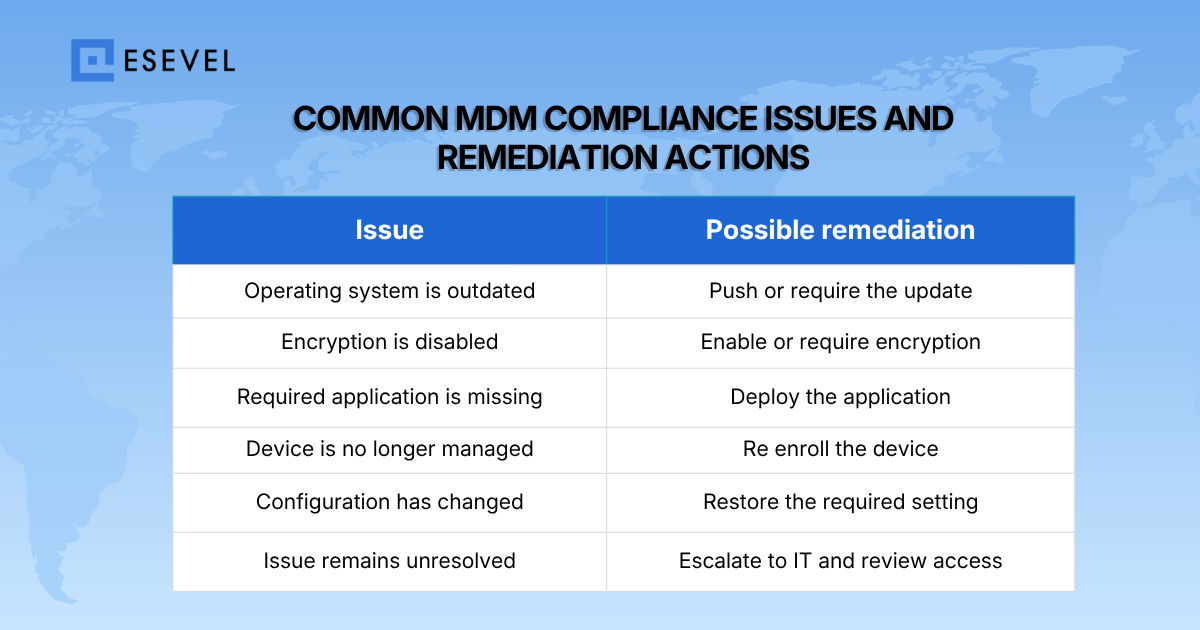
IT can also give employees time to correct lower risk issues before access is affected. Microsoft Intune, for example, supports scheduled actions for noncompliance and grace periods before later actions take effect.
This makes compliance remediation an operational workflow rather than a simple pass or fail check. IT should know who owns the issue, how quickly it should be resolved, and what happens if remediation fails.
How do MDM compliance policies work with Conditional Access?
MDM compliance and Conditional Access perform different jobs.
MDM determines whether the device meets the required conditions. Conditional Access or another access control system can use that status when deciding whether the user and device should access company resources.
The flow can look like this:
Device → MDM compliance check → compliance status → access policy → allow, restrict, or require remediation
For example, Microsoft Entra Conditional Access can use compliance information reported by Intune and require a device to be marked compliant before granting access to protected resources. Microsoft also recommends testing Conditional Access policies before full enforcement to reduce the risk of unexpected lockouts.
Not every compliance failure needs to block access immediately. The response should match the risk and the organization’s policy.
How should IT monitor MDM compliance across remote teams?
Distributed teams need centralized device compliance monitoring because devices may be spread across different countries, operating systems, and working environments.
The scale can become significant quickly. A 2025 TechTarget Enterprise Strategy Group study found that 72% of organizations managed at least 1,000 endpoints, while 93% said the typical employee used two or more endpoints each day. Around 40% also reported that endpoint management or security had become more difficult than two years earlier.
IT should regularly review:
- Overall compliance: Track how much of the managed fleet currently meets policy.
- Unknown devices: Investigate devices that have stopped reporting or have not been evaluated.
- Repeat failures: Identify devices that repeatedly fall out of compliance.
- Aging issues: Monitor problems that remain unresolved beyond the expected remediation period.
- OS and patch trends: Look for versions or device groups with recurring update problems.
- Remediation ownership: Make sure every unresolved issue has a clear owner and escalation path.
For distributed IT teams, this is where device tracking and management can connect compliance visibility with the broader status of each company device.
How should IT handle recurring or unresolved device noncompliance?
Some noncompliance can be corrected automatically, but exceptions and failed remediation still create manual work.
Automox’s 2026 endpoint management research found that 43% of IT teams spend 10 or more hours each week on manual endpoint tasks, while only 6% report reaching full automation.
IT should therefore distinguish between different types of unresolved problems:
| Situation | Appropriate response |
| Temporary issue | Monitor or provide a remediation period |
| User correctable setting | Notify the employee with clear instructions |
| Configuration problem | Correct or redeploy the required configuration |
| Persistent software issue | Escalate for IT investigation |
| Aging or unsupported hardware | Evaluate repair or replacement |
| Device cannot meet requirements | Replace, retire, or remove it from approved use |
MDM can identify and remediate many software and policy problems remotely, but it cannot repair failing hardware or make an aging device meet requirements it no longer supports.
When a compliance issue requires physical intervention, MDM alone may not be enough. Bunker, for example, used Esevel alongside JumpCloud to centralize device management and policy enforcement while coordinating preconfigured device delivery. The company reported 2x faster device provisioning.
This is where global hardware support and broader device lifecycle operations can complement MDM with repair, replacement, retrieval, and other physical remediation.
How does MDM compliance connect with device operations?
MDM compliance works best when policy enforcement connects with broader device operations. Bunker used Esevel with JumpCloud to centralize device monitoring, automate policy enforcement, and track update compliance.
“With Esevel and JumpCloud, I have full control over our devices and can ensure they’re always compliant.”
Jacques Olivier Hache, Head of Engineering at Bunker, also reported 2x faster device provisioning, with preconfigured laptops shipped directly to employees.
The example shows why compliance sometimes needs to extend beyond software into provisioning, replacement, and physical device support.
How can global teams maintain consistent device compliance?
Global teams should standardize the parts of MDM compliance that should remain consistent regardless of employee location.
This includes the minimum compliance baseline, policy ownership, definitions of compliant and noncompliant devices, remediation process, reporting requirements, and escalation rules.
At the same time, IT may need to account for differences in operating systems, device models, hardware age, employee locations, and local support availability.
The goal is not to create a different compliance policy for every country. It is to maintain a clear company wide baseline while defining controlled exceptions where technology or operational conditions require them.
Esevel supports this broader operating model by combining managed MDM capabilities such as policy enforcement, patch management, remote lock and wipe, and device visibility with IT support and physical device operations. This can help distributed organizations keep the compliance process connected from detection through remediation instead of managing each stage separately.
Building a repeatable MDM compliance process
Effective MDM compliance is not created by switching on a set of device checks. IT needs a repeatable process for deciding what devices must meet, detecting failures, correcting problems, and monitoring whether issues remain unresolved.
Start with a practical compliance baseline. Define clear remediation ownership and connect compliance status with access controls only where the risk justifies it. For distributed teams, centralized reporting and consistent escalation become increasingly important as devices spread across locations and operating systems.
The strongest approach connects digital compliance with the broader device lifecycle. When a device can no longer meet requirements through software remediation, IT should have a clear path to repair, replace, retrieve, or retire it.
FAQs
What is MDM compliance?
MDM compliance is the process of checking managed devices against company defined requirements such as operating system version, encryption, password settings, updates, and management status.
What makes a device noncompliant?
A device becomes noncompliant when it fails one or more required conditions in its assigned device compliance policy.
What should an MDM compliance policy include?
It can include operating system requirements, patch status, encryption, password rules, MDM enrollment, required applications, device integrity, and supported device health checks.
Can MDM automatically fix a noncompliant device?
Sometimes. MDM may deploy updates, applications, or configurations automatically, but some problems require employee action, IT investigation, or physical device support.
Does MDM compliance automatically block access?
No. Compliance status and access control are separate. An identity or access policy can use device compliance as a condition, but the organization decides when and how access should be restricted.
Keep MDM compliance consistent over time
Effective MDM compliance depends on more than defining a policy once. IT teams need to review compliance status, remediate issues quickly, update requirements as devices and operating systems change, and maintain clear ownership across the process.
For distributed teams, consistent monitoring becomes even more important. When software remediation is not enough, IT should also have a clear path for device repair, replacement, retrieval, or other lifecycle actions.

Maytiska Omar Maytiska is an experienced content writer and blog specialist with 4+ years of expertise in creating engaging, SEO-driven content. She focuses on IT and digital topics, turning complex ideas into clear, reader-friendly insights. Her work helps position Esevel as a trusted voice in the digital space.